Thursday, May 16, 2013
Access Hosting Blog Helps You Get Your Access Database on the Web
AccessHosting.com runs a blog featuring useful posts on getting Microsoft Access Web Databases up and running: Access Hosting Academy.
Labels:
access 2007,
access 2010,
access 2013,
sharepoint,
SQL Server
Friday, April 19, 2013
Get a BONUS Metro Windows 8 Style Native MS Access SideBar Switchboard
Get a BONUS Metro Windows 8 Style Native SideBar Switchboard with each purchase of
the NATIVE SideBar MS Access Switchboard for Microsoft© Access 2000/2002/2003/2007/2010/2013, which uses only native access controls and which comes with FIVE other styles:
- Windows XP
- Access 2007/2010 Vista NOIR
- Access 2007/2010 Black
- Access 2007/2010 Silver
- Access 2007/2010 Blue
Labels:
access 2007,
access 2010,
access 2013,
metro icons,
metro-style,
windows 8
Sunday, April 14, 2013
New Free Windows 8 Metro Style Tablet Dashboard Sample Database for Microsoft Access
From aadconsulting.com a new free Windows 8 metro style tablet dashboard sample database for Microsoft Access, featuring a mouse or touch driven modal kiosk tablet gui for Access 2007/2010/2013.
Download
Download
Labels:
access 2007,
access 2010,
access 2013,
metro icons,
metro-style,
windows 8
Wednesday, March 13, 2013
Hosted Exchange and SharePoint 2010 from less than $2 a month
Hosted Exchange and SharePoint 2010 from less than $2 a month - limited offer http://tinyurl.com/dxv9bw7
Monday, November 26, 2012
What's New in Office 2013
The official Microsoft listing of changes in Office 2013 for Office users is here.
What's New information for Office developers is here. The new MS Access application model is set out here.
Features removed in MS Access 2013:
Access Data Projects (ADP) functionality has been removed
Access 2013 SQL-based databases will replace much of the benefit of ADPs. There are three possible mitigations for ADPs:
. Convert the ADP to an Access App solution.
. Convert the ADP to a linked Access Desktop Database.
. Convert the ADP to a full SQL-based solution.
Import objects into an ACCDE file and then create linked tables to the existing data by using an earlier version of Access.
Access support of Jet 3.x IISAM driver is no longer available
An Access 97 user can no longer open an Access 97 database in Access 2013. To upgrade, the user must open the file in Office 2010 or an earlier version, and then open it in Office 2013. ACCDB is the recommended format for desktop databases. Open the Access 97 database file in an earlier version of Access and convert it to a later version. Access 2013 supports Access 2000 and later versions through Access 2010.
PivotCharts and PivotTables are removed
There are no options to create PivotCharts and PivotTables in Access 2013. Office Web components are no longer supported. Better charting capabilities in Excel. Use enhanced PivotChart and PivotTable capabilities in Excel. Charts that are not PivotCharts and that use the MSGraph component are still available in Access 2013. Charts that are created by the Chart Wizard component are still supported.
dBASE support removed from Access
Access Data Collection
Cannot create new Data Collection forms. The data collection feature enabled creation of data collection forms and sending those forms as an e-mail message. When customers returned those e-mail messages, the data was processed and stored in an Access database. Access 2013 cannot create new forms. Access 2013 enables processing data collection forms that are created in earlier versions of Access.
Access 2003 toolbar and menus fully removed
You can no longer create Access 2003 toolbar and menus that display in Access 2013. Access 2003 toolbars and menus are displayed in Access 2007 and Access 2010 without the Ribbon. They will not display in Access 2013 but will appear in the Add-ins tab in Access 2013. Custom Ribbon commands are supported. Toolbars display in the Add-ins tab on the Ribbon. Custom Ribbon commands are also supported.
Access Replication Options fully removed
When opening a .mdb file in Access 2010 or older, the Replication Options displays in the Ribbon Database Tools tab. This option is removed from Access 2013
Access Source Code Control fully removed
The Source Code Control add-in lets Microsoft Visual SourceSafe or other source code control systems integrate to allow check-in/check-out of queries, forms, reports, macros, modules, and data. The Developer Source Code Control is not available as an add-in for Access 2013.
Access Three-State Workflow fully removed
The entry points for workflow are no longer available. In UI Macros the Workflow commands are not available. If you open an existing Access 2010 database that has UI Macros with StartNewWorkFlow or Workflow tasks, Access displays a warning.
Access Upsizing Wizard fully removed
The Upsizing Wizard allowed useers to scale up Access database tables to a new or existing Microsoft SQL Server database. This feature is removed for Access 2013
Sunday, August 26, 2012
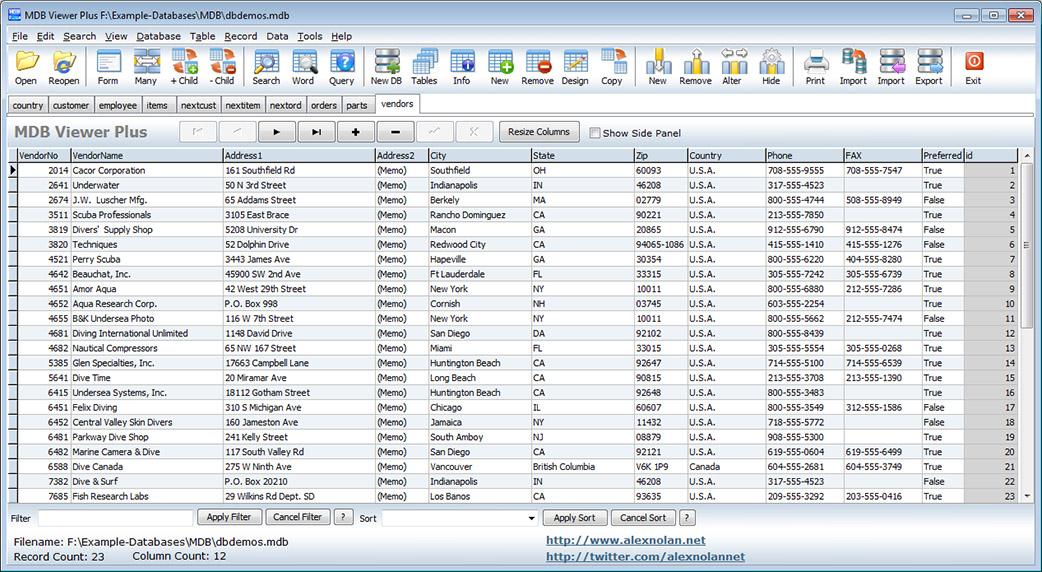
MDB Viewer Plus: free viewer/editor for Access MDBs and ACCDBs
MDB Viewer Plus from AlexNolan.Net is a free viewer/editor for Access MDBs and ACCDBs. Does not require retaiil Acces as it uses Microsoft Data Access Components (MDAC) which is installed as part of Windows.
Tuesday, July 17, 2012
All the Office 2013 Links You Need
Microsoft released various flavors of the Office 2013 (v15) Preview Release today:
These links will get you started running the suite:
- Download the Destktop MSI Microsoft Office 365 ProPlus Preview
- Download Streaming Microsoft Office 365 ProPlus Preview
- Access 2013 Developer Center
- What's new for Access 2013 Developers
- Create and customize a web app in Access 2013 Preview
- Overview of Apps for Office 2013
Labels:
access 15,
access 2013,
office 15,
office 2013,
office 365
Friday, March 30, 2012
RegDllView - View all registered dll/ocx/exe files on ypur PC
RegDllView is a neat little utility for developers that displays the list of all registered dll/ocx/exe files (COM registration). For each registered file, you can view the last date/time that it was registered, and the list of all registration entries (CLSID/ProgID). Download from CNET
Tuesday, February 21, 2012
Microsoft Office for iPad expected soon...
Thursday, February 16, 2012
New Look for aadconsulting.com
I have just launched the new look aadconsulting.com with a sleeker modern and easier to navigate design: aadconsulting.com. Come over for a visit.
Tuesday, June 28, 2011
Office 2010 SP1 Released
The 370mb download includes the addition of integrated community content in the Access 2010 Application Part Gallery.
Tuesday, June 07, 2011
Friday, May 06, 2011
Tuesday, April 26, 2011
Streamline Reporting on Recurring Data Imports
The article from Microsoft walks you through the creation of an Access database that supports importing monthly sales data from a text file, and provides the sample data used to create the article, as well as the database file complete with all the data imported.
The scenario comprises the following tasks:
- Set up an import specification to allow Access to import the same data in future months.
- Use the built-in Table Analyzer tool to create a normalized structure for the data.
- Create a set of append queries that will parse the incoming data into the normalized structure.
- Write a macro that automates the data import process.
Tuesday, March 29, 2011
All Access Downloads/Add-Ins for Access 97 to Access 2010
Microsoft has finally re-organised all its Access downloads in one place. Just click on a column to sort.
Access 2010: Sample Access Database for Streamline Reporting
This Microsoft download provides a sample data set to show how to automate a recurring import of data into a Microsoft Access 2010 database.
Monday, November 15, 2010
How To Build an Access 2010 Web Database
A detailed article from MS on building a web database in Access 2010.
New Access 2010 Resource Center on TechNet
TechNet has launched a new Access 2010 Resources portal with a focus on migrating, deploying and securing Access 2010 databases. Learn how to plan and implement an Access Services site, and get links to developer resources, training, videos, and how-to articles.
Sunday, October 24, 2010
Free eBooks from Microsoft Press
- Free ebook: Moving to Microsoft Visual Studio 2010 (10 chapters by by Patrice Pelland, Pascal Paré, and Ken Haines)
- Free ebook: Introducing Microsoft SQL Server 2008 R2 (10 chapters by Ross Mistry and Stacia Misner)
- Free ebook: Programming Windows Phone 7 Series (DRAFT Preview) (6 chapters by Charles Petzold)
- Free ebook: Petzold’s Programming Windows Phone 7 (Special Excerpt 2) (newer than the ebook above; 11 chapters by Charles Petzold)
- Free ebook: Own Your Future: Update Your Skills with Resources and Career Ideas from Microsoft(8 chapters by Katherine Murray)
- Free ebook: Understanding Microsoft Virtualization Solutions (Second Edition) (6 chapters by Mitch Tulloch)
- Free ebook: First Look Microsoft Office 2010 (14 chapters by Katherine Murray)
- Free ebook: Windows 7 troubleshooting tips (short ebook by Mitch Tulloch)
- Free ebook: Introducing Windows Server 2008 R2 (9 chapters by Charlie Russel and Craig Zacker)
- Free ebook: Deploying Windows 7, Essential Guidance (10 chapters from the Windows 7 Resource Kit and 6 TechNet articles)
Tuesday, October 12, 2010
Subscribe to:
Posts (Atom)