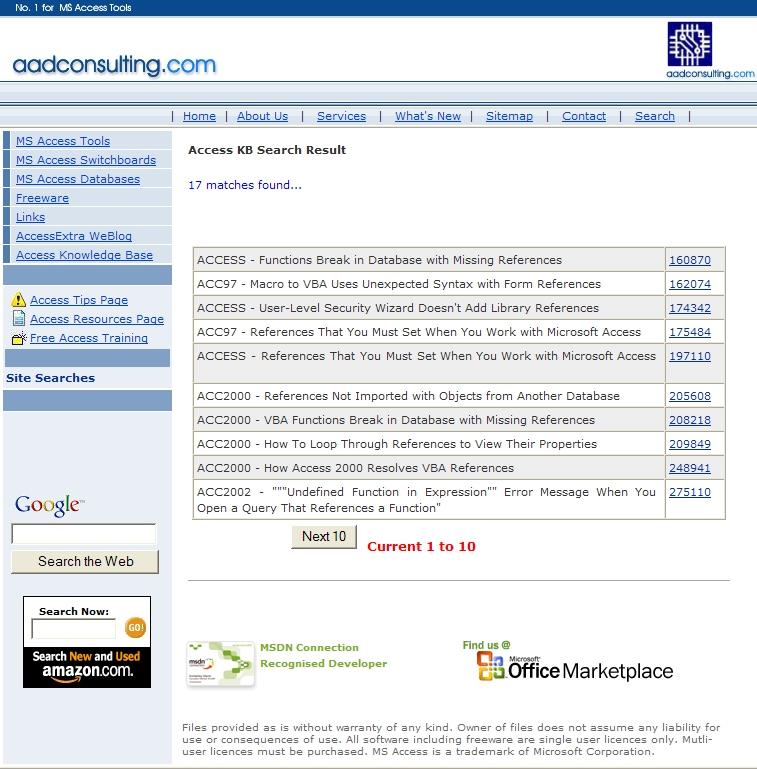
I have upgraded the on-line Access KB Articles database for direct search results for over 3,000 article links. The search page now supports OR & AND boolean operators.

The BETA 2 is now available for free download. The Links Manager will find all the MS Access files in the location you select and an Access report will display all table links and base string connections, and any connect errors grouped by:
BETA 2 adds a new dependents of report, after feedback on the first BETA.

The easy way to create data output from MS Access - including XML - with my latest Access Add-In, Ezy Reporter PLUS. An add code options allows developers to add Ezy Reporter PLUS to their applications. Download from aadconsulting.com



Exlcusive to readers of the Access Extra blog, is my new free tool for Microsoft Access versions 97 to 2003: A Better ZoomBox to edit the following control properties when designing Access Forms and Reports:
Features:
The Better ZoomBox is invoked by clicking the <...> build button next to each of the above properties in form and report design view.
Access 2000
Access 2002
Access 2003

MSXML (Microsoft XML Parser) 3.0 Software Development Kit (SDK) The Microsoft® XML Parser (MSXML) 3 SDK includes header and .lib files, and documentation for the MSXML 3 Release.
Microsoft XML Parser (MSXML) 3.0 Service Pack 7 (SP7) The Microsoft® XML Parser (MSXML) 3.0 SP7 release offers a number of bug fixes over the previous MSXML 3.0 SP releases.
You proceed as follows:
MS Access Database Mechanic

More Office Downloads
Microsoft Office Live Communications Server 2005 with SP1 Management Pack for MOM 2000 SP1
Microsoft Office Small Business Accounting 2006 Software Development Kit 1.2 Includes documentation and samples - everything developers need to write, build, and deploy Microsoft Small Business Accounting integrated applications.
In Access, the functionality of tools tips has not changed since they were introduced in Access95 ten years ago.
In a free sample Access2000 database Cool Tool Tips, which you can download, I have implemented a more functional and controllable paradigm, which also looks great. If you have an application that is to any degree complex to use, Cool Tool Tips is an easily-implemented solution that avoids the need for a Help file, and keeps tips on the screen for however long they are needed by the user:
When a control with a tip gets the focus, the tip is read from the control's Tag property, and when the control loses the focus the tip is hidden. Clicking on the tip while it is displayed hides the tip.
A tip's heading and text are separated by a "~" delimiter in the string assigned to a control's Tag property. The string is parsed by a generic public function in a module, called by another generic function behind the form.
Migrating Smart Tags from Office XP to the Office 2003 Editions
Microsoft Office 2003 Editions Resource Kit The Office Resource Kit features a collection of tools designed specifically to support the Microsoft Office System, and includes comprehensive discussion of such topics as deployment, security, messaging, and worldwide support.
Fixing a Corrupt MS Access Database
If you suspect your MS Access database is corrupt, try the following fixes in this order:
1. Compact and Repair the Database. It is advisable to create a backup of the database before running Compact and Repair, in the event the operation goes wrong.
2. Check that .mdb compiles without error.
3. Make a backup copy of the original .mdb and use the undocumented /decompile switch to decompile the .mdb, by creating a shortcut to the .mdb on these lines:
"C:\Program Files\Microsoft Office 2003\OFFICE11\msaccess.exe"
"C:\MyDocuments\MyDBase.mdb /decompile
4. Use the undocumented SaveAsText and LoadFromText methods of the Application object.
a. Export all objects, except tables, in the database to text files using the following procedures:
Application.SaveAsText(acQuery, "<ObjectName>", "<Path\File Name>")
Application.SaveAsText(acForm, "<ObjectName>", "<Path\File Name>")
Application.SaveAsText(acReport, "<ObjectName>", "<Path\File Name>")
Application.SaveAsText(acDataAccesPage, "<ObjectName>", "<Path\File Name>")
Application.SaveAsText(acMacro, "<ObjectName>", "<Path\File Name>")
Application.SaveAsText(acModule, "<ObjectName>", "<Path\File Name>")
where <ObjectName> is the name of an existing object, and
<Path\File Name> is the path to and the file name of the text file to be created.
b. Create a new database and import all the database objects into the new database.
For more info about database corruption, refer to:
The Latest Updates and Ehancements for MS Office
Microsoft To Lock up Office Documents As government gets strict on how companies manage data, Microsoft is looking at ways to make Office files more secure.
Microsoft Offers Peek at next Version of MS Office Slated improvements include enhanced collaboration and individual productivity.
Microsoft Office Live Meeting Office Live Meeting is a new Web Conferencing solution for hosting online meetings, training, and events, which integrates with standard Office applications. A 14 day trial is available.
Microsoft Office Update Check for and download free updates for Microsoft Office.

Checking, Resolving, and Fixing Broken Library References in your MS Access Applications
Access versions 97, 2000, and 2002/2003 resolve broken references differently, so you need conditional code for each run-time environment.
The following Access KB articles are a good starting point for this difficult topic:
This article from trigeminal.com is the best I have read on the topic: How to guarantee that references will work in your Access Applications
I have just come across this MS download containing sample scripts and documentation enabling you to create your own version of the TechNet Script Center, either as stand-alone Web pages, stand-alone .vbs files, or as a .chm Help file. The Kit also includes instructions for using these helper scripts, and the really great thing about it is that it contains an MS Access database with 2,214 sample scripts for the Windows Scripting Host!
MS Access Object Dependency Browser (ODB): the easy way to explore all objects, objet collections, and dependencies of your Access database.
Microsoft introduced a native object dependency viewer in Access2003, where objects can be viewed in separate treeviews: objects that depend on me, and objects that I depend on.
ODB goes much further: