MSDN Library Now Available for Free Download
The MSDN Library May 2006 an essential resource of information for developers using Microsoft tools, products, and technologies is now available for free download.
The download is available as three separate ISO image files totaling 2gb. Unfortunately you can't pick and choose content and there is no TOC for each ISO, though on the download page you are told to download the files most appropriate for you... There are other inconsistencies on the page, and MS really needs to review the text, and consider custom download options based on content.
Saturday, July 29, 2006


Friday, July 28, 2006
Even More Office 2007 Developer Videos
2007 Office System Video: Windows SharePoint Services Platform How Windows SharePoint Services provides the unified server foundation for many of the 2007 Microsoft Office system server capabilities
2007 Office System Video: Portals Customizing search capabilities, building custom portal interfaces, providing personalized views, and aggregating connections to line-of-business data.
2007 Office System Video: Windows SharePoint Services Platform How Windows SharePoint Services provides the unified server foundation for many of the 2007 Microsoft Office system server capabilities
2007 Office System Video: Portals Customizing search capabilities, building custom portal interfaces, providing personalized views, and aggregating connections to line-of-business data.
SQL Server 2005: How Microsoft IT Does It
Improving Data Security by Using Microsoft SQL Server 2005
Using SQL Server 2005 Integration Services in a Scalable Business Intelligence Solution
Improving Data Security by Using Microsoft SQL Server 2005
Using SQL Server 2005 Integration Services in a Scalable Business Intelligence Solution
Thursday, July 27, 2006
Office 2007 Ribbon To Be "Tweaked"
Source Gregg Keizer, TechWeb July 26 2006
Microsoft has announced that the Technical Refresh of the current Beta 2 of Office 2007 will make changes to the operation of the RibbonBar. See my post of July 2 on my take on the Access 2007 RibbonBar.
This is news to me: you can use Ctrl-F1 to collapse the RibbonBar since the first beta to provide more viewing and working space for documents. Microsoft Office 2007 GUI program manger Jensen Harris has outlined changes on how the RibbonBar will be invoked in future builds. In the latest builds, you can right-click anywhere in the Ribbon to bring up a context menu which includes an option to minimize the Ribbon. This is in addition to Ctrl+F1 and double-clicking the selected tab. Jensen has also posted a short video showing the new feature in action. The Menu Tabs also activates a tab as a pop-up in a minimized Ribbon with a left-click. When users finish with the tab pop-up or click away from it, it disappears, and returns the interface to a ribbon-minimized state. The new feature can be seen in another video clip posted to Jensen's blog.
But from what I can gather all this does is return some screen real estate to the GUI, and still does not allow Access developers to implement a classic menubar/toolbar navigation paradigm.
Monday, July 24, 2006
More Office 2007 Developer Videos
2007 Office System Video: Solutions and Partners Industry experts demonstrate how to integrate Office clients, servers, services, and tools to build real world solutions.
2007 Office System Video: Enterprise Content Management View conference breakout sessions about the new, extensible content management features.
2007 Office System Video: Solutions and Partners Industry experts demonstrate how to integrate Office clients, servers, services, and tools to build real world solutions.
2007 Office System Video: Enterprise Content Management View conference breakout sessions about the new, extensible content management features.
Saturday, July 22, 2006
Office 2007 Developer Videos
Download this series of Office 2007 developer-oriented videos:
Collaboration How developers can use the 2007 Microsoft Office system to create powerful collaboration tools
Client Development Using the Microsoft Office System client
Enterprise Project Management Project 2007 and enterprise project management.
Friday, July 21, 2006
2007 Office System Video: Business Intelligence
Download this series of developer-oriented videos from Microsft.com to view conference breakout sessions about building smart client and browser-based BI solutions leveraging a wide array of extensible capabilities, including key performance indicators, PivotTables, Web parts, and spreadsheet-based Web services.
Download this series of developer-oriented videos from Microsft.com to view conference breakout sessions about building smart client and browser-based BI solutions leveraging a wide array of extensible capabilities, including key performance indicators, PivotTables, Web parts, and spreadsheet-based Web services.
SQL Server 2005 Books Online (July 2006)
Download an updated version of the documentation and tutorials for Microsoft SQL Server 2005. See the Additional Information section for an update on SQL Server Express Books Online.
Download an updated version of the documentation and tutorials for Microsoft SQL Server 2005. See the Additional Information section for an update on SQL Server Express Books Online.
Thursday, July 20, 2006
SQL Server 2005 Samples and Sample Databases (July 2006)
Download over 100 samples and three sample databases for SQL Server 2005 from Microsoft.com.
Download over 100 samples and three sample databases for SQL Server 2005 from Microsoft.com.
MVP Allen Browne's Tips for Microsoft Access
Microsoft Access tips, solutions, tutorials, help, and examples from Allen Browne Articles for beginners and advanced users of Access. Examples and solutions, bugs and traps to avoid, and sample code & utilities to download. All free.
Microsoft Access tips, solutions, tutorials, help, and examples from Allen Browne Articles for beginners and advanced users of Access. Examples and solutions, bugs and traps to avoid, and sample code & utilities to download. All free.
The Hey, Scripting Guy! Archive
The first two years of the Hey, Scripting Guy! column, gathered in one fully-searchable archive. This HTML help file includes all the text, graphics, and hyperlinks for nearly 500 Hey, Scripting Guy! columns. Includes many useful scripts using the Windows Scripting object.
The first two years of the Hey, Scripting Guy! column, gathered in one fully-searchable archive. This HTML help file includes all the text, graphics, and hyperlinks for nearly 500 Hey, Scripting Guy! columns. Includes many useful scripts using the Windows Scripting object.
Wednesday, July 19, 2006

WEBCAST: Ensuring High Availability for SQL Server
Webcast: Ensuring High Availability for SQL Server A live TechRepublic.com Webcast to see a walkthrough demonstration of such a product, WANSyncHA SQL, XOsoft's business continuity solution for Microsoft SQL Server 2000 and 2005.
Top 10 advanced features of SQL Server SQL 2005
From TechRepublic.com: Top 10 advanced features of SQL Server SQL 2005 New features enhance productivity, efficiency, availability, and administrative ease. A discussion of the more advanced new features of the SQL Server 2005 Database Engine.
Monday, July 17, 2006
Latest MS Access KB Articles
Courtesy of KbAlertz.com:
Access 97
167852 ACC97: Can't Use Back Button in IE3 If Started from Web Toolbar
167293 ACC: Can't Print Datasheet Gridlines in Color in Access 95/97
Access 2000
917284 MS06-038: Vulnerabilities in Microsoft Office could allow remote code execution
914797 Description of the security update for Office 2000: July 11, 2006
917152 Description of the security update for Office 2000 and for Project 2000: July 11, 2006
288300 ACC2000: "Microsoft Access Can't Find the Wizard..." Error Message After You Apply the Access 2000 and SQL Server 2000 Readiness Update
918957 A file does not open in the program that you expect when you try to open the file in Office
Access 2002
919530 Description of the Access 2002 post-Service Pack 3 hotfix package for the Estonian version of Access 2002: June 6, 2006
914796 Description of the security update for Office XP: July 11, 2006
917150 Description of the security update for Office XP, the security update for Project 2002, and the security update for Visio 2002: July 11, 2006
Access 2003
917151 Description of the security update for Office 2003: July 11, 2006
914455 Description of the security update for Office 2003, for Project 2003, and for OneNote 2003: July 11, 2006
921647 Description of the Access 2003 post-Service Pack 2 hotfix package: June 26, 2006
915433 Description of the Office 2003 hotfix package: April 5, 2006
913646 Description of the Office 2003 post-Service Pack 2 hotfix package: April 24, 2006
919427 You cannot use can the MSOLAP provider name to reference the Analysis Services 9.0 OLE DB Provider after you install or repair an Office 2003 program
921025 You cannot open Access report snapshot (.snp) files in Internet Explorer after you install Windows XP Service Pack 2
921024 Error message when you use Access 2003 to open a database file: "Error 1706. No valid source could be found"
Courtesy of KbAlertz.com:
Access 97
167852 ACC97: Can't Use Back Button in IE3 If Started from Web Toolbar
167293 ACC: Can't Print Datasheet Gridlines in Color in Access 95/97
Access 2000
917284 MS06-038: Vulnerabilities in Microsoft Office could allow remote code execution
914797 Description of the security update for Office 2000: July 11, 2006
917152 Description of the security update for Office 2000 and for Project 2000: July 11, 2006
288300 ACC2000: "Microsoft Access Can't Find the Wizard..." Error Message After You Apply the Access 2000 and SQL Server 2000 Readiness Update
918957 A file does not open in the program that you expect when you try to open the file in Office
Access 2002
919530 Description of the Access 2002 post-Service Pack 3 hotfix package for the Estonian version of Access 2002: June 6, 2006
914796 Description of the security update for Office XP: July 11, 2006
917150 Description of the security update for Office XP, the security update for Project 2002, and the security update for Visio 2002: July 11, 2006
Access 2003
917151 Description of the security update for Office 2003: July 11, 2006
914455 Description of the security update for Office 2003, for Project 2003, and for OneNote 2003: July 11, 2006
921647 Description of the Access 2003 post-Service Pack 2 hotfix package: June 26, 2006
915433 Description of the Office 2003 hotfix package: April 5, 2006
913646 Description of the Office 2003 post-Service Pack 2 hotfix package: April 24, 2006
919427 You cannot use can the MSOLAP provider name to reference the Analysis Services 9.0 OLE DB Provider after you install or repair an Office 2003 program
921025 You cannot open Access report snapshot (.snp) files in Internet Explorer after you install Windows XP Service Pack 2
921024 Error message when you use Access 2003 to open a database file: "Error 1706. No valid source could be found"
Friday, July 14, 2006
Microsoft Core XML Services (MSXML) 6.0
Microsoft has released MSXML 6.0. with improved reliability, security, conformance with the XML 1.0 and XML Schema 1.0 W3C Recommendations, and compatibility with System.Xml 2.0. Download details.
Microsoft has released MSXML 6.0. with improved reliability, security, conformance with the XML 1.0 and XML Schema 1.0 W3C Recommendations, and compatibility with System.Xml 2.0. Download details.
New Free MS Access Tool: The Access DASHBOARD®
Manage all your Access databases in one free application
I have just launched my latest free Access tool: The Access DASHBOARD®. Launch multiple versions of MS Access Databases. Supports Access 97 or later and JET 2 or later, and these Access files types:*.mdb;*.mda;*.mde;*.adp;*.ade. Windows file associations are NOT affected.

Download from the Free Access Tools tab on my Access Tools page.
The DASHBOARD® automatically determines in which version of JET adatabase was created. Each file is opened in the appropriate versionof MS Access. Users can manually override the version applied bythe DASHBOARD. You can use the Shortcut Builder to create customDesktop shortcuts.
In-built Tools allow you to Backup, Repair, Compact, and Decompile database files without leaving the DASHBOARD.
As an option, you can have your Windows Explorer Right-click PopUp Menu available friom within the DASHBOARD.
Manage all your Access databases in one free application
I have just launched my latest free Access tool: The Access DASHBOARD®. Launch multiple versions of MS Access Databases. Supports Access 97 or later and JET 2 or later, and these Access files types:*.mdb;*.mda;*.mde;*.adp;*.ade. Windows file associations are NOT affected.
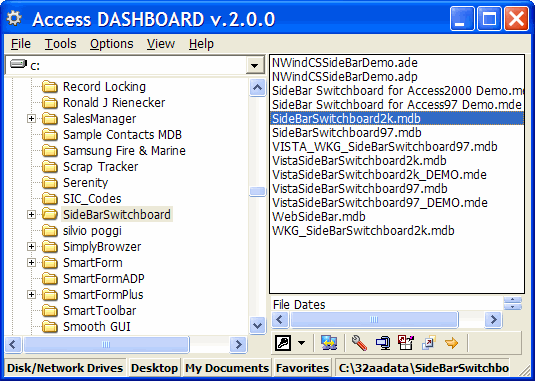
Download from the Free Access Tools tab on my Access Tools page.
The DASHBOARD® automatically determines in which version of JET adatabase was created. Each file is opened in the appropriate versionof MS Access. Users can manually override the version applied bythe DASHBOARD. You can use the Shortcut Builder to create customDesktop shortcuts.
In-built Tools allow you to Backup, Repair, Compact, and Decompile database files without leaving the DASHBOARD.
As an option, you can have your Windows Explorer Right-click PopUp Menu available friom within the DASHBOARD.
Wednesday, July 12, 2006
Office 2007 and OBAs: Customizable Business Applications
Building Office Business Applications: A New Breed of Business Applications Built on the 2007 Microsoft Office System This white paper introduces Office Business Applications (OBAs), a new breed of easily customizable solutions that address real-world business problems through the 2007 Microsoft Office system.
Building Office Business Applications: A New Breed of Business Applications Built on the 2007 Microsoft Office System This white paper introduces Office Business Applications (OBAs), a new breed of easily customizable solutions that address real-world business problems through the 2007 Microsoft Office system.
Data Access Tracing in SQL Server 2005
Data Access Tracing in SQL Server 2005 Learn how to apply the new tracing functionality in Microsoft data access technologies such as ADO.NET 2.0, MDAC 2.82, SQL Server Native Client, and the JDBC driver; and in the SQL Server network protocols and the SQL Server 2005 database engine.
Data Access Tracing in SQL Server 2005 Learn how to apply the new tracing functionality in Microsoft data access technologies such as ADO.NET 2.0, MDAC 2.82, SQL Server Native Client, and the JDBC driver; and in the SQL Server network protocols and the SQL Server 2005 database engine.
MSDN Magazine August 2006: Focus On Office Development
The just released August 2006 issue of MSDN Magazine features these Office-related articles:
Business Apps: What You Need To Know About Using Office As A Development Platform
Gathering MOSS: New Dev-Centric Features In Office SharePoint Server Keep Your Apps Rolling
Add-In Power: Let Users Customize Your Apps With Visual Studio Tools For Applications
InfoPath 2007: Designing Form Templates With The New Features Of InfoPath
The just released August 2006 issue of MSDN Magazine features these Office-related articles:
Business Apps: What You Need To Know About Using Office As A Development Platform
Gathering MOSS: New Dev-Centric Features In Office SharePoint Server Keep Your Apps Rolling
Add-In Power: Let Users Customize Your Apps With Visual Studio Tools For Applications
InfoPath 2007: Designing Form Templates With The New Features Of InfoPath
Subscribe to:
Posts (Atom)