Live Office: An Heretical View
George Ou, Technical Director for TechRepublic.com, has posted in his blog, a sobering article on the realities of web-based applications:
'David Berlind wrote this blog "Corporate PCs: Underpowered for Vista. Overpowered for Writely?" and asked if the computing world should be going back to lower powered computers to run Web-based Applications like Google's Writely instead of ramping up their hardware to run Windows Vista. But in my opinion, the question should be reversed since web applications actually eat up more resources than Windows Vista.
Google's newly acquired Writely should hardly be considered a replacement for Microsoft Office, Word Perfect, OpenOffice.org Write, or any other rich client. The only Web-based word processor or Office Suite that comes close to something like Microsoft Office is ThinkFree Office which is written in Java. But ThinkFree Office makes resource-hogging OpenOffice.org look good by comparison. Just the word processor alone with no data loaded eats up 100 MBs of RAM. Loading up the spread sheet and presentation software will cost you another 200 MBs of RAM. Oh and if you actually want some data with that, you better prepare a Gigabyte of RAM. Vista on the other hand will run on a computer with 128 MBs of RAM (without any Aero Glass eye candy).
Some ask why not come up with a Web-based Office with something like AJAX but the reality is, it's not the panacea some make it out to be. Sun's James Gosling recently gave this interview and talked about the problems of AJAX development. The truth of the matter is, Web-based applications are just a poor way of pushing the presentation layer to the user. If all that is desired is online-only application access, then Citrix is the way to go because it delivers a vastly superior user experience while requiring far less bandwidth and far less resources on the client side.'
Wednesday, April 26, 2006


Tuesday, April 25, 2006
What's New in Access 12:
Build Better Looking Forms and Reports Faster

MSDN Blogger, Erik Rucker, in posts this month has highlighted some cool new tools that will be available in Access 2007:
AutoFormatting - 25 New Themes
Better Image Support - If you want to store images directly in the database the new attachment data-type is a god-send. In the past you would use the OLE Object data type, and because of how OLE worked, there were bloat issues as Access had to store a preview of the file along with the OLE data. Attachments are a new complex data-type that stores multiple attachments to a record in a binary field in a hidden table, and Access compresses the file when it is added if it isn’t already a compressed file type.
WYSIWYG Form and Report Authoring - new forms authoring tools allow you to see live data at design time.
Working with Layouts - Access 12 introduces a new control-grouping concept called Layouts that provide control flow. Using Layouts, when you move controls around they can snap into position and the other controls can reflow because the controls are all aware of their relationship to one another.
Multiple Item Forms - Multi-item forms can be created in one click, and also use Layouts for control positioning. Building a multi-item form creates a datasheet that can be edited, and with a "new item" row at the bottom that can be used to add new records.
Rich Text In Access Forms - Better late than ever: Access 2003 dropped support for the "unsafe" VB6 RichText Control. Access 12 now provides a native rich text control, and allows users to both display and edit rich text at runtime. Rich text support can be turned on through the property sheet or rich text fields can be added to a form through the Add Field task pane.
Sidebar: How about native controls that replace all MS Common Controls, such as the TreeView amd ListItem controls?
Color Pickers - More colors that can be set by using the Access theme color picker that is available from the ribbon and builds on color properties in the property sheet.
Build Better Looking Forms and Reports Faster

MSDN Blogger, Erik Rucker, in posts this month has highlighted some cool new tools that will be available in Access 2007:
AutoFormatting - 25 New Themes
Better Image Support - If you want to store images directly in the database the new attachment data-type is a god-send. In the past you would use the OLE Object data type, and because of how OLE worked, there were bloat issues as Access had to store a preview of the file along with the OLE data. Attachments are a new complex data-type that stores multiple attachments to a record in a binary field in a hidden table, and Access compresses the file when it is added if it isn’t already a compressed file type.
WYSIWYG Form and Report Authoring - new forms authoring tools allow you to see live data at design time.
Working with Layouts - Access 12 introduces a new control-grouping concept called Layouts that provide control flow. Using Layouts, when you move controls around they can snap into position and the other controls can reflow because the controls are all aware of their relationship to one another.
Multiple Item Forms - Multi-item forms can be created in one click, and also use Layouts for control positioning. Building a multi-item form creates a datasheet that can be edited, and with a "new item" row at the bottom that can be used to add new records.
Rich Text In Access Forms - Better late than ever: Access 2003 dropped support for the "unsafe" VB6 RichText Control. Access 12 now provides a native rich text control, and allows users to both display and edit rich text at runtime. Rich text support can be turned on through the property sheet or rich text fields can be added to a form through the Add Field task pane.
Sidebar: How about native controls that replace all MS Common Controls, such as the TreeView amd ListItem controls?
Color Pickers - More colors that can be set by using the Access theme color picker that is available from the ribbon and builds on color properties in the property sheet.
New Office and SQL Server Articles and Webcasts
From DevX.com:
Articles
XML Onboard: The Developer Potential of Office 12 for Commercial Enterprise Software
SQL Server 2005: Better Than Ever for Software Developers
The XML Data Type
ADO.NET 2.0
Server Management Objects
2005 Web Services
SQL Server Service Broker
From DevX.com:
Articles
XML Onboard: The Developer Potential of Office 12 for Commercial Enterprise Software
SQL Server 2005: Better Than Ever for Software Developers
On Demand Webcasts-SQL Server 2005 For Developers Series

The XML Data Type
ADO.NET 2.0
Server Management Objects
2005 Web Services
SQL Server Service Broker
MS Access: Quick Tip
In a Datasheet View, when you want to hide columns, don't select Format > Hide Columns, use Format > Unhide Columns... , as this command opens the Unhide Columns dialog, from which you can dynamically hide/unhide as many as columns as you want, by using the checkboxes for each column.
In a Datasheet View, when you want to hide columns, don't select Format > Hide Columns, use Format > Unhide Columns... , as this command opens the Unhide Columns dialog, from which you can dynamically hide/unhide as many as columns as you want, by using the checkboxes for each column.
Latest MS Access Knowledge Base Articles
Courtesy of KbAlertz.com:
Access 2000
913070 #Deleted is displayed in the records when you open a linked ODBC table from an Oracle 10g database in Access 2003, in Access 2002, or in Access 2000
199879 OFF2000: Remove All Doesn't Remove Temporary Shortcut Bar Files
212761 OFF2000: Application Information Missing in System Information Utility
199901 OFF2000: Removing Templates Removes Modified Database Files
907337 You receive an error message when you start Visual Basic for Applications code in an Access database
226517 OFF2000: "Keep these programs" Check Box Unavailable
229381 OFF2000: Unable to Install Internet Explorer 5 in Office Maintenance Mode Setup
228690 OFF2000: Extra Programs Listed in Removing Previous Versions Dialog Box
229457 OFF2000: Error Installing Office on Windows NT with Internet Explorer 2.0
229386 OFF2000: "...setup completed successfully" Message Does Not Appear at the End of Setup
229375 OFF2000: "Web Browsing Component Only" Installs Internet Explorer 5
221437 OFF2000: Task Scheduler Is Turned On After Installing Office
233273 OFF2000: List of Settings Migrated from Earlier Versions of Office
243253 OFF2000: How to Manipulate the Feature Tree by Using the Keyboard
228616 OFF2000: Exit Setup Dialog Box Appears Unexpectedly When You Press the ENTER Key
217435 OFF2000: Microsoft Office Manager View Settings Do Not Migrate to Office Shortcut Bar
210055 OFF2000: Copy To Commands Missing in Bookshelf After Upgrade
228677 You receive a "Could not find a package to install on the installation media" error message when you run Office 2000 Setup from an administrative installation point
229410 OFF2000: Cannot Open Binder Documents After Installing Office 2000
234041 OFF2000: Error Message: "This Installation Is Forbidden by System Policy ..." Running Setup
231611 OFF2000: Unable to Run Setup with AlwaysInstallElevated Policy Enabled
238417 OFF2000: Numbers in Quicken 98 Reports Appear with Spaces After Installing Office 2000
229459 OFF2000: AlwaysInstallElevated Key Is Reset to Zero
217609 OFF2000: Some Switches and Properties Are Ignored When Using the /j Switch
228631 OFF2000: Motionless Office Assistant Is Always Installed to \Program Files\Microsoft Office\Office Folder
229451 OFF2000: Removing Office Removes User-modified Files
233119 OFF2000: How to Automatically Reboot After the First Portion of Setup
226530 OFF2000: UserName and CompanyName Fields Not Set to Blanks
241056 OFF2000: "A Newer Version of DCOM95 Had Been Installed..." Message During Setup on Windows 95
217683 OFF2000: Maintenance Mode Requires 1280KB of Disk Space in Addition to the Features That You Choose to Add
217673 OFF2000: Setup Error "Installation was not completed successfully" in Quiet Mode
245088 OFF2000: MSDN CD Not Recognized When You Apply the Office 2000 ODBC Vulnerability Update
245113 OFF2000: MSDN DVD Not Recognized When You Apply the Office 2000 ODBC Vulnerability Update
Access 2002
917418 You receive an error message when you try to create or to modify the design of an SQL object in Office Access 2003 or in Access 2002
917415 Access 2002 exits when you create or try to modify an in-line function when the Access 2002 project is connected to a SQL Server 2005 database
917584 Description of the Office XP post-Service Pack 3 hotfix package: March 31, 2006
915749 Description of Access 2002 post-Service Pack 3 hotfix package: March 11, 2006
913572 Description of Access 2002 post-Service Pack 3 hotfix package: March 15, 2006
Access 2003
905409 Description of the Office 2003 post-Service Pack 2 hotfix package: April 12, 2006
917418 You receive an error message when you try to create or to modify the design of an SQL object in Office Access 2003 or in Access 2002
Access 2003
905409 Description of the Office 2003 post-Service Pack 2 hotfix package: April 12, 2006
917418 You receive an error message when you try to create or to modify the design of an SQL object in Office Access 2003 or in Access 2002
Monday, April 24, 2006
CreateInstall Free
I have just come across, CreateInstall Free, a neat little application for creating Windows install sets, and is particularly suitable for deploying Access applications. It has a crisp clean interface, is very easy to use, and handles advanced features such as INI files, command-line parameters, and auto-registration of system files, including DLL's and OCX's.
The install footprint is small, and the installation gui is well-designed and efficient:
Highly recommended.
I have just come across, CreateInstall Free, a neat little application for creating Windows install sets, and is particularly suitable for deploying Access applications. It has a crisp clean interface, is very easy to use, and handles advanced features such as INI files, command-line parameters, and auto-registration of system files, including DLL's and OCX's.
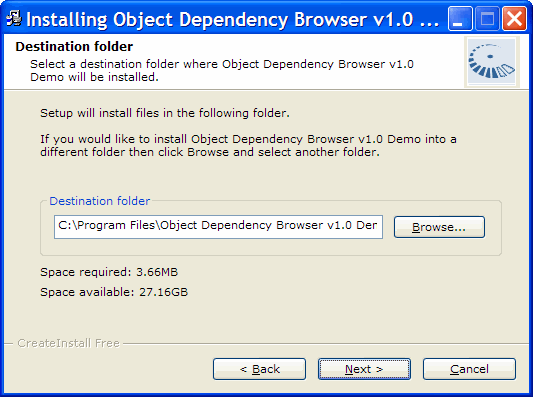
The install footprint is small, and the installation gui is well-designed and efficient:
Highly recommended.
Thursday, April 20, 2006
More SQL Server Downloads 2
SQL Server 2005 Express Edition Absolute Beginners Video Code Samples These are code samples that are a part of the Absolute Beginner Series for SQL Server 2005 Express Edition.
Teacher Starter Kit for SQL Server 2005 Express Edition and Visual Basic The Teacher Starter Kit is a rich client application for keeping track of students, course rosters, and assessments or grades.
Microsoft SQL Server 2005 Service Pack 1 Community Technology Preview Download the Community Technology Preview releases of SQL Server 2005 Service Pack 1 (SP1) and SQL Server 2005 Books Online SP1 and submit feedback on these releases.
SQL Server 2005 Express Edition Absolute Beginners Video Code Samples These are code samples that are a part of the Absolute Beginner Series for SQL Server 2005 Express Edition.
Teacher Starter Kit for SQL Server 2005 Express Edition and Visual Basic The Teacher Starter Kit is a rich client application for keeping track of students, course rosters, and assessments or grades.
Microsoft SQL Server 2005 Service Pack 1 Community Technology Preview Download the Community Technology Preview releases of SQL Server 2005 Service Pack 1 (SP1) and SQL Server 2005 Books Online SP1 and submit feedback on these releases.
More SQL Server 2005 Downloads
Teacher Starter Kit for SQL Server 2005 Express Edition and Visual C# The Teacher Starter Kit is a rich client application for keeping track of students, course rosters, and assessments or grades.
SQL Server 2005 Samples and Sample Databases (April 2006) Download over 100 samples and three sample databases for SQL Server 2005.
Teacher Starter Kit for SQL Server 2005 Express Edition and Visual C# The Teacher Starter Kit is a rich client application for keeping track of students, course rosters, and assessments or grades.
SQL Server 2005 Samples and Sample Databases (April 2006) Download over 100 samples and three sample databases for SQL Server 2005.
Wednesday, April 19, 2006
SQL Server 2005 SP1 and Other SQL Server Goodies
SQL Server 2005 SP1 Download Service Pack 1 for Microsoft SQL Server 2005.
Microsoft SQL Server 2005 Express Edition SP1 Microsoft SQL Server 2005 Express Edition is a free, easy-to-use, lightweight version of SQL Server 2005. It is fast and easy to learn, allowing you to quickly develop and deploy dynamic data-driven applications.
Feature Pack for SQL Server 2005 Apr 2006 Download the April 2006 Feature Pack for Microsoft SQL Server 2005, a collection of standalone install packages that provide additional value for SQL Server 2005.
Design for Operations Integration Kit Application faults and performance bottlenecks automatically generate work items/trouble tickets in Visual Studio 2005 Team System
Microsoft SQL Server 2005 Upgrade Advisor Download the April 2006 version of Microsoft SQL Server 2005 Upgrade Advisor. Upgrade Advisor analyzes instances of SQL Server 7.0 and SQL Server 2000 to help you prepare for upgrades to SQL Server 2005.
Microsoft SQL Server Management Studio Express Microsoft SQL Server Management Studio Express (SSMSE) is a free, easy-to-use graphical management tool for managing SQL Server 2005 Express Edition and SQL Server 2005 Express Edition with Advanced Services.
Microsoft SQL Server 2005 Express Edition Toolkit Microsoft SQL Server 2005 Express Edition Toolkit provides additional tools and resources for SQL Server 2005 Express Edition and SQL Server 2005 Express Edition with Advanced Services.
Microsoft SQL Server 2005 Express Edition with Advanced Services Microsoft SQL Server 2005 Express Edition with Advanced Services is a new, free, easy-to use version of SQL Server Express that includes more features and makes it easier than ever to start developing powerful data-driven applications for web or local desktop development.
SQL Server 2005 SP1 Download Service Pack 1 for Microsoft SQL Server 2005.
Microsoft SQL Server 2005 Express Edition SP1 Microsoft SQL Server 2005 Express Edition is a free, easy-to-use, lightweight version of SQL Server 2005. It is fast and easy to learn, allowing you to quickly develop and deploy dynamic data-driven applications.
Feature Pack for SQL Server 2005 Apr 2006 Download the April 2006 Feature Pack for Microsoft SQL Server 2005, a collection of standalone install packages that provide additional value for SQL Server 2005.
Design for Operations Integration Kit Application faults and performance bottlenecks automatically generate work items/trouble tickets in Visual Studio 2005 Team System
Microsoft SQL Server 2005 Upgrade Advisor Download the April 2006 version of Microsoft SQL Server 2005 Upgrade Advisor. Upgrade Advisor analyzes instances of SQL Server 7.0 and SQL Server 2000 to help you prepare for upgrades to SQL Server 2005.
Microsoft SQL Server Management Studio Express Microsoft SQL Server Management Studio Express (SSMSE) is a free, easy-to-use graphical management tool for managing SQL Server 2005 Express Edition and SQL Server 2005 Express Edition with Advanced Services.
Microsoft SQL Server 2005 Express Edition Toolkit Microsoft SQL Server 2005 Express Edition Toolkit provides additional tools and resources for SQL Server 2005 Express Edition and SQL Server 2005 Express Edition with Advanced Services.
Microsoft SQL Server 2005 Express Edition with Advanced Services Microsoft SQL Server 2005 Express Edition with Advanced Services is a new, free, easy-to use version of SQL Server Express that includes more features and makes it easier than ever to start developing powerful data-driven applications for web or local desktop development.
Wednesday, April 12, 2006
New Versions of Vista-Style Switchboards
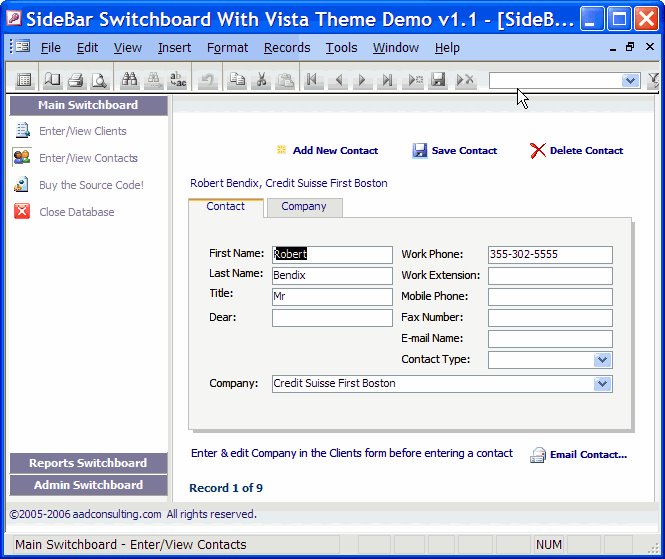
Two new versions of my Vista-style Switchboard are now available:
Two new versions of my Vista-style Switchboard are now available:
- Vista Switchboard With Resizable Panes and hover links:

All About SQL Server 2005
Dig into the details of SQL Server 2005 Increase security, scalability, and availability with live and on-demand webcasts, along with virtual labs, where you can check out SQL Server 2005 without setup or installation.
Dig into the details of SQL Server 2005 Increase security, scalability, and availability with live and on-demand webcasts, along with virtual labs, where you can check out SQL Server 2005 without setup or installation.
Migrate Access 2003 Applications to Small Business Accounting 2006
Migrate Access 2003 Applications to Small Business Accounting 2006 Examine how integration of Small Business Accounting 2006 with Access 2003 can benefit ISVs, particularly the Access developers designing solutions for the small business market.
Migrate Access 2003 Applications to Small Business Accounting 2006 Examine how integration of Small Business Accounting 2006 with Access 2003 can benefit ISVs, particularly the Access developers designing solutions for the small business market.
Tuesday, April 11, 2006
Access Extra: Now on MSN® Alerts
You can receive Access Extra posts as MSN Alerts through your MSN® Messenger or Windows® Messenger, your e-mail, or your mobile device.
You can choose how and when to receive messages. MSN Alerts does not charge for sending alerts to your mobile device; however, your mobile service provider may charge for every text message you receive, including alerts.
Sign-up by clicking on this link:

You can receive Access Extra posts as MSN Alerts through your MSN® Messenger or Windows® Messenger, your e-mail, or your mobile device.
You can choose how and when to receive messages. MSN Alerts does not charge for sending alerts to your mobile device; however, your mobile service provider may charge for every text message you receive, including alerts.
Sign-up by clicking on this link:
Sunday, April 09, 2006
MS Access: RIP?
In his latest newsletter this weekend, author, Rick Dobson, says:
The development flexibility and excellent pricing for the [VB] Express suite contrasted with the higher pricing and relatively aged development capabilities of Microsoft Access suggest that many Access developers will find a more useful environment for creating custom database solutions with the Express suite.
I beg to differ. Outside large enterprises, independent Access developers must compete on price, and clients will not pay more for something less accessible and more expensive to build and maintain. Access has been a success because it is simply the best RAD for desktop databases.
In his latest newsletter this weekend, author, Rick Dobson, says:
The development flexibility and excellent pricing for the [VB] Express suite contrasted with the higher pricing and relatively aged development capabilities of Microsoft Access suggest that many Access developers will find a more useful environment for creating custom database solutions with the Express suite.
I beg to differ. Outside large enterprises, independent Access developers must compete on price, and clients will not pay more for something less accessible and more expensive to build and maintain. Access has been a success because it is simply the best RAD for desktop databases.
SQL Server 2005 Mobile Edition To Run on all versions of Windows
SQL Server 2005 Mobile Edition for handheld devices that run Windows CE and Windows Tablet Edition, is to run on all versions of Windows. Source: www.computerworld.com
SQL Server 2005 Mobile Edition for handheld devices that run Windows CE and Windows Tablet Edition, is to run on all versions of Windows. Source: www.computerworld.com
Excel Hands-On Lab
Visual Studio 2005 Tools for Office Excel Hands-on Labs The labs included in this download provide hands-on practice with developing Microsoft Excel solutions using Visual Studio 2005 Tools for Office.
Visual Studio 2005 Tools for Office Excel Hands-on Labs The labs included in this download provide hands-on practice with developing Microsoft Excel solutions using Visual Studio 2005 Tools for Office.
Wednesday, March 29, 2006
Retrieve and Display Data with Microsoft Visual Studio Tools for Office
Learn how to retrieve and display data in Excel using Web services and VSTO in this article from Advisor.com.
Learn how to retrieve and display data in Excel using Web services and VSTO in this article from Advisor.com.
Monday, March 27, 2006
MS White Paper for Developers on the MS Office 2007 GUI

Office 2007 Document: Developer Overview of the User Interface for the 2007 Microsoft Office System A developer-oriented review of the user interface for the 2007 release of the Microsoft Office System including a discussion of the impact of the redesigned UI on custom solutions.
Office 2007 Document: Developer Overview of the User Interface for the 2007 Microsoft Office System A developer-oriented review of the user interface for the 2007 release of the Microsoft Office System including a discussion of the impact of the redesigned UI on custom solutions.
Sunday, March 26, 2006
Pocket Guide: MS Access Samples and Wizards from Microsoft
- Access 2003/2002/2000 Sample: Multiple Column Reports database The Multiple Column reports sample database for Microsoft Access contains sample reports that demonstrate creating telephone book style multiple column reports.
- Access 2003 Sample: Inside Out Sample Files This download contains sample files that accompany articles excerpted from the book Access 2003 Inside Out.
- Access 2003/2002/2000 Sample: Basing One Combo Box on Another Sample Database This sample database, for the Basing One Combo Box on Another column on Office Online, includes an example form that demonstrates how to limit what appears in one combo box based on the choice you make in another combo box.
- Access 2003/2002 Sample: Using Parameters with Queries and Reports Sample Database This sample Microsoft Access database provides example forms, queries, and reports that demonstrate using query parameters, as well as using a custom form to supply parameters to a query or report.
- Access 2000 Sample: Database of Sample Forms The Access 2000 Database of Sample Forms provides sample user forms that demonstrate how to perform a wide variety of tasks such as bringing a subtotal from a sub form to a form, and how to disable command bar items.
- Access 2003 Sample: Using Automation with Access and Outlook This download provides a sample Access file for use with the MSDN article "Using Automation in Microsoft Office Access 2003 to Work with Microsoft Office Outlook 2003."
- Access 2003/2002/2000 Sample: On time and how much has elapsed Use this sample database file to learn how to calculate elapsed time.
- Access 2000 Sample: Query Topics The Access 2000 Sample: Query Topics database contains examples of useful database queries, including crosstab, union, and join queries.
- Access 2000 Sample: Report Topics The Access 2000 Sample: Report Topics database contains sample reports that demonstrate how to perform a variety of reporting tasks.
- Access 2003 Sample: Animating Microsoft Office Access 2003 Learn different methods of animating Microsoft Office Access 2003. These include using the Animation ActiveX control, the Timer control, and animating the Office assistant.
- Access 2003 Sample: Performing Mail-Merges Using XML Data Learn how to perform a mail merge programmatically from Microsoft Office Access 2003 using an external XML data file and the Mail Merge feature of Microsoft Office Word 2003.
- New XML Features in Access 2003 Sample Use these files to learn how to import, export, and transform XML data programmatically into Access.
- Access 2002 Add-In: Security Manager The Microsoft Access 2002 Security Manager enables the database-security administrator to make knowledgeable security decisions as the database and its workgroup evolve.
- Access 2000 Add-In: Security Manager The Microsoft Access 2000 Security Manager enables the database-security administrator to make knowledgeable security decisions as the database and its workgroup evolve.
- Office 2003 Sample: XMLCase Study (Contoso)Learn how to create an XML solution using applications from the Microsoft Office System in the context of a pharmaceutical company.
- Access 2002 Sample File: Design Databases with Forms and Excel Learn how to use Excel to create prototypes of your Access databases with this sample spreadsheet.
- Access 2002 Sample File: Design Databases with Forms and Excel Learn how to use Excel to create prototypes of your Access databases with this sample spreadsheet.
- Access Workflow Designer Call-Tracking Sample Team Solution This sample is provided in conjunction with the MSDN Library article, "Microsoft® Access Workflow Designer Call-Tracking Sample Team Solution.
- Microsoft Jet SQL for Access 2000 - Sample 1 These three downloadable samples are provided in conjunction with a series of MSDN Library articles that discuss how to use Microsoft® Jet SQL with data from an Access 2000 database.
- Microsoft Jet SQL for Access 2000 Sample 2 These three downloadable samples are provided in conjunction with a series of MSDN Library articles that discuss how to use Microsoft® Jet SQL with data from an Access 2000 database.
- Microsoft Jet SQL for Access 2000 - Sample 3 These three downloadable samples are provided in conjunction with a series of MSDN Library articles that discuss how to use Microsoft® Jet SQL with data from an Access 2000 database.
- Northwind Traders Direct Sample Application Northwind Traders Direct is a simple e-commerce application that uses data access pages, frames, and cookies. It was created using Microsoft® FrontPage® 2000 and Microsoft Access 2000.
- Using ADO with the Microsoft Jet Provider Sample Provides a guide to revising code that uses Microsoft Data Access Objects (DAO) into code that uses Microsoft ActiveX Data Objects (ADO), as well as a guide to writing new code using ADO with the Microsoft Jet Provider.
- Access 2002: Create Dynamic Reports in Access Sample Files Sample files for use with the article Create Dynamic Reports in Access Using Linked Tables.
- Access 2002 Update: Additional Help Files This downloadable file contains the most current Microsoft Access 2002 Help files and replaces the existing ones.
- Access 2002 Add-in: Expanded Help File Access 2002 online Help with pre-expanded content for screen readers.
- Access 2000 and SQL Server 2000 Readiness Update The Access 2000 and SQL Server 2000 Readiness Update improves the way in which Microsoft Access 2000 works with Microsoft SQL Server 2000.
- Access 97 White Paper: Internet Replication
- Access 97 Internet ActiveX Sample Database
- Access 2.0 Sample Database Containing 19 Modules of Access Basic Code
- Access 7.0 Sample Database Containing 19 Modules of Visual Basic for Applications Code (Neatcode.exe) Neatcode.mdb is a Microsoft Access for Windows 95 version 7.0 sample database that contains 19 sample modules of Visual Basic for Applications code. Topics include complex math, statistics, OLE Automation, data access objects, and more.
- Access 7.0 Add-in: Replica to Regular Database Wizard (Wzrplrgl.exe) This file contains an add-in for Microsoft Access 95 that enables you to convert the Design Master database from a replica set to its original, nonreplicated state.
- Access 97 Add-in: Replica to Regular Database Wizard (Wzrprg97.exe) This file contains an add-in for Microsoft Access 97 that enables you to convert the Design Master database from a replica set to its original, nonreplicated state.
- Access 7.0 White Paper: Porting 16-bit Applications to 32-bit Versions (Accport.exe) The Accport.exe file contains a document which discusses how to port 16-bit Microsoft Office applications (with code written in the Microsoft Excel macro language (XLM), WordBasic, Visual Basic for Applications, or Access Basic) to 32-bit versions for use in Windows 95 and Windows NT.
- Access 97 Knowledge Base Help Files Knowlege Base (KB) Help file containing all KB articles for Microsoft Access 97 published on or prior to April 18, 1997.
- Access 97 Document: Conversion White Paper Contains a Microsoft Word document called "Microsoft Access 97 Conversion White Paper." This document contains a discussion on potential issues arising from the conversion of Microsoft Access version 1.x, 2.0, and 7.0 databases to Microsoft Access 97.
- Access 7.0 Viewable Wizard Code: WzTool70.mda (wztool70.exe) In the retail version of Microsoft Access for Windows 95 version 7.0, you can't view the Visual Basic for Applications code for wizards. This file contains a special version of the wizard that has viewable wizard code for developers to use as a learning tool.
- Access 97 Treeview Control Wizard (WzTreevw.exe) The WzTreevw.mde file is a Treeview Control Wizard for Microsoft Access 97. When you insert a Treeview Control on your form with this wizard installed, the wizard will guide you through configuring the Treeview Control.
- Excel 5.0 DLL Files for Developers To Access Excel 5.0c: Xlodbc.xla and Xlodbc.dll (Xlodbc.exe) These files are made available to allow third-party developers quick and easy access to these files in the event that they do not have access to the full version of Microsoft Excel version 5.0c.
- Excel 2000 Help File: Running Excel 4.0 Macros Download the complete Help file for the Microsoft Excel 4.0 macro functions (XLM macro functions). You can then access this information from the Office Assistant when you use these functions in Microsoft Excel 2000.
- Import and Link Exchange/Outlook Wizards for Access 97 Use the Import Exchange/Outlook Wizard or the Link Exchange/Outlook Wizard to import or link a Microsoft Exchange or Microsoft Outlook folder or address book to a Microsoft Access table.
- Partial Replica Wizard for Access 97 With the Partial Replica Wizard, you can create a partial replica without programming. Specify a filter expression for a table, and the wizard sets the Data Access Objects (DAO) properties and uses the DAO methods for you.
- Access 2000 Tutorial: Northwind Traders Sample Database You can use the Northwind Traders sample database as a tool to help you learn Access 2000. Experiment with the data stored in Northwind, and use the forms, reports, and other database objects as models for your own database.
- Access 97 Relationship Print Wizard In response to a long-standing request from our developers, Microsoft® Access proudly presents the Print Relationships Wizard.
Friday, March 24, 2006
Free SQL Server 2005 Report Packs
You can use these free SQL Server Reporting 2005 Services report packs as templates to quickly author and distribute new interactive reports.
You can use these free SQL Server Reporting 2005 Services report packs as templates to quickly author and distribute new interactive reports.
ReadMe Files for SQL Server 2005 SP1
Readme Files for SQL Server 2005 SP1 and SQL Server 2005 SP1 Express Editions and Tools Before you install SQL Server 2005 Service Pack 1 (SP1) or SQL Server 2005 SP1 Express editions and tools, review the readme for information about installing SP1 and to learn about common issues that can impact your installation experience or use of the product.
Readme Files for SQL Server 2005 SP1 and SQL Server 2005 SP1 Express Editions and Tools Before you install SQL Server 2005 Service Pack 1 (SP1) or SQL Server 2005 SP1 Express editions and tools, review the readme for information about installing SP1 and to learn about common issues that can impact your installation experience or use of the product.
Microsoft Office 2007 Launch Delayed
Tracking the delay in Windows Vista, Microsoft confirmed late Thursday that it is also pushing the launch of Office 2007 to next year.
Tracking the delay in Windows Vista, Microsoft confirmed late Thursday that it is also pushing the launch of Office 2007 to next year.
Thursday, March 23, 2006
Process Explorer for Windows: Task Manager On Steroids
Process Explorer, from Sysinternals, is an advanced process management application that tells you what is running under 32/64-bit Windows, how those running processes affect other processes, and their use of system resources.
System Requirements: Microsoft® Debugging Tools for Windows® - dbghelp.dll
Price: Free!
Details: The main screen shows the processes running on your PC in a treeview. Each process is listed with its icon, a process id, current CPU utilization, a description, and the maker. You can search for processes by handle or the DLL a handle has loaded, and find more for information about a process from the Web by right-clicking on it in the tree.
Recommendation: MS TechNet Magazine April 2006 - ToolBox: New Products for IT Professionals
Process Explorer, from Sysinternals, is an advanced process management application that tells you what is running under 32/64-bit Windows, how those running processes affect other processes, and their use of system resources.
System Requirements: Microsoft® Debugging Tools for Windows® - dbghelp.dll
Price: Free!
Details: The main screen shows the processes running on your PC in a treeview. Each process is listed with its icon, a process id, current CPU utilization, a description, and the maker. You can search for processes by handle or the DLL a handle has loaded, and find more for information about a process from the Web by right-clicking on it in the tree.
Recommendation: MS TechNet Magazine April 2006 - ToolBox: New Products for IT Professionals
The Deal On the New GUI in MS Access 2007
MSDN blogger, Eric Rucker, in his What's New In Access 2007 blog, provides an illustrated exposition of the new ribbon navigation paradigm.
MSDN blogger, Eric Rucker, in his What's New In Access 2007 blog, provides an illustrated exposition of the new ribbon navigation paradigm.
Hotfix for SQL Server 2000 Service Pack 4
Hotfix for SQL Server 2000 Service Pack 4 - Build 2187 This just released cumulative hotfix package contains all hotfixes available in SQL Server 2000 Build 2187. For users of the MSDE for Access 2000 or later, this page contains full details of the update as it applies to MSDE 2000. The English language download file is SQL2000.MSDE-KB884525-SP4-x86-LLL.exe (56mb).
Hotfix for SQL Server 2000 Service Pack 4 - Build 2187 This just released cumulative hotfix package contains all hotfixes available in SQL Server 2000 Build 2187. For users of the MSDE for Access 2000 or later, this page contains full details of the update as it applies to MSDE 2000. The English language download file is SQL2000.MSDE-KB884525-SP4-x86-LLL.exe (56mb).
Wednesday, March 22, 2006
Pre-Realease Version of Visual Studio Tools for Office 2007 Available
Microsoft Pre-Release Software Visual Studio Tools For Office "v3" - March Community Technology Preview (CTP) Microsoft has provided a version of the Visual Studio Tools for Office "v3" for the users of the Beta 1 Technical Refresh of Microsoft Office 2007.
Microsoft Pre-Release Software Visual Studio Tools For Office "v3" - March Community Technology Preview (CTP) Microsoft has provided a version of the Visual Studio Tools for Office "v3" for the users of the Beta 1 Technical Refresh of Microsoft Office 2007.
Sunday, March 19, 2006
All You Need to Know About MS Access Security
Veteran Access guru, Roger Jennings, in the first Access book I ever read, Access 2 Developers Handbook, described Access security as "labyrinthine". He wasn't exaggerating.
Garry Robinson, of vb123.com, has recently published a book that guides you through the labrynth, Real World Microsoft Access Database Protection and Security, from A!Press.
Read all about it on Garry's Access site. A sample chapter of the book was featured on MSDN.
Veteran Access guru, Roger Jennings, in the first Access book I ever read, Access 2 Developers Handbook, described Access security as "labyrinthine". He wasn't exaggerating.
Garry Robinson, of vb123.com, has recently published a book that guides you through the labrynth, Real World Microsoft Access Database Protection and Security, from A!Press.
Read all about it on Garry's Access site. A sample chapter of the book was featured on MSDN.
New Version 2.0 of The Executive Assistant for Microsoft© Access
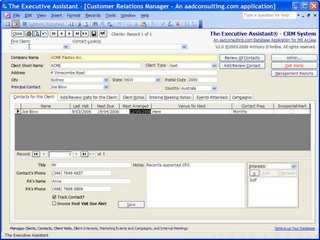
I have just launched the new Version 2.0 of The Executive Assistant - CRM System with Integrated Executive Diary Management, which alllows executives to:
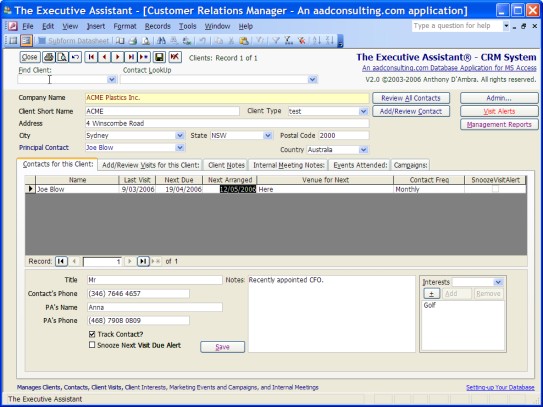
I have just launched the new Version 2.0 of The Executive Assistant - CRM System with Integrated Executive Diary Management, which alllows executives to:
- Easily manage Clients, Contacts, Client Visits, and Internal Meetings
- Quickly create detailed Visit and Meeting Reports
- Built-in Visit scheduling
- Automated email distribution
- Comprehensive reporting
New in Version 2.0:
- Contact Interests tracking
- Event and Marketing Campaign management
- Modern Windows Vista-themed GUI
- Visits Alerts and overdue visit monitoring
- Client address information
- More comprehensive reporting options
The Executive Assistant is used by senior executives at Munich Re Australia, Samsung Fire & Marine, and UBS.
The Version 1.0 .mde application is now free!
Saturday, March 18, 2006
New MS Access Knowledge Base Articles
Latest Access KB Articles courtesy of KBAlertz.com:
Access 97
128195 ACC: Commands Not Available During BeforeUpdate Event
139024 OFF: Extract Command Copies Cabinet File Structure
Access 2000
913296 Jet 4.0 data engine update fixes issues that may occur on a Windows XP-based computer
207816 ACC2000: Lookup Wizard Fails with Certain Data Types in Tables
197589 ACC2000: Exporting SQL Specific Query to HTML Causes Error
209661 ACC2000: "Couldn't Find Input Table or Query" Error Message
Access 2002
284463 OFFXP: You Cannot Select "Run from CD" During Installation
280565 OFFXP: Office Shortcut Bar Buttons Remain After Office 2000 Programs Are Removed
290162 OFFXP: User-Modified Files Removed When You Remove Office
280564 OFFXP: Setup.exe Stops Responding When Network Connection Is Interrupted
290167 OFFXP: UserName and CompanyName Fields Not Set to Blank
274388 OFFXP: Your "Features to Install" Settings Are Not Saved During Office Setup
913471 Description of the updates for Office XP: March 14, 2006
Access 2003
905645 Description of the Security Update for Office 2003: February 14, 2006
914830 Access 2003 may not start as expected after you install Office 2003 SP2
902445 Description of the Access 2003 post-Service Pack 2 hotfix package: January 24, 2006
914907 The installation of an update for an Office 2003 program may not be completed successfully after you run the Disk Cleanup tool
913581 Description of the Office 2003 post-Service Pack 2 hotfix package for the Portuguese (Brazilian) version of Office 2003: February 1, 2006
913420 Error message when you try to repair, reinstall, or add a component to an Office 2003 program and you use a Local Installation Source: "Installation Error: File Not Found"
915058 Description of the Office 2003 post-Service Pack 2 hotfix package: February 27, 2006
913571 Description of the updates for Office 2003: March 14, 2006
900459 Description of the Office 2003 post-Service Pack 2 hotfix package: February 24, 2006
Latest Access KB Articles courtesy of KBAlertz.com:
Access 97
128195 ACC: Commands Not Available During BeforeUpdate Event
139024 OFF: Extract Command Copies Cabinet File Structure
Access 2000
913296 Jet 4.0 data engine update fixes issues that may occur on a Windows XP-based computer
207816 ACC2000: Lookup Wizard Fails with Certain Data Types in Tables
197589 ACC2000: Exporting SQL Specific Query to HTML Causes Error
209661 ACC2000: "Couldn't Find Input Table or Query" Error Message
Access 2002
284463 OFFXP: You Cannot Select "Run from CD" During Installation
280565 OFFXP: Office Shortcut Bar Buttons Remain After Office 2000 Programs Are Removed
290162 OFFXP: User-Modified Files Removed When You Remove Office
280564 OFFXP: Setup.exe Stops Responding When Network Connection Is Interrupted
290167 OFFXP: UserName and CompanyName Fields Not Set to Blank
274388 OFFXP: Your "Features to Install" Settings Are Not Saved During Office Setup
913471 Description of the updates for Office XP: March 14, 2006
Access 2003
905645 Description of the Security Update for Office 2003: February 14, 2006
914830 Access 2003 may not start as expected after you install Office 2003 SP2
902445 Description of the Access 2003 post-Service Pack 2 hotfix package: January 24, 2006
914907 The installation of an update for an Office 2003 program may not be completed successfully after you run the Disk Cleanup tool
913581 Description of the Office 2003 post-Service Pack 2 hotfix package for the Portuguese (Brazilian) version of Office 2003: February 1, 2006
913420 Error message when you try to repair, reinstall, or add a component to an Office 2003 program and you use a Local Installation Source: "Installation Error: File Not Found"
915058 Description of the Office 2003 post-Service Pack 2 hotfix package: February 27, 2006
913571 Description of the updates for Office 2003: March 14, 2006
900459 Description of the Office 2003 post-Service Pack 2 hotfix package: February 24, 2006
Friday, March 17, 2006
Thursday, March 16, 2006
Another SQL Server 2005 Download...
Community Pack for SQL Server 2005 CTP Download the Community Technology Preview (CTP) of the Community Pack for Microsoft SQL Server 2005, a collection of standalone install packages that provide additional value for SQL Server 2005.
Community Pack for SQL Server 2005 CTP Download the Community Technology Preview (CTP) of the Community Pack for Microsoft SQL Server 2005, a collection of standalone install packages that provide additional value for SQL Server 2005.
Five Cool Things About the New Office 2007 File Formats
Office 2007 features a new default XML file format. This article from DevX.com explains the developer benefits provided bythe new Office Open XML File formats, and includes a sample application that illustrates how the new file formats enable Office document generation.

Office 2007 features a new default XML file format. This article from DevX.com explains the developer benefits provided bythe new Office Open XML File formats, and includes a sample application that illustrates how the new file formats enable Office document generation.
Latest SQL Server 2005 Downloads
SQL Server 2005 SP1 Express Editions and Tools CTP Download Community Technology Preview (CTP) SQL Server Express or SQL Server Express with Advanced Services. Also download SQL Server Management Studio Express and the SQL Server Express Toolkit.
SQL Server 2005 SP1 CTP Download the Community Technology Preview (CTP) of Microsoft SQL Server 2005 Service Pack 1.
SQL Server 2005 Books Online SP1 CTP (March 2006) Download an updated version of the documentation and tutorials for Microsoft SQL Server 2005.
SQL Server 2005 SP1 Express Editions and Tools CTP Download Community Technology Preview (CTP) SQL Server Express or SQL Server Express with Advanced Services. Also download SQL Server Management Studio Express and the SQL Server Express Toolkit.
SQL Server 2005 SP1 CTP Download the Community Technology Preview (CTP) of Microsoft SQL Server 2005 Service Pack 1.
SQL Server 2005 Books Online SP1 CTP (March 2006) Download an updated version of the documentation and tutorials for Microsoft SQL Server 2005.
Wednesday, March 15, 2006
New Office MS Office Updates
The latest Office updates, including critical security patches for Office XP, can be downloaded from the Microsoft Office Online Downloads site:
The latest Office updates, including critical security patches for Office XP, can be downloaded from the Microsoft Office Online Downloads site:
Security Update for Excel 2003 (KB905756)
A security vulnerability exists in Microsoft Office Excel 2003 that could allow
arbitrary code to run when opening a malicious document. This update addresses
that vulnerability.
Security Update for Excel 2002 (KB905755)
A security vulnerability exists in Microsoft Excel 2002 that could allow
arbitrary code to run when opening a malicious document. This update addresses
that vulnerability.
Security Update for Excel 2000 (KB905757)
A security vulnerability exists in Microsoft Excel 2000 that could allow
arbitrary code to run when opening a malicious document. This update addresses
that vulnerability.
Security Update for Excel Viewer 2003 (KB914451)
A security vulnerability exists in Microsoft Office Excel Viewer 2003 that could
allow arbitrary code to run when opening a malicious document. This update
addresses that vulnerability.
Security Update for PowerPoint 2002 (KB905758)
A security vulnerability exists in Microsoft PowerPoint 2002 that could allow
arbitrary code to run when opening a malicious document. This update addresses
that vulnerability.
Security Update for PowerPoint 2000 (KB905555)
A security vulnerability exists in Microsoft PowerPoint 2000 that could allow
arbitrary code to run when opening a malicious document. This update addresses
that vulnerability.
Security Update for Outlook 2002 (KB905649)
A security vulnerability exists in Microsoft Outlook 2002 that could allow
arbitrary code to run when opening a malicious document. This update addresses
that vulnerability.
Security Update for Outlook 2000 (KB905646)
A security vulnerability exists in Microsoft Outlook 2000 that could allow
arbitrary code to run when opening a malicious document. This update addresses
that vulnerability.
Security Update for Office 2000 Multilanguage Pack (KB905646)
A security vulnerability exists in Microsoft Office 2000 that could allow
arbitrary code to run when opening a maliciously modified document. This update
resolves that vulnerability when Office 2000 is used with a Multilanguage Pack.
Security Update for Office XP Multilingual User Interface Pack (KB905649)
A security vulnerability exists in Microsoft Office XP that could allow
arbitrary code to run when opening a malicious document. This update resolves
that vulnerability when Office XP is used with a Multilingual User Interface
Pack.
Security Update for Word 2002 (KB905754)
A Security vulnerability exists in Microsoft Word 2002 that could allow
arbitrary code to run when opening a malicious document. This update addresses
that vulnerability.
Security Update for Word 2000 (KB905553)
Security vulnerability exists in Microsoft Word 2000 that could allow arbitrary
code to run when opening a malicious document. This update addresses that
vulnerability.
Update for Office 2003 Proofing Tools (KB913571)
This update to Microsoft Office 2003 Proofing Tools improves how Office 2003
finds and corrects errors in Dutch language documents. This update includes
previously released security updates for Office 2003 Proofing Tools.
Update for Office 2003 Multilingual User Interface Pack (KB913571)
This update to Microsoft Office 2003 Multilingual User Interface Pack (MUI)
improves how Office 2003 finds and corrects errors in Dutch language documents.
This update includes previously released security updates for Office 2003 MUI.
Update for Office 2003 (KB913571)
Microsoft has released an update to the spelling checker for Microsoft Office
2003. This update significantly improves how Office 2003 programs find and
correct errors in Dutch language documents.
Update for Office XP (KB913471)
Microsoft has released an update to the spelling checker for Microsoft Office
XP. This update significantly improves how Office XP programs find and correct
errors in Dutch language documents.
Update for Office XP Proofing Tools (KB913471)
This update to Microsoft Office XP Proofing Tools improves how Office XP finds
and corrects errors in Dutch language documents.
Update for Outlook 2003 (KB913807)
This update to Microsoft Office Outlook 2003 corrects a problem that may occur
when you use the CreateItemFromTemplate method programmatically to create a
form. This update includes previously released security updates for Outlook
2003.
Update for Outlook 2003 Junk Email Filter (KB913161)
This update provides the Junk E-mail Filter in Microsoft Office Outlook 2003
with a more current definition of which e-mail messages should be considered
junk e-mail. This update was released in March 2006.
Update for Project 2003 Multilingual User Interface Pack (KB913571)
This update to Microsoft Office Project 2003 Multilingual User Interface Pack (MUI)
improves how Project 2003 finds and corrects errors in Dutch language documents.
This update includes previously released security updates for Project 2003 MUI.
Update for Visio 2003 Multilingual User Interface Pack (KB913571)
This update to Microsoft Office Visio 2003 Multilingual User Interface Pack (MUI)
improves how Visio 2003 finds and corrects errors in Dutch language documents.
This update includes previously released security updates for Visio 2003 MUI.
Tuesday, March 14, 2006
Microsoft Office 2003 Training Library Plus Access to Online Books
This subscription portal offers 16 courses and 10 online books. The self-paced e-learning courses will help you become familiar with the basic and advanced features and tools of Microsoft Office 2003 and its component applications via interactive simulations that provide hands-on practice to master specific tasks. They also include skills assessments to help pinpoint the areas where training can have the most impact. In addition, these courses can be downloaded for offline use for the length of your subscription so you can learn even when you’re not connected to the Internet. The online books provide a searchable, just-in-time source of information to give you quick answers to specific problems as you encounter them. Together, these learning resources can help you to be more productive and effective with Microsoft Office 2003.
A One Subscription Year costs US$169.99.
The offer includes the following:
E-Learning
Course 4100: Core Training for Microsoft® Office Access 2003
Course 4101: Advanced Training for Microsoft® Office Excel 2003
Course 4102: Advanced Training for Microsoft® Office Word 2003
Course 4103: Core Training for Microsoft® Office PowerPoint® 2003
Course 4104: Core Training for Microsoft® Office Outlook® 2003
Course 4105: Core Training for Microsoft® Office Word 2003
Course 4106: Core Training for Microsoft® Office Excel 2003
Course 4107: Advanced Training for Microsoft® Office Outlook® 2003
Course 4108: Core Training for Microsoft® Office FrontPage® 2003
Course 4109: Core Training for Microsoft® Office OneNote® 2003
Course 4110: Core Training for Microsoft® Office Professional Enterprise Edition 2003
Course 4111: Core Training for Microsoft® Office Project 2003
Course 4112: Core Training for Microsoft® Office Visio® Standard 2003
Course 4113: Designing Forms Using Microsoft® Office InfoPath® 2003
Course 4117: Working with Forms Using Microsoft® Office InfoPath® 2003
What's New in Microsoft® Office Professional Enterprise Edition 2003
E-Reference
Beyond Bullet Points: Using Microsoft® PowerPoint® to Create Presentations That Inform, Motivate, and Inspire
Introducing Microsoft® Office InfoPath™ 2003
Microsoft® Office Access 2003 Inside Out
Microsoft® Office Excel 2003 Inside Out
Microsoft® Office FrontPage® 2003 Inside Out
Microsoft® Office Outlook® 2003 Inside Out
Microsoft® Office Project 2003 Inside Out
Microsoft® Office System Inside Out - 2003 Edition
Microsoft® Office Visio® 2003 Inside Out
Microsoft® Office Word 2003 Inside Out
This subscription portal offers 16 courses and 10 online books. The self-paced e-learning courses will help you become familiar with the basic and advanced features and tools of Microsoft Office 2003 and its component applications via interactive simulations that provide hands-on practice to master specific tasks. They also include skills assessments to help pinpoint the areas where training can have the most impact. In addition, these courses can be downloaded for offline use for the length of your subscription so you can learn even when you’re not connected to the Internet. The online books provide a searchable, just-in-time source of information to give you quick answers to specific problems as you encounter them. Together, these learning resources can help you to be more productive and effective with Microsoft Office 2003.
A One Subscription Year costs US$169.99.
The offer includes the following:
E-Learning
Course 4100: Core Training for Microsoft® Office Access 2003
Course 4101: Advanced Training for Microsoft® Office Excel 2003
Course 4102: Advanced Training for Microsoft® Office Word 2003
Course 4103: Core Training for Microsoft® Office PowerPoint® 2003
Course 4104: Core Training for Microsoft® Office Outlook® 2003
Course 4105: Core Training for Microsoft® Office Word 2003
Course 4106: Core Training for Microsoft® Office Excel 2003
Course 4107: Advanced Training for Microsoft® Office Outlook® 2003
Course 4108: Core Training for Microsoft® Office FrontPage® 2003
Course 4109: Core Training for Microsoft® Office OneNote® 2003
Course 4110: Core Training for Microsoft® Office Professional Enterprise Edition 2003
Course 4111: Core Training for Microsoft® Office Project 2003
Course 4112: Core Training for Microsoft® Office Visio® Standard 2003
Course 4113: Designing Forms Using Microsoft® Office InfoPath® 2003
Course 4117: Working with Forms Using Microsoft® Office InfoPath® 2003
What's New in Microsoft® Office Professional Enterprise Edition 2003
E-Reference
Beyond Bullet Points: Using Microsoft® PowerPoint® to Create Presentations That Inform, Motivate, and Inspire
Introducing Microsoft® Office InfoPath™ 2003
Microsoft® Office Access 2003 Inside Out
Microsoft® Office Excel 2003 Inside Out
Microsoft® Office FrontPage® 2003 Inside Out
Microsoft® Office Outlook® 2003 Inside Out
Microsoft® Office Project 2003 Inside Out
Microsoft® Office System Inside Out - 2003 Edition
Microsoft® Office Visio® 2003 Inside Out
Microsoft® Office Word 2003 Inside Out
Monday, March 13, 2006
New Version of Vista-Style Switchboard for MS Access
The new version of my very popular Vista-Style Switchboard for MS Access features an Office 2007 ribbon bar-style menu/toolbar:
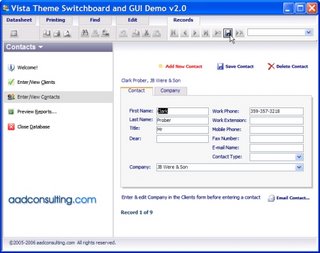
Buy the source code to use the GUI in your own Access applications. Download the demos.
The new version of my very popular Vista-Style Switchboard for MS Access features an Office 2007 ribbon bar-style menu/toolbar:

Buy the source code to use the GUI in your own Access applications. Download the demos.
New Free Custom Toolbar for MS Access
I have just released my Custom Form and Report Design Toolbar: a handy Custom Toolbar for Access, giving you faster and less tedious resizing and positioning of form and report controls. Download the .mdb and import the Toolbar into any Access97 or later database.
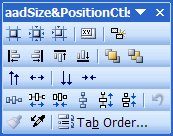
An neat shortcut using the Toolbar: resize a selected group of controls to match the smallest or largest of a group, in just two mouse-clicks:
Match largest >>

Match smallest >>

I have just released my Custom Form and Report Design Toolbar: a handy Custom Toolbar for Access, giving you faster and less tedious resizing and positioning of form and report controls. Download the .mdb and import the Toolbar into any Access97 or later database.

An neat shortcut using the Toolbar: resize a selected group of controls to match the smallest or largest of a group, in just two mouse-clicks:
Match largest >>

Match smallest >>

Friday, March 10, 2006
New Office Articles from DevX.com
New articles on this portal:
New articles on this portal:
- Improve Your Outlook with Visual Studio Tools for Office This article walks you through a sample add-in application for Outlook 2003 as well as showing off some of the things that are possible when creating an Outlook add-in solution using the Visual Studio Tools for Office 2005.
- Extending Enterprise Applications with Microsoft Outlook: Architectural Design Guide
Take a first-hand look at the architectural design and sample code that demonstrates an
approach for integrating enterprise CRM and other LOB application data into the Microsoft Outlook user interface.
Friday, March 03, 2006

Learning Resources for Visual Basic Express
Microsoft has launched the Absolute Beginner’s Video Series for learning the basics of creating applications using Visual Basic 2005 Express Edition. The series includes over 10 hours of video-based instruction that walks you through creating your first "Hello World" application to a fully functioning RSS Reader application. Sample projects covered in the videos can be downloaded.
You can also download a Supplemental Readings paper, which is also an excellent introduction to computers and programming generally, including chapters on:
- What is Computer Programming
- Object Oriented Programming
- What is the .NET Framework?
- Creating and Obtaining Data from a Database
Thursday, March 02, 2006
Deploying Microsoft Office 2003 Service Pack 2
Office 2003 SP 2 White Paper Covers the advantages of deploying Microsoft Office 2003 Service Pack 2 by using the local installation source with client updating, OHotfix.exe, and OHotfix.ini.
Office 2003 SP 2 White Paper Covers the advantages of deploying Microsoft Office 2003 Service Pack 2 by using the local installation source with client updating, OHotfix.exe, and OHotfix.ini.
Monday, February 27, 2006
Free DevForce Express for Visual Studio:
Cut Down Development Time
Cut down the time you spend developing data-intensive client/server applications. IdeaBlade's free DevForce Express is a developer productivity solution for .NET that is fully integrated with Microsoft Visual Studio, which helps professional developers build, maintain, and operate smart client Internet applications by bridging the infrastructure gap between the Application layer and .NET. Applications built with DevForce Express may be developed, deployed, and resold royalty-free.
Cut Down Development Time
Cut down the time you spend developing data-intensive client/server applications. IdeaBlade's free DevForce Express is a developer productivity solution for .NET that is fully integrated with Microsoft Visual Studio, which helps professional developers build, maintain, and operate smart client Internet applications by bridging the infrastructure gap between the Application layer and .NET. Applications built with DevForce Express may be developed, deployed, and resold royalty-free.
Two Free .NET Books from MSDN and Microsoft Press
Right now on the MSDN web site you can get free two Micosoft Press titles:
Free Book - Introducing Visual Basic 2005 for Developers
Get a focused, first look at the features and capabilities in Microsoft Visual Basic 2005, Visual Studio 2005, and .NET Framework 2.0. If you currently work with Visual Basic 6, these authors fully understand the adoption and code migration issues you’ll encounter. They’ll step you through a quick primer on .NET Framework programming, offering guidance for a productive transition. If you already work with .NET, you’ll jump directly into what’s new, learning how to extend your existing skills. From the innovations in rapid application development, debugging, and deployment, to new data access, desktop, and Web programming capabilities, you get the prerelease insights and code walkthroughs you need to get productive right away.
Free Book - Upgrading Microsoft Visual Basic 6.0 to Microsoft Visual Basic .NET
Upgrading Microsoft Visual Basic 6.0 to Microsoft Visual Basic .NET is is the complete technical guide to upgrading Visual Basic 6 applications to Visual Basic .NET, covering all upgrade topics from APIs to ZOrders. It shows how to fix upgrade issues with forms, language, data access, and COM+ Services, and how to upgrade applications with XML Web services, ADO.NET, and .NET remoting. It also provides big-picture architectural advice, a reference of function and object model changes, and hundreds of before-and-after code samples.
Right now on the MSDN web site you can get free two Micosoft Press titles:
Free Book - Introducing Visual Basic 2005 for Developers
Get a focused, first look at the features and capabilities in Microsoft Visual Basic 2005, Visual Studio 2005, and .NET Framework 2.0. If you currently work with Visual Basic 6, these authors fully understand the adoption and code migration issues you’ll encounter. They’ll step you through a quick primer on .NET Framework programming, offering guidance for a productive transition. If you already work with .NET, you’ll jump directly into what’s new, learning how to extend your existing skills. From the innovations in rapid application development, debugging, and deployment, to new data access, desktop, and Web programming capabilities, you get the prerelease insights and code walkthroughs you need to get productive right away.
Free Book - Upgrading Microsoft Visual Basic 6.0 to Microsoft Visual Basic .NET
Upgrading Microsoft Visual Basic 6.0 to Microsoft Visual Basic .NET is is the complete technical guide to upgrading Visual Basic 6 applications to Visual Basic .NET, covering all upgrade topics from APIs to ZOrders. It shows how to fix upgrade issues with forms, language, data access, and COM+ Services, and how to upgrade applications with XML Web services, ADO.NET, and .NET remoting. It also provides big-picture architectural advice, a reference of function and object model changes, and hundreds of before-and-after code samples.
Windows Vista to Come in Six Flavors

The Windows Vista product lineup will consists of six versions, two for businesses, three for consumers, and one for emerging markets:
- Windows Vista Business
- Windows Vista Enterprise
- Windows Vista Home Basic
- Windows Vista Home Premium
- Windows Vista Ultimate, and
- Windows Vista Starter.
All versions are scheduled to ship in the second half of 2006. Full story
Tuesday, February 21, 2006
First To Know: Office 2007
Visit the Future of Microsoft Office portal for the deal on Office 2007. Get details of features, bundling, and pricing, and the new Enterprise Edition.
RSS Feed:

Visit the Future of Microsoft Office portal for the deal on Office 2007. Get details of features, bundling, and pricing, and the new Enterprise Edition.
RSS Feed:
Monday, February 20, 2006
Hot Off The Press: March 2006 MSDN Articles
Advanced Basics: Set Word Document Properties Programmatically Ken Getz shows you how to set document properties for Word docs programmatically.
Office Unbound: Bring Your Documents To Life With Data Binding In Visual Studio Tools For Office Thanks to Visual Studio 2005 Tools for the Microsoft Office System, Windows Forms controls added to a workbook or document can be bound to databases, Web services, or objects. Find out how.
Outlook Add-Ins: Improve Your Outlook With Visual Studio Tools For Office Microsoft Visual Studio Tools for Office 2003 supported only Microsoft Word and Excel. The new 2005 version, however, has the tools you need to create managed code add-ins for Outlook 2003.
Text Rendering: Build World-Ready Apps Using Complex Scripts In Windows Forms Controls
The System.Windows.Forms.TextRenderer class provides support for complex scripts in Windows Forms controls so you can render text the way you want and support international locales.
Winning Forms: Practical Tips For Boosting The Performance Of Windows Forms Apps Techniques you can use to ensure that Windows Forms-based apps provide optimal performance to match the rich UI responsiveness they’re known to provide.
Reporting Services: Deliver SQL Server Reports To SharePoint To Enhance Team Collaboration
Advanced Basics: Set Word Document Properties Programmatically Ken Getz shows you how to set document properties for Word docs programmatically.
Office Unbound: Bring Your Documents To Life With Data Binding In Visual Studio Tools For Office Thanks to Visual Studio 2005 Tools for the Microsoft Office System, Windows Forms controls added to a workbook or document can be bound to databases, Web services, or objects. Find out how.
Outlook Add-Ins: Improve Your Outlook With Visual Studio Tools For Office Microsoft Visual Studio Tools for Office 2003 supported only Microsoft Word and Excel. The new 2005 version, however, has the tools you need to create managed code add-ins for Outlook 2003.
Text Rendering: Build World-Ready Apps Using Complex Scripts In Windows Forms Controls
The System.Windows.Forms.TextRenderer class provides support for complex scripts in Windows Forms controls so you can render text the way you want and support international locales.
Winning Forms: Practical Tips For Boosting The Performance Of Windows Forms Apps Techniques you can use to ensure that Windows Forms-based apps provide optimal performance to match the rich UI responsiveness they’re known to provide.
Reporting Services: Deliver SQL Server Reports To SharePoint To Enhance Team Collaboration
Friday, February 17, 2006
Windows Command Shell Overview
The Windows Command Shell provides direct communication between the user and the operating system using the command interpreter Cmd.exe, which loads applications and directs the flow of information between applications.
Using the Windows Script Host, you can return useful system information to your MS Access and other Office applications.
The system and local environment variables for Windows XP:
%ALLUSERSPROFILE%
Local
Returns the location of the All Users Profile.
%APPDATA%
Local
Returns the location where applications store data by default.
%CD%
Local
Returns the current directory string.
%CMDCMDLINE%
Local
Returns the exact command line used to start the current Cmd.exe.
%CMDEXTVERSION%
System
Returns the version number of the current Command Processor Extensions.
%COMPUTERNAME%
System
Returns the name of the computer.
%COMSPEC%
System
Returns the exact path to the command shell executable.
%DATE%
System
Returns the current date. Uses the same format as the date /t command. Generated by Cmd.exe.
%ERRORLEVEL%
System
Returns the error code of the most recently used command. A non zero value usually indicates an error.
%HOMEDRIVE%
System
Returns which local workstation drive letter is connected to the user's home directory. Set based on the value of the home directory. The user's home directory is specified in Local Users and Groups.
%HOMEPATH%
System
Returns the full path of the user's home directory. Set based on the value of the home directory. The user's home directory is specified in Local Users and Groups.
%HOMESHARE%
System
Returns the network path to the user's shared home directory. Set based on the value of the home directory. The user's home directory is specified in Local Users and Groups.
%LOGONSEVER%
Local
Returns the name of the domain controller that validated the current logon session.
%NUMBER_OF_PROCESSORS%
System
Specifies the number of processors installed on the computer.
%OS%
System
Returns the operating system name. Windows 2000 displays the operating system as Windows_NT.
%PATH%
System
Specifies the search path for executable files.
%PATHEXT%
System
Returns a list of the file extensions that the operating system considers to be executable.
%PROCESSOR_ARCHITECTURE%
System
Returns the chip architecture of the processor. Values: x86, IA64.
%PROCESSOR_IDENTIFIER%
System
Returns a description of the processor.
%PROCESSOR_LEVEL%
System
Returns the model number of the processor installed on the computer.
%PROCESSOR_REVISION%
System
Returns the revision number of the processor.
%PROMPT%
Local
Returns the command prompt settings for the current interpreter. Generated by Cmd.exe.
%RANDOM%
System
Returns a random decimal number between 0 and 32767. Generated by Cmd.exe.
%SYSTEMDRIVE%
System
Returns the drive containing the Windows XP root directory (that is, the system root).
%SYSTEMROOT%
System
Returns the location of the Windows XP root directory.
%TEMP% and %TMP%
System and User
Returns the default temporary directories that are used by applications available to users who are currently logged on. Some applications require TEMP and others require TMP.
%TIME%
System
Returns the current time. Uses the same format as the time /t command. Generated by Cmd.exe. $USERDOMAIN%
Local
Returns the name of the domain that contains the user's account.
%USERNAME%
Local
Returns the name of the user who is currently logged on.
%USERPROFILE%
Local
Returns the location of the profile for the current user.
%WINDIR%
System
Returns the location of the operating system directory.
The Windows Command Shell provides direct communication between the user and the operating system using the command interpreter Cmd.exe, which loads applications and directs the flow of information between applications.
Using the Windows Script Host, you can return useful system information to your MS Access and other Office applications.
The system and local environment variables for Windows XP:
%ALLUSERSPROFILE%
Local
Returns the location of the All Users Profile.
%APPDATA%
Local
Returns the location where applications store data by default.
%CD%
Local
Returns the current directory string.
%CMDCMDLINE%
Local
Returns the exact command line used to start the current Cmd.exe.
%CMDEXTVERSION%
System
Returns the version number of the current Command Processor Extensions.
%COMPUTERNAME%
System
Returns the name of the computer.
%COMSPEC%
System
Returns the exact path to the command shell executable.
%DATE%
System
Returns the current date. Uses the same format as the date /t command. Generated by Cmd.exe.
%ERRORLEVEL%
System
Returns the error code of the most recently used command. A non zero value usually indicates an error.
%HOMEDRIVE%
System
Returns which local workstation drive letter is connected to the user's home directory. Set based on the value of the home directory. The user's home directory is specified in Local Users and Groups.
%HOMEPATH%
System
Returns the full path of the user's home directory. Set based on the value of the home directory. The user's home directory is specified in Local Users and Groups.
%HOMESHARE%
System
Returns the network path to the user's shared home directory. Set based on the value of the home directory. The user's home directory is specified in Local Users and Groups.
%LOGONSEVER%
Local
Returns the name of the domain controller that validated the current logon session.
%NUMBER_OF_PROCESSORS%
System
Specifies the number of processors installed on the computer.
%OS%
System
Returns the operating system name. Windows 2000 displays the operating system as Windows_NT.
%PATH%
System
Specifies the search path for executable files.
%PATHEXT%
System
Returns a list of the file extensions that the operating system considers to be executable.
%PROCESSOR_ARCHITECTURE%
System
Returns the chip architecture of the processor. Values: x86, IA64.
%PROCESSOR_IDENTIFIER%
System
Returns a description of the processor.
%PROCESSOR_LEVEL%
System
Returns the model number of the processor installed on the computer.
%PROCESSOR_REVISION%
System
Returns the revision number of the processor.
%PROMPT%
Local
Returns the command prompt settings for the current interpreter. Generated by Cmd.exe.
%RANDOM%
System
Returns a random decimal number between 0 and 32767. Generated by Cmd.exe.
%SYSTEMDRIVE%
System
Returns the drive containing the Windows XP root directory (that is, the system root).
%SYSTEMROOT%
System
Returns the location of the Windows XP root directory.
%TEMP% and %TMP%
System and User
Returns the default temporary directories that are used by applications available to users who are currently logged on. Some applications require TEMP and others require TMP.
%TIME%
System
Returns the current time. Uses the same format as the time /t command. Generated by Cmd.exe. $USERDOMAIN%
Local
Returns the name of the domain that contains the user's account.
%USERNAME%
Local
Returns the name of the user who is currently logged on.
%USERPROFILE%
Local
Returns the location of the profile for the current user.
%WINDIR%
System
Returns the location of the operating system directory.
Wednesday, February 15, 2006
New Articles On Microsoft Visual Studio 2005 Tools for Office
From the DevX.com Office Developer Portal:
From the DevX.com Office Developer Portal:
- Recent Blog articles that are crucial for successful STO deployment.
- Using the Server Capabilities in Microsoft Visual Studio 2005 Tools for Office to Build a Benefits Registration System. Build a Web app that dynamically attaches a VSTO customization to a document, caches the data, and delivers the document to a user from an HTTP Web request.
- MSDN Webcast: Creating Office Solutions with Visual Studio 2005 Tools for the Microsoft Office System Learn how code and the object model between Visual Studio and Office documents are moretightly integrated than ever before.
- OFFICE DEV LABS Evaluate Office apps as developer platforms through Microsoft's freehosted experience--a series of guided, hands-on labs that can be completed in under anhour each. Best of all, you can dive right in since there's nothing to install! Here are a few of the topics to get you started:
Word 2003 - Understanding How Word 2003 Uses XML
Word 2003 - Building Microsoft Office Word 2003 XML Solutions
Excel 2003 - Understanding XML and Microsoft Excel 2003
Excel 2003 - Building Microsoft Office Excel 2003 XML Solutions
Visual Studio Tools for Office Solution Development with Excel 2003
Securing and Deploying Visual Studio Tools for Office Solutions
InfoPath 2003 - Creating and Deploying Forms
InfoPath 2003 - Managed Code, Task Panes, Modifying Schemas, Digital Signatures
Monday, February 13, 2006
Microsoft To Announce Office 12 Branding Feb 16th
On Thursday, Microsoft will announce the product branding for Office 12 and indicative pricing:
On Thursday, Microsoft will announce the product branding for Office 12 and indicative pricing:
- New product names and enhanced Office logo and branding,
- Office client editions and products included in each edition, and
- Office Serverv line-up and the licensing information.
Sunday, February 12, 2006
NEW Version of 3J - Email Link Creator Freeware
The new v2.1 of 3J - Email Link Creator is now available for free download from aadconsulting.com and is now also deployable as a FrontPage 2002/2003 Add-In.
 Fight SPAM: Encrypt Your Email Address! SPAM often originates from your own web pages by placing your email address in your web site pages. Along comes the Spammer-spider, harvesting any email addresses it finds. Not only will you receive SPAM from now on, your email address will also be sold to others, resulting in even more SPAM. As you need people to be able to contact you via email, you have to have your have an email link on your web site. Stop the Spammer spiders in their webs with this free application.
3J - Email Link Creator encrypts your email address in HTML to hide it from spammer robots.You can quickly create complete mailto links in HTML: including the body, subject and image link tags. Just enter your Email address and either the Link Text or Image Path fields. The other fields are optional. All link parameters are saved and available in droplists. Set the default Image path to simplify the creation of image links.
Download
The new v2.1 of 3J - Email Link Creator is now available for free download from aadconsulting.com and is now also deployable as a FrontPage 2002/2003 Add-In.
 Fight SPAM: Encrypt Your Email Address! SPAM often originates from your own web pages by placing your email address in your web site pages. Along comes the Spammer-spider, harvesting any email addresses it finds. Not only will you receive SPAM from now on, your email address will also be sold to others, resulting in even more SPAM. As you need people to be able to contact you via email, you have to have your have an email link on your web site. Stop the Spammer spiders in their webs with this free application.
3J - Email Link Creator encrypts your email address in HTML to hide it from spammer robots.You can quickly create complete mailto links in HTML: including the body, subject and image link tags. Just enter your Email address and either the Link Text or Image Path fields. The other fields are optional. All link parameters are saved and available in droplists. Set the default Image path to simplify the creation of image links.
Download
Saturday, February 11, 2006
Latest MS Access Knowledge Base Articles
Courtesy of KbAlertz.com:
Access 2002
Courtesy of KbAlertz.com:
Access 2002
- 911729 Description of the Office XP post-Service Pack 3 hotfix package: December 16, 2005
- 913296 Jet 4.0 data engine update fixes issues that may occur on a Windows XP-based computer
Access 2003
- 909995 Description of the Office 2003 post-Service Pack 2 hotfix package: December 19, 2005
- 913031 Error message when you try to view or print a report in Access 2003: "Error 2501 The Open Report Action was canceled"
- 911888 Description of the Office 2003 post-Service Pack 2 hotfix package: December 6, 2005
- 912022 Description of the Office 2003 post-Service Pack 2 hotfix package: December 16, 2005
- 912448 An Office 2003 program unexpectedly quits with an unrecoverable error when the program is started by another program that is running under a non-interactive account
- 910288 Description of the Dutch Multilingual User Interface Pack for Office 2003 post-Service Pack 2 hotfix package: December 15, 2005
- 910041 Description of the Microsoft Office 2003 post-Service Pack 2 hotfix package: December 8, 2005
- 913545 The first lines or the last lines of some report pages may not appear or may be truncated in Access 2003
912260 The plus sign (+) may not appear when you try to click the plus sign (+) to drill down into the related records of a child table in Office Access 2003 - 913164 Description of the Office 2003 post-Service Pack 2 hotfix package: January 18, 2006
- 912819 Description of the Office 2003 post-Service Pack 2 hotfix package: January 11, 2006
- 912160 You cannot access Microsoft Office Online from a Microsoft Office 2003 program
- 894233 Description of the Access 2003 post-Service Pack 2 hotfix package for the Swedish version of Microsoft Office Access 2003: January 10, 2006
- 914830 Access 2003 may not start as expected after you install Office 2003 SP2
- 902445 Description of the Access 2003 post-Service Pack 2 hotfix package: January 24, 2006
Subscribe to:
Posts (Atom)