Wednesday, December 21, 2005


XML Onboard: The Developers Potential of Office 12

From DevX.com: In this article learn what Office 12 will mean for developers, particularly those who are creating commercial and enterprise apps.

Tuesday, December 20, 2005

Latest Access Knowledge Base Articles

Courtesy of KbAlertz.com:

907347 You receive an "Unable to open " error message when you try to access the Office Online Web site in an Office 2003 program

888697 You may receive the "Word was unable to open the data source" error message when you try to mail merge to Word by using an Access parameter query in Microsoft Access

910817 The security level is reset to its original level after a user changes the security level in an Office 2003 program

907248 Description of the Microsoft Office 2003 post-Service Pack 2 hotfix package: November 15, 2005

906723 Error message when you try to open an Office 2003 file from an FTP site in Internet Explorer: "Could not open "

909112 Description of the Office 2003 post-Service Pack 2 hotfix package: December 2, 2005
Understanding the Word Object Model

Understanding the Word Object Model from a Visual Studio 2005 Developer's Perspective Ken Getz on Visual Studio 2005. Learn how you can use objects provided by MS Word 2003 to create managed code solutions with Visual Studio 2005 Tools for Office. Code examples demonstrate how to work with Word 2003 applications and documents, and with important properties and methods.

Sunday, December 18, 2005

MS Office Excel Add-in for SQL Server Analysis Services Just Released

Excel 2002/2003 Add-in for SQL Server Analysis Services Quickly and easily access multidimensional data, perform in-depth analysis, and create flexible, interactive reports in Microsoft Excel. Use the Add-in to access and analyze multidimensional data and create interactive structured and free-form reports in Microsoft Office Excel. Easily access online analytical processing (OLAP) data, perform in-depth analysis, and create flexible reports using Microsoft Office Excel.

You can also download articles and a White Paper on using and deploying this great new tool:

Wednesday, December 14, 2005


Why Access Developers Need Microsoft SQL Server Express

SQL Server Express is the replacement for MSDE, and its database engine is fully compatible with SQL Server 2005, so it is easier to migrate you Access ADP projects from SQL Server Express to SQL Server 2005. Plus it has a graphical query tool, which simplifies creating queries and managing SQL Server.

As set out in my post of 1 November 2005, Visual Basic Express, Visual Web Developer Express, and SQL Server Express Edition are FREE - until 7 November 2006 - cuttting-edge applications for creating Windows and Web solutions with Visual Basic 2005, and they DO NOT expire. Download from:

Access guru and writer, Rick Dobson, has just published a book to get you started: Beginning SQL Server 2005 Express Database Applications with Visual Basic Express and Visual Web Developer Express.

Microsoft Press has also released a book, Microsoft® Visual Basic® 2005 Express Edition: Build a Program Now!, which comes with a CD that includes Visual Basic 2005 Express Edition and Microsoft SQL Server 2005 Express Edition.

Sunday, December 11, 2005

Microsoft's Office OpenXML Standard Gets Go Ahead

Standards body Ecma International accepted on Thursday Microsoft Corp.'s application to produce a standard for office productivity applications that is compatible with Microsoft's Office Open XML Formats. More

Thursday, December 08, 2005

Create an Outlook Add-in that Consolidates Disparate Task Data into a Single View

From DevX.Com: Learn how to consolidate task data residing in various MS Office file types into a Microsoft Outlook Add-in. This article shows how you can begin to incorporate snippets of data included in Microsoft Office files into a meaningful solution.

Tuesday, December 06, 2005

Updated SQL Server 2005 Books Online

SQL Server 2005 Books Online (December 2005) Download an updated version of the documentation and tutorials for Microsoft SQL Server 2005.
Point of Sale Connector for MS Office Small Business Accounting 2006

POS Connector for Microsoft Office Small Business Accounting 2006 and Microsoft Retail Management System The POS Connector for Microsoft Office Small Business Accounting 2006 allows small business retailers to connect Small Business Accounting to Microsoft Retail Management System.

POS Connector for Microsoft Office Small Business Accounting 2006 and Microsoft Point of Sale The POS Connector for Microsoft Office Small Business Accounting 2006 allows small business retailers to connect Small Business Accounting to Microsoft Point of Sale.

Monday, December 05, 2005

Latest MS Office, Visual Studio, and SQL Server Downloads

Visual Studio 2005 Tools for Office: Understanding the Word Object Model Sample This download contains Visual Basic and C# code examples of using the Microsoft Word object model in Visual Studio 2005 Tools for Office applications.

Office 2003 Sample: Generating Active Directory Diagrams with Visio 2003 and Visual Studio .NET 2003 This code sample accompanies the MSDN article "Generating Active Directory Diagrams with Visio 2003 and Visual Studio .NET 2003."

Office 2003 Add-in: Project Report Presentation The Project Report Presentation Add-in for Microsoft Office Project 2003 helps a user to quickly and easily create a Microsoft Office PowerPoint presentation containing user-selected task information from Microsoft Office Project.

SQL Server 2005 Express Edition Documentation and Samples (December 2005) Download the Microsoft SQL Server 2005 Express Edition (SQL Server Express) Books Online and samples.

SQL Server 2005 Samples and Sample Databases (December 2005) Download over 100 samples and three sample databases for SQL Server 2005.

Wednesday, November 30, 2005

Visual Studio 2005 Tools for Microsoft Office Out Now

Visual Studio 2005 Tools for Microsoft Office Now Available Use .NET Framework version 2.0 to extend Microsoft Office 2003 Editions applications, such as Word, Excel and Outlook, using Visual Basic and Visual C#.

Visual Studio 2005 Tools for Office Sample: Status Report Application for Word 2003 This download contains sample code for a Word Status Report solution developed in Visual Basic and C# with Microsoft Visual Studio 2005 Tools for the Microsoft Office System.

Sunday, November 27, 2005

Free Power Tools for MS Office Developers

My free Developer ToolPack for Microsoft® Access, which is listed at Microsoft's Office Marketplace, has been updated today with the Access Database Mechanic and Table Links and Connections Manager applets, coming out of Beta.

The Toolpack comprises:

Access Database Mechanic A tool that automates the process of attempting to recover a corrupt Microsoft Access database, using three operations: compact & repair, decompile, and complete rebuild of an .mdb. The applet also features a fail-safe mechanism that creates a uniquely named back-up copy of the .mdb before each recovery operation.

Ezy Debug Simplify debugging in Microsoft Access 2000 and later. Ezy Debug is launched from the right-click popup menu in the code window of the VBA Editor. The applet provides quick access to the error-trapping settings in the code window, and once invoked it is available both in the Database and VBE windows. The current error-trapping setting is displayed and can be changed on the fly.

The Table Links and Connections Manager finds all the Microsoft Access files in the location you select and an Access report will display all table links and base string connections, and any connect errors grouped by:

  • Jet Version
  • File Type: mdb/mde/mda or adp/ade
  • Linked Database Paths and linked tables: for mdb/mde/mda's
  • Depend on me table links
  • Base Connection String: for adp/ade's
  • Separate reports are produced for .mdx and .adx files.

The A Better ZoomBox property builder lets you edit the following control properties when designing Access forms and reports:

  • Record Source
  • Row Source
  • Control Source

With full Find/Replace functionality and saving of customized font and Enter key settings.


Friday, November 25, 2005


New v2.0 of Object Dependency Browser Add-In for Microsoft© Access

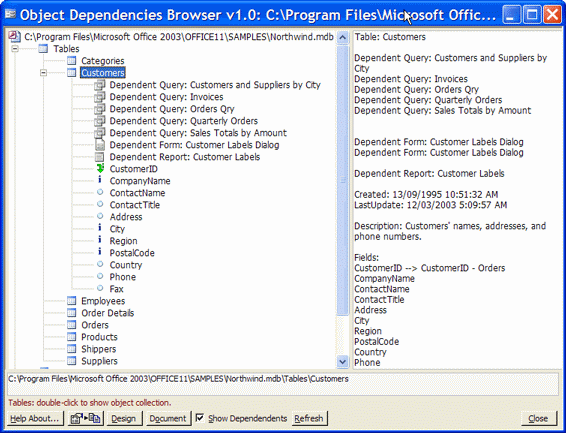
Use Object Dependency Browser *(OBD) to dynamically explore all objects, object collections, and dependencies of your Access database. Microsoft introduced a native object dependency viewer in Access2003, where objects can be viewed in separate treeviews:
  • objects that depend on me, and
  • objects that I depend on.

ODB goes much further:

  • Supports Access 97, Access 2000, Access 2002, and Access2003
  • The two dependency views are integrated in the one treeview. For example, in the above screenshot, ODB displays not only the fields collection for the Customers table, but linked tables and joins, and all other objects in the database that depend on the Customers table.
  • Clicking on a join field will show the related to table/field and the type of join.
  • Full dependency details are also displayed in the adjacent properties pane
  • Each object can be fully documented in a formatted Access report by clicking the Document button.
  • Copy of all object details from the properties pane to the Windows clipboard by clicking the Copy to Clipboard button.
  • Open database objects in design view with a click of the Design button.

ODB v2.0 offers these new additional features:

  • Explicitly documents Union query source tables/queries
  • Documents for Queries: depend on me queries
  • Documents Data Access Pages (Access 2000 and later)
  • Documents Custom Command Bars
  • Documents for Forms: custom Menubars, Toolbars, and Shortcut Menus

This update completes the recent upgrade cycle for three Access add-ins, which offer exceptional functionality and ease of use:

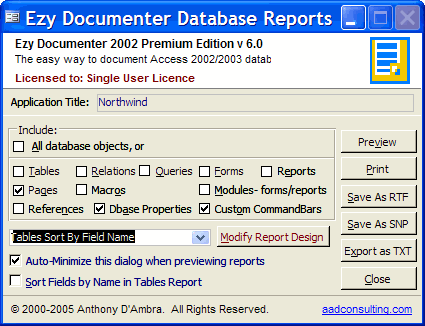
Ezy Documenter Premium Edition Automatically documents and prints in fully formatted Access reports all the objects in your Access database: tables and fields, table relations, query definitions, forms and record sources, reports and record sources, code modules, macros, data access pages, references, custom command bars, and database properties. The Premium Edition allows user customization of each Ezy Documenter Database Report. Reports can be exported in varied formats.

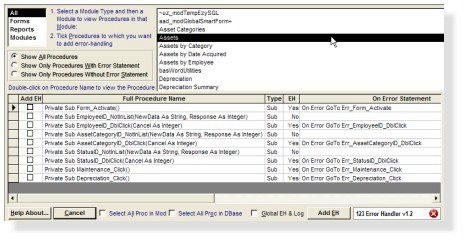
123 Error Handler Wizard Instantly add error-handling to your databases: 1. The Wizard reviews your database and identifies all procedures without error-handling, and reports the On Error... statement for all other procedures. 2. You select which procedures to add error-handling. 3. The Wizard adds error-handling to the selected procedures in one automated operation.

Object Dependency Browser The easy way to explore all objects, objet collections, and dependencies of your Access database. Microsoft introduced a native object dependency viewer in Access2003. ODB goes much further. ODB supports Access 97, Access 2000, Access 2002, and Access2003, and all dependency views are integrated into the one treeview.
Thursday, November 24, 2005

Latest Microsoft Access Knowledge Base Articles

Courtesy of KBAlertz.com:

Access 2000
  • 907349 How to troubleshoot video issues in Office programs
Access 2002
  • 908475 You cannot embed an Adobe OpenType font in a document that is in an Office program
  • 905867 You are offered an update for Access 2002 when you check for updates on the Microsoft Office Update Web site or on the Microsoft Update Web site
  • 904018 Description of the update for Access 2002: October 18, 2005
  • 905862 Description of Office XP post-Service Pack 3 hotfix package: September 6, 2005
  • 905863 The Private Bytes counter in Performance Monitor may continually increase when an ActiveX control is updated in an Office XP document
  • 908125 Description of Office XP post-Service Pack 3 hotfix package: October 5, 2005
  • 904953 You cannot change, add, or delete data in tables that are linked to an Excel workbook in Office Access 2003 or in Access 2002
  • 903727 Description of the Access 2002 post-Service Pack 3 hotfix package: July 12, 2005
Access 2003
  • 907347 You receive an "Unable to open " error message when you try to access the Office Online Web site in an Office 2003 program

Saturday, November 19, 2005

The Easy Way to Document Access Databases:
Ezy Documenter Premium Edition for V6.0


A new version of my MS Access add-in, Ezy Documenter Premium, is now available. Ezy Documenter automatically documents and prints in fully formatted Access reports all the objects in your Access database: tables and fields, table relations, query definitions, forms and record sources, reports and record sources, code modules, macros, data access pages, references, custom command bars, and database properties. The Premium Edition allows user customization of each Ezy Documenter Database Report.

New in v6.0:

  • Linked table paths
  • Data Access Pages: name, linked URL, and Data Source
  • Custom Command Bars All Database Object Properties

Try the Demo

Thursday, November 17, 2005

Microsoft Office Live Communications Server Labs and Tools Kit

Add real-time collaboration to your applications. Get complimentary controls and sample code for incorporating presence and real-time collaboration into line-of-business applications by ordering the free Microsoft Office Live Communications Server Labs and Tools Kit.

Tuesday, November 15, 2005


New Improved 123 Error-Handler Wizard for MS Access

A new improved version 1.3 of my very popular MS Access tool, 123 Error-Handler Wizard, is now available.

The Wizard reviews your database and identifies all procedures without error-handling, and reports the On Error... statement for all other procedures. You select which procedures to add error-handling. The Wizard adds error-handling to the selected procedures in one automated operation. You can also optionally add global error-handling to your database at the same time.

Version 1.3 fixes these issues:
  1. In some rare cases depending on the existence of pre-existing error-handlingcode and/or Access incorrectly returning the last line of a procedure, the error-handler was not added to the last procedure in a module.
  2. Due to Access incorrectly returning the procedure type for a Function in certain instances, the line "Exit Sub" was inserted instead of "ExitFunction" in the error-handler.

Monday, November 14, 2005

Visual Studio 2005 Tools for Office Sample Code

Visual Studio 2005 Tools for Office Sample: Outlook Snippets This download contains IntelliSense code examples for developing custom add-ins for Microsoft Office Outlook 2003. (November 7, 2005)
Jet vs MSDE vs SQL Server Express

SQL Server 2005 Express Edition Overview This MSDN article discusses the integration of SQL Server Express with Visual Studio 2005 and compares this product with the existing free Microsoft databases like MSDE and Jet.

Thursday, November 10, 2005

Microsoft Office 12 Open XML Formats Guide

The White Paper, Microsoft Office Open XML Formats Guide, provides detailed information on Microsoft Office 12 Open XML Formats, the new XML-based file formats for Microsoft Office Word, Microsoft Office Excel, and Microsoft Office PowerPoint. The new file formats will be made available not only to customers who adopt the next release of Microsoft Office products, but also to customers using previous versions of the Microsoft Office.