Access 2000 or Later
A simple technique for placing a psuedo-command button on a Datasheet:
1. Create a query for the form's RecordSource
2. Add a calculated column/field to the query, for example:
Edit: IIf([Status]<>"Closed","Edit","")
Drag the field on to the form as a TextBox
3. Set the TextBox's Is Hyperlink property to Yes
4. Add a procedure to the TextBox's OnClick Event, for example:
Private Sub Edit_Click()
DoCmd.RunCommand acCmdSaveRecord
If (Not IsNull(.IssueID) And .Status <> "Closed") Then
DoCmd.OpenForm "EditIssues", acNormal, "", "[IssueID]=" & .IssueID, , acNormal
End If
End With
End Sub
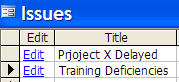
The Datasheet will look like this:


3 comments:
Thank you ever so much for this. Amazing really but I'd never noticed the 'Is Hyperlink' property before
excellent post...i would never have thought of doing that...
Excellent! Thanks.
Post a Comment