Friday, March 10, 2006

New Office Articles from DevX.com

New articles on this portal:


Friday, March 03, 2006


Learning Resources for Visual Basic Express

Microsoft has launched the Absolute Beginner’s Video Series for learning the basics of creating applications using Visual Basic 2005 Express Edition. The series includes over 10 hours of video-based instruction that walks you through creating your first "Hello World" application to a fully functioning RSS Reader application. Sample projects covered in the videos can be downloaded.
You can also download a Supplemental Readings paper, which is also an excellent introduction to computers and programming generally, including chapters on:

  • What is Computer Programming
  • Object Oriented Programming
  • What is the .NET Framework?
  • Creating and Obtaining Data from a Database

Thursday, March 02, 2006

Deploying Microsoft Office 2003 Service Pack 2

Office 2003 SP 2 White Paper Covers the advantages of deploying Microsoft Office 2003 Service Pack 2 by using the local installation source with client updating, OHotfix.exe, and OHotfix.ini.

Monday, February 27, 2006

Free DevForce Express for Visual Studio:
Cut Down Development Time


Cut down the time you spend developing data-intensive client/server applications. IdeaBlade's free DevForce Express is a developer productivity solution for .NET that is fully integrated with Microsoft Visual Studio, which helps professional developers build, maintain, and operate smart client Internet applications by bridging the infrastructure gap between the Application layer and .NET. Applications built with DevForce Express may be developed, deployed, and resold royalty-free.
Two Free .NET Books from MSDN and Microsoft Press

Right now on the MSDN web site you can get free two Micosoft Press titles:

Free Book - Introducing Visual Basic 2005 for Developers
Get a focused, first look at the features and capabilities in Microsoft Visual Basic 2005, Visual Studio 2005, and .NET Framework 2.0. If you currently work with Visual Basic 6, these authors fully understand the adoption and code migration issues you’ll encounter. They’ll step you through a quick primer on .NET Framework programming, offering guidance for a productive transition. If you already work with .NET, you’ll jump directly into what’s new, learning how to extend your existing skills. From the innovations in rapid application development, debugging, and deployment, to new data access, desktop, and Web programming capabilities, you get the prerelease insights and code walkthroughs you need to get productive right away.

Free Book - Upgrading Microsoft Visual Basic 6.0 to Microsoft Visual Basic .NET
Upgrading Microsoft Visual Basic 6.0 to Microsoft Visual Basic .NET is is the complete technical guide to upgrading Visual Basic 6 applications to Visual Basic .NET, covering all upgrade topics from APIs to ZOrders. It shows how to fix upgrade issues with forms, language, data access, and COM+ Services, and how to upgrade applications with XML Web services, ADO.NET, and .NET remoting. It also provides big-picture architectural advice, a reference of function and object model changes, and hundreds of before-and-after code samples.

Windows Vista to Come in Six Flavors

The Windows Vista product lineup will consists of six versions, two for businesses, three for consumers, and one for emerging markets:

  • Windows Vista Business
  • Windows Vista Enterprise
  • Windows Vista Home Basic
  • Windows Vista Home Premium
  • Windows Vista Ultimate, and
  • Windows Vista Starter.

All versions are scheduled to ship in the second half of 2006. Full story

Tuesday, February 21, 2006

First To Know: Office 2007

Visit the Future of Microsoft Office portal for the deal on Office 2007. Get details of features, bundling, and pricing, and the new Enterprise Edition.

RSS Feed: RSS Icon Add to My MSN

Monday, February 20, 2006

Hot Off The Press: March 2006 MSDN Articles

Advanced Basics: Set Word Document Properties Programmatically Ken Getz shows you how to set document properties for Word docs programmatically.

Office Unbound: Bring Your Documents To Life With Data Binding In Visual Studio Tools For Office Thanks to Visual Studio 2005 Tools for the Microsoft Office System, Windows Forms controls added to a workbook or document can be bound to databases, Web services, or objects. Find out how.

Outlook Add-Ins: Improve Your Outlook With Visual Studio Tools For Office Microsoft Visual Studio Tools for Office 2003 supported only Microsoft Word and Excel. The new 2005 version, however, has the tools you need to create managed code add-ins for Outlook 2003.

Text Rendering: Build World-Ready Apps Using Complex Scripts In Windows Forms Controls
The System.Windows.Forms.TextRenderer class provides support for complex scripts in Windows Forms controls so you can render text the way you want and support international locales.

Winning Forms: Practical Tips For Boosting The Performance Of Windows Forms Apps Techniques you can use to ensure that Windows Forms-based apps provide optimal performance to match the rich UI responsiveness they’re known to provide.

Reporting Services: Deliver SQL Server Reports To SharePoint To Enhance Team Collaboration

Friday, February 17, 2006

Windows Command Shell Overview

The Windows Command Shell provides direct communication between the user and the operating system using the command interpreter Cmd.exe, which loads applications and directs the flow of information between applications.

Using the Windows Script Host, you can return useful system information to your MS Access and other Office applications.

The system and local environment variables for Windows XP:

%ALLUSERSPROFILE%
Local
Returns the location of the All Users Profile.
%APPDATA%
Local
Returns the location where applications store data by default.
%CD%
Local
Returns the current directory string.
%CMDCMDLINE%
Local
Returns the exact command line used to start the current Cmd.exe.
%CMDEXTVERSION%
System
Returns the version number of the current Command Processor Extensions.
%COMPUTERNAME%
System
Returns the name of the computer.
%COMSPEC%
System
Returns the exact path to the command shell executable.
%DATE%
System
Returns the current date. Uses the same format as the date /t command. Generated by Cmd.exe.

%ERRORLEVEL%
System
Returns the error code of the most recently used command. A non zero value usually indicates an error.
%HOMEDRIVE%
System
Returns which local workstation drive letter is connected to the user's home directory. Set based on the value of the home directory. The user's home directory is specified in Local Users and Groups.
%HOMEPATH%
System
Returns the full path of the user's home directory. Set based on the value of the home directory. The user's home directory is specified in Local Users and Groups.
%HOMESHARE%
System
Returns the network path to the user's shared home directory. Set based on the value of the home directory. The user's home directory is specified in Local Users and Groups.
%LOGONSEVER%
Local
Returns the name of the domain controller that validated the current logon session.
%NUMBER_OF_PROCESSORS%
System
Specifies the number of processors installed on the computer.
%OS%
System
Returns the operating system name. Windows 2000 displays the operating system as Windows_NT.
%PATH%
System
Specifies the search path for executable files.
%PATHEXT%
System
Returns a list of the file extensions that the operating system considers to be executable.
%PROCESSOR_ARCHITECTURE%
System
Returns the chip architecture of the processor. Values: x86, IA64.
%PROCESSOR_IDENTIFIER%
System
Returns a description of the processor.
%PROCESSOR_LEVEL%
System
Returns the model number of the processor installed on the computer.
%PROCESSOR_REVISION%
System
Returns the revision number of the processor.
%PROMPT%
Local
Returns the command prompt settings for the current interpreter. Generated by Cmd.exe.
%RANDOM%
System
Returns a random decimal number between 0 and 32767. Generated by Cmd.exe.
%SYSTEMDRIVE%
System
Returns the drive containing the Windows XP root directory (that is, the system root).
%SYSTEMROOT%
System
Returns the location of the Windows XP root directory.
%TEMP% and %TMP%
System and User
Returns the default temporary directories that are used by applications available to users who are currently logged on. Some applications require TEMP and others require TMP.
%TIME%
System
Returns the current time. Uses the same format as the time /t command. Generated by Cmd.exe. $USERDOMAIN%
Local
Returns the name of the domain that contains the user's account.
%USERNAME%
Local
Returns the name of the user who is currently logged on.
%USERPROFILE%
Local
Returns the location of the profile for the current user.
%WINDIR%
System
Returns the location of the operating system directory.

Wednesday, February 15, 2006

New Articles On Microsoft Visual Studio 2005 Tools for Office

From the DevX.com Office Developer Portal:

Monday, February 13, 2006

Microsoft To Announce Office 12 Branding Feb 16th

On Thursday, Microsoft will announce the product branding for Office 12 and indicative pricing:
  • New product names and enhanced Office logo and branding,
  • Office client editions and products included in each edition, and
  • Office Serverv line-up and the licensing information.

Sunday, February 12, 2006

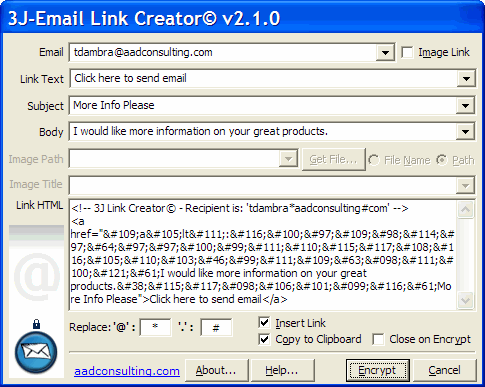
NEW Version of 3J - Email Link Creator Freeware

The new v2.1 of 3J - Email Link Creator is now available for free download from aadconsulting.com and is now also deployable as a FrontPage 2002/2003 Add-In.

Fight SPAM: Encrypt Your Email Address! SPAM often originates from your own web pages by placing your email address in your web site pages. Along comes the Spammer-spider, harvesting any email addresses it finds. Not only will you receive SPAM from now on, your email address will also be sold to others, resulting in even more SPAM. As you need people to be able to contact you via email, you have to have your have an email link on your web site. Stop the Spammer spiders in their webs with this free application.

3J - Email Link Creator encrypts your email address in HTML to hide it from spammer robots.You can quickly create complete mailto links in HTML: including the body, subject and image link tags. Just enter your Email address and either the Link Text or Image Path fields. The other fields are optional. All link parameters are saved and available in droplists. Set the default Image path to simplify the creation of image links.

Download

Saturday, February 11, 2006

Latest MS Access Knowledge Base Articles

Courtesy of KbAlertz.com:

Access 2002

  • 911729 Description of the Office XP post-Service Pack 3 hotfix package: December 16, 2005
  • 913296 Jet 4.0 data engine update fixes issues that may occur on a Windows XP-based computer

Access 2003

  • 909995 Description of the Office 2003 post-Service Pack 2 hotfix package: December 19, 2005
  • 913031 Error message when you try to view or print a report in Access 2003: "Error 2501 The Open Report Action was canceled"
  • 911888 Description of the Office 2003 post-Service Pack 2 hotfix package: December 6, 2005
  • 912022 Description of the Office 2003 post-Service Pack 2 hotfix package: December 16, 2005
  • 912448 An Office 2003 program unexpectedly quits with an unrecoverable error when the program is started by another program that is running under a non-interactive account
  • 910288 Description of the Dutch Multilingual User Interface Pack for Office 2003 post-Service Pack 2 hotfix package: December 15, 2005
  • 910041 Description of the Microsoft Office 2003 post-Service Pack 2 hotfix package: December 8, 2005
  • 913545 The first lines or the last lines of some report pages may not appear or may be truncated in Access 2003
    912260 The plus sign (+) may not appear when you try to click the plus sign (+) to drill down into the related records of a child table in Office Access 2003
  • 913164 Description of the Office 2003 post-Service Pack 2 hotfix package: January 18, 2006
  • 912819 Description of the Office 2003 post-Service Pack 2 hotfix package: January 11, 2006
  • 912160 You cannot access Microsoft Office Online from a Microsoft Office 2003 program
  • 894233 Description of the Access 2003 post-Service Pack 2 hotfix package for the Swedish version of Microsoft Office Access 2003: January 10, 2006
  • 914830 Access 2003 may not start as expected after you install Office 2003 SP2
  • 902445 Description of the Access 2003 post-Service Pack 2 hotfix package: January 24, 2006

Tuesday, January 31, 2006

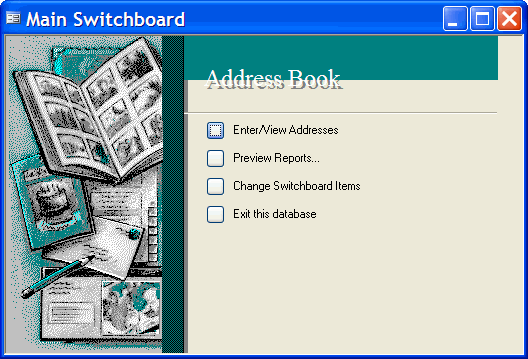
New: FREE Cool Ms Access Switchboard Builder

I have just uploaded my latest free Access add-in: Cool MS Access Switchboard Builder for Microsoft© Access 97 and 2000/2002/2003.

Use Cool MS Access Switchboard Builder to replace this:


with this:


Cool MS Access Switchboard Builder uses the native Switchboard Items table created by the Access Switchboard Manager.

Download:

Thursday, January 26, 2006

TIP: Command Button on a Datasheet Form
Access 2000 or Later

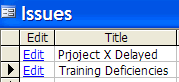
A simple technique for placing a psuedo-command button on a Datasheet:

1. Create a query for the form's RecordSource

2. Add a calculated column/field to the query, for example:

Edit: IIf([Status]<>"Closed","Edit","")

Drag the field on to the form as a TextBox

3. Set the TextBox's Is Hyperlink property to Yes

4. Add a procedure to the TextBox's OnClick Event, for example:

Private Sub Edit_Click()
With CodeContextObject
DoCmd.RunCommand acCmdSaveRecord
If (Not IsNull(.IssueID) And .Status <> "Closed") Then
DoCmd.OpenForm "EditIssues", acNormal, "", "[IssueID]=" & .IssueID, , acNormal
End If
End With
End Sub

The Datasheet will look like this:


Free Half-Day Vista and Office 12 Preview from Microsoft

For US Readers Only

Become the know-it-all of Windows Vista and Office 12 by attending this free half-day event to take a sneak peek at features still in the works.

The Office 12 preview will cover:
  • Application task panes, add-in development, and the new user interface.
  • The Office OpenXML File Format, which allows for manipulation of files, creating files without using the individual programs, repurposing content, and merging files with business data.
Click on a city near you to attend:

AZ, Phoenix - March 21
CA, Berkeley - February 7
CA, Irvine - February 21
CO, Englewood - February 9
DC, Washington - February 2
FL, Miami - February 21
FL, Orlando - February 23
GA, Atlanta - February 16
IL, Lombard - January 26
KY, Newport - February 2
MA, Boston - January 26
MI, Ann Arbor - March 7
NC, Raleigh - March 2
NY, New York - February 9
PA, Prussia - February 7
TN, Nashville - February 23
TX, Austin - March 14
TX, Houston - March 16
VA, Richmond - March 16
WA, Redmond - March 2
WI, Madison - February 16

Wednesday, January 25, 2006


Cool Tools For Windows

I thought I would share with you some truly useful tools that enhance productivity in MS Windows. All are freeware, except for Folder Pilot.

Folder Pilot
A shell extension that adds a toolbar to Windows Explorer. This functionality will be available in Windows Vista, but you can get it now for Win2000/XP with Folder Pilot. It adds breadcrumb navigation, where your folder history in a session is dynamically loaded to the Folder Pilot toolbar. Also, a right-click menu allows you to quickly access recently viewed folders, or your own custom entries. 30 day trial. Buy for only US$20.

FolderBox
From the makers of Folder Pilot. Adds a very useful Explorer pane in Windows Explorer, with up to 5 custom tabs. Supports full drag'n'drop and the Windows Explorer right-click popup menu. Free. PRO version allows up to 10 tabs and costs only US$15.

ShellExView/ShellMenuView
Display all the shell extensions for file types on your PC, and allows an extension to be disabled.

ExecPar
Right-click on an .exe file and enter arguments - very neat! Free

PlacesBar Editor
Add your own custom entries to system open/save dialogs. Free

Wildcard Select
Right-click in any Windows Explorer window, and a popup allows you to select any files with the entered extension in the open folder. Extensions used are saved and available from a drop list, making it as easy as 2 clicks! Free - but you need to register with CodeProject.com to download.




Monday, January 23, 2006

New Updated Access Database Templates from Microsoft

Microsoft has released 12 new updated MS Access 2003 database templates for free download:
  • Accounts Ledger Database
  • Asset Tracking Database
  • Classroom Management Database
  • Contact Management Database
  • Event Management Database
  • Expense Report Database
  • Inventory Management Database
  • Issues Database
  • Orders Management Database
  • Personal Address Book Database
  • Service Call Management Database
  • Time And Billing Database

    These are not just updates, but feature a radically re-designed gui and navigation paradigm. Gone is the look of the aging Access95-style switchboard. It is replaced with a nice implementation of XP-themed tabs, subforms, and command buttons, plus funky Windows Vista-inspired formatting:


    The Reports also have a crisp modern look.

    Though I don't think the ditching of the Switchboard Items table navigation paradigm is a good idea, as it complicates the management of application navigation.

    While the the templates are available in only in Access 2002/2003 format, they can be converted to Access 97 and Access 2000 versions, though the XP-themed tabs and command buttons and some of the new formatting is lost. You can easily restore most of the new formatting by changing the border properties of controls to the following settings:


  • Special Effect: Flat
  • Border Style: Solid
  • Border Color: 12632256
  • Border Width: Hairline

If you are looking for a modern-looking Access gui and navigation implemented using the native Access Switchboard Items table, then have a look at my sample Access Switchboard Applications at aadconsulting.com.

Hot Off the Press: New Free Help Authoring and Documentation Tool from Microsoft

Get hold of the free Visual Studio 2005 Express to get access to this cool new Help Authoring Tool.

Press Release 23 January 2006:

Microsoft and Innovasys Ltd., a leader in help authoring and documentation tools, today announced the inclusion of a tailored version of the Innovasys HelpStudio help authoring product, HelpStudio Lite, in the Microsoft Visual Studio 2005 SDK. By providing a full help authoring environment within the Visual Studio 2005 SDK, Innovasys is providing developers building components and products that integrate with Visual Studio 2005 a complete solution for authoring help materials to accompany their solutions. HelpStudio Lite enables developers to author and maintain high quality help content with a consistent style quickly and easily.

HelpStudio Lite includes a template based authoring concept that makes it easy for developers to customize and change over time the look and feel of a help system without requiring rework to existing content. HelpStudio Lite ships with two default templates; one that reflects the look and feel of Visual Studio .NET 2003 technical documentation and another implementing the new style introduced with Visual Studio 2005 technical documentation.

"Enabling developers to concentrate on content authoring is a core part of the HelpStudio design. The template based authoring concept, together with the many other productivity features of HelpStudio Lite enable developers to get great looking results, consistent with the established Microsoft documentation styles, right out of the box." said Richard Sloggett, CTO of Innovasys.

Sunday, January 22, 2006

More Office Code Samples

Excel

Bring the Power of Visual Studio .NET to Business Solutions Built with Microsoft Office
Case-Study: XML in Microsoft Office 2003 (Contoso Pharmaceuticals)
Create an End-to-End XML Solution with Word 2003 and Excel 2003
Create an Estimate Solution Using Visual Studio Tools for Office, Version 2005
Create Word and Excel Smart Documents with C++ and XML
Excel 2003 XML: Create an Expense Report Template
IntelliSense Code Snippets for Word 2003 and Excel 2003
Part 3: Replicating Excel 2003 Formulas to SQL Server
Populate Excel 2003 Worksheets using Windows Forms
Understand the Excel Object Model from a .NET Developer's Perspective
Use Dynamic Controls and Views in an Excel Solution
Use Excel 2003 to Manage Project Sites with Windows SharePoint Services 2003

FrontPage

Create an RSS Feed for Your FrontPage Web Site
Create Managed Add-ins for FrontPage 2003

InfoPath

InfoPath 2003 Training: Hands-on Exercises
Reference Implementation for Clinical Forms
Integrate SharePoint Products and Technologies and InfoPath 2003

Office 2003

Bring the Power of Visual Studio .NET to Business Solutions Built with Office
Case-Study: XML in Microsoft Office 2003 (Contoso Pharmaceuticals)
Create an Office 2003 Research Service Using the Amazon Web Service API

Outlook

Custom Calendar Providers for Outlook 2003
Easy Task Reports with Outlook and WordML
Use Automation with Access and Outlook
What's New in Outlook 2003 for Developers

PowerPoint

Create a PowerPoint Slide Presentation from Scratch Using Access Data

Project

Project Initiation with a Windows Forms Application
Build and Host a PDS Web Application for Project Server

Research Services

Build Office 2003 Research Services That Work Offline
Build Your Own Research Library with Office 2003 and the Google Web Service API

SharePoint Products and Technologies

A Developer's Introduction to Web Parts
Configure the Payroll Receipt Application for SharePoint Portal Server 2003
Create a Site Context Search Box that Uses SharePoint Portal Server Search Results
Create Custom Web Part Page Templates for SharePoint Products and Technologies
Create Event Log Messages for a Document Library in Windows SharePoint Services
Create Web Parts that Call Web Services for SharePoint Products and Technologies
Integrate SharePoint Products and Technologies and InfoPath 2003
Use Excel 2003 to Manage Project Sites with Windows SharePoint Services 2003
Write a Back Up and Restore Application for SharePoint Portal Server 2003
Write Custom Web Services for SharePoint Products and Technologies

Smart Documents

Add an ActiveX Control to a Smart Document
Smart Documents Resume Sample Application
Smart Document Sample with Word 2003
Smart Documents Development Overview Sample

Visio

Generate Active Directory Diagrams with Visio 2003 and Visual Studio .NET 2003
Host an Interactive Visio Drawing Surface in .NET Custom Clients

Visual Studio 2005 Tools for Office

Build a Status Report Application with Visual Studio Tools 2005 for Office
Build an Excel Invoice Application using Visual Studio Tools 2005 for Office
Create a Capital Expenditure Model with Visual Studio 2005 Tools for Office
Create an Estimate Solution Using Visual Studio Tools 2005 for Office
Create an Outlook My.Blogs Managed Code Add-in
Create an Outlook Task Add-in Solution with Visual Studio 2005 Tools for Office
Deploy Visual Studio 2005 Tools for Office Solutions Using Windows Installer
IntelliSense Code Snippets for Word 2003 and Excel 2003
Migrate a Word VBA Solution to Visual Basic
Outlook Add-in Samples for Visual Studio 2005 Tools for Office
Outlook Add-in Snippets for Visual Studio 2005 Tools for Office
Overview of Server Capabilities in Visual Studio 2005 Tools for Office
Understanding the Excel Object Model from a Visual Studio 2005 Developer's Perspective
Understanding the Word Object Model from a Visual Studio 2005 Developer's Perspective
Use Dynamic Controls and Views in an Excel Solution
Use Excel 2003 to Manage Project Sites with Windows SharePoint Services 2003

Visual Studio Tools for Office, Version 2003

Estimate Sample Solution based on Word 2003 and Excel 2003
Build a Professional Excel Stock Allocation Application with Visual Studio Tools for Office, Verson 2003
Solution Files for Visual Studio Tools for the Microsoft Office System Training Labs
Understand the Excel Object Model from a .NET Developer's Perspective
Understand the Word Object Model from a .NET Developer's Perspective

Word

Automate Word Tables for Data Insertion and Extraction
Case-Study: XML in Microsoft Office 2003 (Contoso Pharmaceuticals)
Create an End-to-End XML Solution with Word 2003 and Excel 2003
Create Word and Excel Smart Documents with C++ and XML
Custom Spell Checker with Word 2003 and Visual Basic .NET
Easy Task Reports with Outlook and WordML
Estimate Sample Solution based on Word 2003 and Excel 2003
Import XML Data to Word 2003 Using Visual Studio Tools for Office
IntelliSense Code Snippets for Word 2003 and Excel 2003
Migrate a Word VBA Solution to Visual Basic
Smart Document Sample with Word 2003
Smart Documents Development Overview Sample
Transform Word Documents into the XSL-FO Format
Understand the Word Object Model from a .NET Developer's Perspective
Word 2003 XML: Memo Styles Sample
Word 2003 XML: Object Model Overview Sample
Word 2003 XML: Sample XML Resume Template
Word 2003 XML: Writing a Trip Report
Working with Word 2003 Images Programmatically

XML in Office

Case-Study: XML in Microsoft Office 2003 (Contoso Pharmaceuticals)
Create an End-to-End XML Solution with Word 2003 and Excel 2003
Create Word and Excel Smart Documents with C++ and XML
Easy Task Reports with Outlook and WordML
Excel 2003 XML: Create an Expense Report Template
New XML Features in Access 2003 Sample
Perform Mail Merges Using XML Data in Access 2003 Sample
Word 2003 XML: Memo Styles Sample
Word 2003 XML: Object Model Overview Sample
Word 2003 XML: Sample XML Resume Template
Word 2003 XML: Writing a Trip Report
New Access Articles at the MS Office Developer Center

Download these Office Code Samples:

Saturday, January 21, 2006

SQL Server 2005 Books Online

Download an updated version of the documentation and tutorials for Microsoft SQL Server 2005 (20 January 2006).

Books Online is the primary documentation for SQL Server 2005. This December 2005 update contains new material and fixes to documentation problems reported by customers after SQL Server 2005 was released and includes :
  • Setup and upgrade instructions
  • Information about new features and backward compatibility
  • Conceptual descriptions of the technologies and features in SQL Server 2005
  • Procedural topics describing how to use the various features in SQL Server 2005
  • Tutorials that guide you through common tasks
  • Reference documentation for the graphical tools, command prompt utilities, programming languages, and application programming interfaces (APIs) that are supported by SQL Server 2005
  • Descriptions of the sample databases and applications included with SQL Server 2005

Friday, January 20, 2006

Office 12 Open XML Format: Read All About It

From DevX.com:

Microsoft Office Open XML Formats Overview The new Office XML Formats introduce a number of benefits not only for developers and the solutions they build, but also for individual users and organizations of all sizes. Get a preview.
New Windows SharePoint Services Applications Templates
More Resources for MS Word and XML
Office 2003 Tool for Transforming XML into WordprocessingML

Office 2003 Tool: WordprocessingML Transform Inference Tool The XSLT Inference tool helps you easily create XSL Transformations (XSLT) that quickly transform XML files into WordprocessingML with complex and rich formatting.
SQL Server 2005 Upgrade Advisor

Microsoft SQL Server 2005 Upgrade Advisor Download the January 2006 version of Microsoft SQL Server 2005 Upgrade Advisor. Upgrade Advisor analyzes instances of SQL Server 7.0 and SQL Server 2000 to help you prepare for upgrades to SQL Server 2005.
New Articles on Visual Studio 2005 Tools for Office

Overview of Server Capabilities in Visual Studio 2005 Tools for Office This download contains a Visual Studio 2005 Tools for Office Benefits Registration solution written in Visual Basic and C# which uses Microsoft Office Word 2003 on the server.

Visual Studio 2005 Tools for Office IntelliSense Code Snippets This download contains 71 IntelliSense code snippets for use with Visual Studio 2005 Tools for Office.

Thursday, January 12, 2006

The Future of Visual Basic

An MSDN TV Broadcast: Visual Basic Futures - Latest Developments in the LINQ Project A discussion of the latest Customer Tech Preview of the next version of Visual Basic.

Overview: Visual Basic 9.0 will offer radical improvements in its ability to work with data in all its forms: as objects, as XML, and as relational data. Paul Vick and Amanda Silver discuss the latest Customer Tech Preview of the next version of Visual Basic to hit the Web. It includes support for DLinq (language integrated query over relational data) and expanded editor support for query statements and integrated XML.
Download the latest TechNet Magazines

Download the latest TechNet Magazines from Microsoft:

NB: To read these compiled .chm files after downloading, UNBLOCK them before opening.

The lastest Jan-Feb 2006 issue has the full run-down on SQL Server 2005:

  • Server 2005: Set the Stage for a Smooth Upgrade Get an overview of what you need to know when examining your current environment and developing an upgrade plan.
  • Boost Performance with New Features in SQL Server 2005 Take an in-depth look at nine of the best new features and technologies that make SQL Server 2005 faster and more scalable.
  • Your Metadata Metadata can unknowingly reveal secrets about your database. New tools and restrictions help to keep your data protected.
  • Running the Microsoft SAP Infrastructure on SQL Server 2005 Many enterprises rely on SAP to handle mission-critical functions. Find out how Microsoft migrated its SAP environment to SQL Server 2005.

SQL Server Articles in the Spring 2005 issue :

  • SQL Server: Reduce Downtime Implement SQL Server 2000 On A Cluster
  • Running SQL Server 2000 on a Windows Server 2003 Server failover cluster will get you more uptime by alleviating your reliance on a single server.
  • XML To The Max Get More Power Out Of Your SQL Server
  • Using the SQL Server 2000 T-SQL Syntax You can manipulate XML in a variety of ways. For example, you can access data contained in an XML string passed into a stored procedure and produce XML output. Find out what these flexible, powerful XML features can do for you.
  • Get A Traffic Report: Analyze Your Database Usage With System Tables By querying data from the master.sysprocesses table you can get almost any information you need about connections to your SQL database, what each process is doing, which processes are blocking, and lots more. Then you can use this data to create some truly enlightening reports.
  • Async Lifestyle: Manage Your Tasks With Service Broker SQL Server 2005 Service Broker is more than just a developer tool. DBAs can use it to schedule tasks, run batch processing, and perform routine database maintenance.
  • On The Horizon: Improved Data Security In SQL Server 2005 Microsoft has performed extensive threat modeling and security analysis to identify the threats facing database servers. This work has resulted in an upcoming version of SQL Server, SQL Server 2005, that is secure by design. This article enumerates the various security improvements to the popular database.

MS Office articles in the Nov-Dec 2005 issue:

  • Microsoft Office Office Gone Wild? You May Not Have Lost That File After All Don't panic. That file may not be gone. Before you give up hope, try one of these tips and you just might be able to recover that lost or damaged Microsoft Office file.
  • Be Prepared: A Guide to SharePoint Disaster Prevention and Recovery s SharePoint becomes an integral tool for collaborating and sharing information, it's increasingly important to know how to recover from a failure.
  • Get Better Metrics with New Reporting Tools for SharePoint Portal Server Using the new reporting tools, you can examine content and analyze how visitors using your sites so you can optimize your portal to better serve its users.
  • Information Rights Management In Office 2003

Wednesday, January 11, 2006


Create an Outlook Add-in that Consolidates Disparate Task Data

From DevX.com:

Create an Outlook Add-in that Consolidates Disparate Task Data into a Single View Learn how to consolidate task data residing in various Office file types into an Microsoft Outlook add-in, and incorporate snippets of data included in Microsoft Office files into a meaningful solution.

Monday, January 09, 2006

Create a Contact Manager Add-In for Outlook Using Visual Studio Tools for Office

Creating an Outlook Business Contact Manager Add-in with Visual Studio Tools for Office
Use Visual Studio 2005 Tools for Office to create a managed add-in for Outlook 2003. Create associations between contacts and Inbox items and report on Inbox activity in the context of a user’s contacts list.

Saturday, January 07, 2006

Latest Access Knowledge Base Articles

Courtesy of KBArlertz.com:

Access 2002:
  • 910287 Description of the Dutch spelling checker for the Dutch version of Office XP post-Service Pack 3 and the Dutch Office XP Multilingual User Interface post-Service Pack 3 hotfix package: December 9, 2005
  • 910290 Description of the Office XP post-Service Pack 3 Proofing Tools Kit for the Dutch spelling checker hotfix package: December 9, 2005
  • 910040 Description of the Access 2002 post-Service Pack 3 hotfix package: November 2, 2005
  • 912608 Description of the Office XP post-Service Pack 3 hotfix package: December 20, 2005

Access 2003:

  • 910284 Description of the Dutch spelling checker for the Dutch version of Office 2003 post-Service Pack 2 hotfix package: December 9, 2005
  • 910286 Description of the Office 2003 post-Service Pack 2 Proofing Tools Kit for the Dutch spelling checker hotfix package: November 23, 2005
  • 908790 Description of the Microsoft Office 2003 post-Service Pack 2 hotfix package: November 22, 2005
  • 912004 Description of the Office 2003 post-Service Pack 2 hotfix package: December 15, 2005
  • 912448 An Office 2003 program unexpectedly quits with an unrecoverable error when the program is started by another program that is running under a non-interactive account
  • 912022 Description of the Office 2003 post-Service Pack 2 hotfix package: December 16, 2005

Friday, January 06, 2006


Get To Know SQL Server 2005

SQL Server 2005 System View Map The SQL Server 2005 System View Map shows the key system views included in SQL Server 2005 and the relationships between them.

A reminder also that you can download more than 100 samples and three sample databases for Microsoft SQL Server 2005: SQL Server 2005 Samples and Sample Databases

Thursday, January 05, 2006


Assess Your Microsoft Office 2003 Skills

Assess your skills for the Office 2003 in areas such as document sharing, data analysis, communication, graphics, and media, and get your Office System learning plan.

Register to take an Assessment

Six New Visual Studio For Office Sample Applications for Download

Some of these samples also contain the VBA code:

Visual Studio 2005 Tools for Office Sample: Using Dynamic Controls and Worksheets This download contains a sample Sales Lead Tracking Microsoft Office Excel 2003 solution built using Microsoft Visual Studio 2005 Tools for the Microsoft Office System.

Visual Studio 2005 Tools for Office Sample: Redesigning an Excel VBA Solution for .NET Using Visual Studio 2005 Tools for Office This download contains two versions of an IIS Log Analyzer tool: a VBA version and a Visual Studio 2005 Tools for Office version.

Visual Studio 2005 Tools for Office Sample: Migrating a Word VBA Solution to Visual Basic Using Visual Studio 2005 Tools for Office VBA Migration Case Study based on Microsoft Word 2003. It is intended for experienced Office/Visual Basic for Applications developers who are taking their first steps with Visual Studio 2005 Tools for Office.

Visual Studio 2005 Tools for Office Sample: Using Excel 2003 to Manage Project Sites with Windows SharePoint Services 2003 Learn how to leverage Microsoft Office Excel 2003 and Microsoft Visual Studio 2005 Tools for the Microsoft Office System to create and manage Microsoft Windows SharePoint Services Web sites.

Visual Studio 2005 Tools for Office Sample: Creating a Capital Expenditure Model with Visual Studio 2005 Tools for Office and Excel 2003 Using Visual Basic and C# Learn how to use Microsoft Visual Studio 2005 Tools for the Microsoft Office System to turn a Microsoft Office Excel 2003 spreadsheet into a complex capital budgeting application.

Visual Studio 2005 Tools for Office Sample: Migrating a VBA Excel Application to Visual Studio 2005 Tools for Office This download contains two versions of an IIS Log Analyzer tool: a VBA version and a Visual Studio 2005 Tools for Office version.

Wednesday, December 21, 2005


XML Onboard: The Developers Potential of Office 12

From DevX.com: In this article learn what Office 12 will mean for developers, particularly those who are creating commercial and enterprise apps.

Tuesday, December 20, 2005

Latest Access Knowledge Base Articles

Courtesy of KbAlertz.com:

907347 You receive an "Unable to open " error message when you try to access the Office Online Web site in an Office 2003 program

888697 You may receive the "Word was unable to open the data source" error message when you try to mail merge to Word by using an Access parameter query in Microsoft Access

910817 The security level is reset to its original level after a user changes the security level in an Office 2003 program

907248 Description of the Microsoft Office 2003 post-Service Pack 2 hotfix package: November 15, 2005

906723 Error message when you try to open an Office 2003 file from an FTP site in Internet Explorer: "Could not open "

909112 Description of the Office 2003 post-Service Pack 2 hotfix package: December 2, 2005
Understanding the Word Object Model

Understanding the Word Object Model from a Visual Studio 2005 Developer's Perspective Ken Getz on Visual Studio 2005. Learn how you can use objects provided by MS Word 2003 to create managed code solutions with Visual Studio 2005 Tools for Office. Code examples demonstrate how to work with Word 2003 applications and documents, and with important properties and methods.

Sunday, December 18, 2005

MS Office Excel Add-in for SQL Server Analysis Services Just Released

Excel 2002/2003 Add-in for SQL Server Analysis Services Quickly and easily access multidimensional data, perform in-depth analysis, and create flexible, interactive reports in Microsoft Excel. Use the Add-in to access and analyze multidimensional data and create interactive structured and free-form reports in Microsoft Office Excel. Easily access online analytical processing (OLAP) data, perform in-depth analysis, and create flexible reports using Microsoft Office Excel.

You can also download articles and a White Paper on using and deploying this great new tool:

Wednesday, December 14, 2005


Why Access Developers Need Microsoft SQL Server Express

SQL Server Express is the replacement for MSDE, and its database engine is fully compatible with SQL Server 2005, so it is easier to migrate you Access ADP projects from SQL Server Express to SQL Server 2005. Plus it has a graphical query tool, which simplifies creating queries and managing SQL Server.

As set out in my post of 1 November 2005, Visual Basic Express, Visual Web Developer Express, and SQL Server Express Edition are FREE - until 7 November 2006 - cuttting-edge applications for creating Windows and Web solutions with Visual Basic 2005, and they DO NOT expire. Download from:

Access guru and writer, Rick Dobson, has just published a book to get you started: Beginning SQL Server 2005 Express Database Applications with Visual Basic Express and Visual Web Developer Express.

Microsoft Press has also released a book, Microsoft® Visual Basic® 2005 Express Edition: Build a Program Now!, which comes with a CD that includes Visual Basic 2005 Express Edition and Microsoft SQL Server 2005 Express Edition.

Sunday, December 11, 2005

Microsoft's Office OpenXML Standard Gets Go Ahead

Standards body Ecma International accepted on Thursday Microsoft Corp.'s application to produce a standard for office productivity applications that is compatible with Microsoft's Office Open XML Formats. More

Thursday, December 08, 2005

Create an Outlook Add-in that Consolidates Disparate Task Data into a Single View

From DevX.Com: Learn how to consolidate task data residing in various MS Office file types into a Microsoft Outlook Add-in. This article shows how you can begin to incorporate snippets of data included in Microsoft Office files into a meaningful solution.

Tuesday, December 06, 2005

Updated SQL Server 2005 Books Online

SQL Server 2005 Books Online (December 2005) Download an updated version of the documentation and tutorials for Microsoft SQL Server 2005.
Point of Sale Connector for MS Office Small Business Accounting 2006

POS Connector for Microsoft Office Small Business Accounting 2006 and Microsoft Retail Management System The POS Connector for Microsoft Office Small Business Accounting 2006 allows small business retailers to connect Small Business Accounting to Microsoft Retail Management System.

POS Connector for Microsoft Office Small Business Accounting 2006 and Microsoft Point of Sale The POS Connector for Microsoft Office Small Business Accounting 2006 allows small business retailers to connect Small Business Accounting to Microsoft Point of Sale.

Monday, December 05, 2005

Latest MS Office, Visual Studio, and SQL Server Downloads

Visual Studio 2005 Tools for Office: Understanding the Word Object Model Sample This download contains Visual Basic and C# code examples of using the Microsoft Word object model in Visual Studio 2005 Tools for Office applications.

Office 2003 Sample: Generating Active Directory Diagrams with Visio 2003 and Visual Studio .NET 2003 This code sample accompanies the MSDN article "Generating Active Directory Diagrams with Visio 2003 and Visual Studio .NET 2003."

Office 2003 Add-in: Project Report Presentation The Project Report Presentation Add-in for Microsoft Office Project 2003 helps a user to quickly and easily create a Microsoft Office PowerPoint presentation containing user-selected task information from Microsoft Office Project.

SQL Server 2005 Express Edition Documentation and Samples (December 2005) Download the Microsoft SQL Server 2005 Express Edition (SQL Server Express) Books Online and samples.

SQL Server 2005 Samples and Sample Databases (December 2005) Download over 100 samples and three sample databases for SQL Server 2005.