Friday, August 25, 2006

Microsoft Backtrack on Office 2007 Ribbon Bar

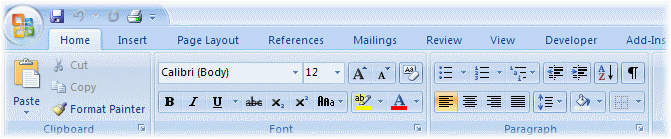
Further to my post of July 26, Microsoft has modified the Office 2007 GUI after complaints from beta testers that the replacement Ribbon menu system took up too much space on screen.  In the next technical refresh of the Office 2007 BETA, users can set the ribbon to automatically minimize whenever it is not being used. Source: ZDNet Australia

Personally, my view is that the Ribbon is another Edsel - giving away my age ;)

Btw, I have been trying to get info from MS about how the Ribbon paradigm effects the implementation of legacy library databases and custom CommandBars, as they have published very little on this topic. After some email traffic the following was extracted from an un-named member of the Access team (my emphasis):

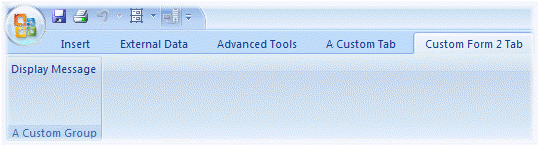
You can use Access 2003 or earlier to create custom command bars and menus in MDB files and those can be used in [Access 2007] add-ins.  If you want to use an ACCDB format add-in or if you don't want to use Access 2003's visual designer for command bars and menus, you will have to create them programmatically.

The add-ins command bars will appear on a separate add-ins tab in the Ribbon.  If you want to have a custom ribbon instead of using the old style command bars, you will probably have to develop either a COM add-in or a managed add-in. There is [aad: "a bit of "] documentation on building add-ins for the ribbon.  You can find some of that documentation here: http://msdn.microsoft.com/office/tool/addin/.  That said, ribbon add-ins and Access menu add-ins don't work all that well together.  This ISV would probably want to convert their Access menu add-in into a managed add-in or a COM add-in if they want to use the ribbon.

New SQL Server 2005 Articles from Microsoft

Microsoft SQL Server 2005 JDBC Driver 1.1 Download the Microsoft SQL Server 2005 JDBC Driver 1.1, a Type 4 JDBC driver that provides database connectivity through the standard JDBC application program interfaces (APIs) available in J2EE (Java2 Enterprise Edition).

SQL Server 2005 Failover Clustering White Paper Comprehensive document about implementing failover clustering for SQL Server 2005 and Analysis Services.

Wednesday, August 23, 2006

How To Add a Pivot Chart To Your Access Reports

This article from TechRepublic.com provides a step-by-step guide on adding a Pivot Chart to an MS Access report.

Monday, August 21, 2006

How To Display Summary Values in Access Using a UNION Query

A good article from Susan Sales Harkins of TechRepublic.com on a fast no-frills way of returning a row of summary values using UNION. Normally, you use SQL’s UNION operator to combine data from two or more tables or queries, but you can also use it to display detail records and summaryvalues.

Saturday, August 19, 2006


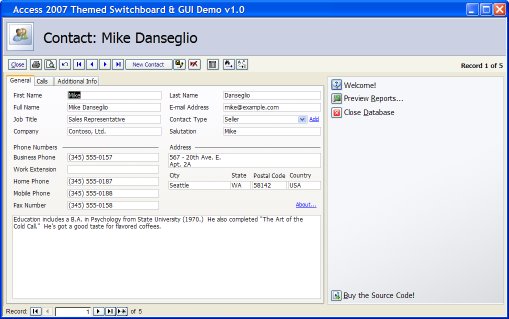
NEW Access 2007 Style Switchboard
A Complete Replacement and Demo Using Only Native Access Controls for
Microsoft© Access 2000/2002/2003

I have just uploaded my latest Access Switchboard Demo, which has been inspired by the new Access 2007 database templates, and includes the following features:
  • Replaces the native Access Switchboard with a superior switchboard, navigation paradigm, and GUI.
  • Uses the Switchboard Items table created by the native access Switchboard Manager.
  • Built-in support for up to 16 option buttons for each switchboard!
  • Option Button Icons are assigned on the fly from a value stored in the Switchboard Items table.
  • The Switchboard resides in a subform, so that the main screen is not affected when switching switchboards.

Download the Demos (acc2007swbdem.zip - 276kb)

Friday, August 18, 2006

FLASH: Windows Vista Will NOT Support MSDE or SQL Server 2000.

Windows Vista/Server will support only SQL Server 2005 Service Pack 2 and later. SP2 is due to ship soon after Vista to ensure compatibility.

There will be no support for the Microsoft Desktop Engine (MSDE), the SQL Server subset, used by many Access developers, shipped with Ms Access/Office prior to Version 2003, and mean't to be replaced by SQL Server Express.

Source: Another Vista Wrinkle: Latest Database Required By Barbara Darrow, CRN 3:34 PM EDT Wed. Aug. 16, 2006

MSDN Just Published: Office 2007 Articles and Videos

Word 2007 HTML and CSS Rendering Capabilities in Outlook 2007 (Part 1 of 2) Provides reference documentation related to supported and unsupported HTML elements, attributes, and CSS properties.

Word 2007 HTML and CSS Rendering Capabilities in Outlook 2007 (Part 2 of 2) Provides detailed instructions on how-to install and use the Outlook 2007 Tool: HTML and CSS Validator. Outlook 2007 HTML.

Video: Customizing the Ribbon with Visual Studio Tools for Office "v3" June CTP Create an add-in for PowerPoint 2007 to customize and modify the ribbon.

Video: Extending the Office 2007 User Interface with a Custom Task Pane Create a shared add-in with Visual Studio 2005 that extends the new user interface with a custom task pane.

Video: Generating Office Documents using the New XML Open File Formats Generate, read and modify documents without going through the object model of the hosting Office application.

Tuesday, August 15, 2006

Outlook 2007 Reference: Business Contact Manager for Outlook Developer Guide

This download provides a CHM version of the Business Contact Manager for MS Outlook 2007 Developer Guide.

Using Sharepoint with MS Office

A free book chapter download from Techrepublic.com.

Topics covered:

  • Opening and Saving Library Documents
  • Using the Shared Workspace Task Pane
  • Integrating with Outlook
  • Creating and Using Lists in Excel
  • Creating and Using Lists in Access
  • Using SharePoint with InfoPath
  • Working with Pictures inPicture Manager
  • Supporting Project Web Access

Sunday, August 13, 2006

All MS Sharepoint Templates Now Available in a Single Download

Windows SharePoint Services Applications Template: All Templates This MS download contains all downloadable application templates for Microsoft Windows SharePoint Services.

Friday, August 11, 2006


The New Office 2007 GUI

New articles and a download from Microsoft:

Customize the Office 2007 Ribbon User Interface for Developer Part 1
Customizing the Office (2007) Ribbon User Interface for Developers Part 2
Learn about the scenarios and XML mark-up that you can use to customize the Ribbon user interface (UI) in the 2007 Microsoft Office release. The Ribbon UI replaces menus, toolbars, and most of the task pane UI in the 2007 release.

Download the Developer Overview of the User Interface for the 2007 Microsoft Office System An overview of the user interface (UI) system for the 2007 release of the Microsoft Office applications and the goals behind the redesign of the UI. Learn about the impact of the redesigned UI on custom solutions and add-ins, and about opportunities to use or extend elements of the new UI in custom solutions (22 printed pages)

Saturday, July 29, 2006

MSDN Library Now Available for Free Download

The MSDN Library May 2006 an essential resource of information for developers using Microsoft tools, products, and technologies is now available for free download.

The download is available as three separate ISO image files totaling 2gb. Unfortunately you can't pick and choose content and there is no TOC for each ISO, though on the download page you are told to download the files most appropriate for you... There are other inconsistencies on the page, and MS really needs to review the text, and consider custom download options based on content.

Friday, July 28, 2006

Even More Office 2007 Developer Videos

2007 Office System Video: Windows SharePoint Services Platform How Windows SharePoint Services provides the unified server foundation for many of the 2007 Microsoft Office system server capabilities
2007 Office System Video: Portals Customizing search capabilities, building custom portal interfaces, providing personalized views, and aggregating connections to line-of-business data.
Microsoft Webcasts Links
SQL Server 2005: How Microsoft IT Does It

Improving Data Security by Using Microsoft SQL Server 2005

Using SQL Server 2005 Integration Services in a Scalable Business Intelligence Solution

Thursday, July 27, 2006

Office 2007 Ribbon To Be "Tweaked"

Source Gregg Keizer, TechWeb July 26 2006

Microsoft has announced that the Technical Refresh of the current Beta 2 of Office 2007 will make changes to the operation of the RibbonBar. See my post of July 2 on my take on the Access 2007 RibbonBar.

This is news to me: you can use Ctrl-F1 to collapse the RibbonBar since the first beta to provide more viewing and working space for documents. Microsoft Office 2007 GUI program manger Jensen Harris has outlined changes on how the RibbonBar will be invoked in future builds. In the latest builds, you can right-click anywhere in the Ribbon to bring up a context menu which includes an option to minimize the Ribbon. This is in addition to Ctrl+F1 and double-clicking the selected tab. Jensen has also posted a short video showing the new feature in action. The Menu Tabs also activates a tab as a pop-up in a minimized Ribbon with a left-click. When users finish with the tab pop-up or click away from it, it disappears, and returns the interface to a ribbon-minimized state. The new feature can be seen in another video clip posted to Jensen's blog.

But from what I can gather all this does is return some screen real estate to the GUI, and still does not allow Access developers to implement a classic menubar/toolbar navigation paradigm.

Monday, July 24, 2006

More Office 2007 Developer Videos

2007 Office System Video: Solutions and Partners Industry experts demonstrate how to integrate Office clients, servers, services, and tools to build real world solutions.

2007 Office System Video: Enterprise Content Management View conference breakout sessions about the new, extensible content management features.

Saturday, July 22, 2006

Office 2007 Developer Videos

Download this series of Office 2007 developer-oriented videos:

Collaboration How developers can use the 2007 Microsoft Office system to create powerful collaboration tools

Client Development Using the Microsoft Office System client

Enterprise Project Management Project 2007 and enterprise project management.

Friday, July 21, 2006

2007 Office System Video: Business Intelligence

Download this series of developer-oriented videos from Microsft.com to view conference breakout sessions about building smart client and browser-based BI solutions leveraging a wide array of extensible capabilities, including key performance indicators, PivotTables, Web parts, and spreadsheet-based Web services.
SQL Server 2005 Books Online (July 2006)

Download an updated version of the documentation and tutorials for Microsoft SQL Server 2005. See the Additional Information section for an update on SQL Server Express Books Online.

Thursday, July 20, 2006

SQL Server 2005 Samples and Sample Databases (July 2006)

Download over 100 samples and three sample databases for SQL Server 2005 from Microsoft.com.
MVP Allen Browne's Tips for Microsoft Access

Microsoft Access tips, solutions, tutorials, help, and examples from Allen Browne Articles for beginners and advanced users of Access. Examples and solutions, bugs and traps to avoid, and sample code & utilities to download. All free.
The Hey, Scripting Guy! Archive

The first two years of the Hey, Scripting Guy! column, gathered in one fully-searchable archive. This HTML help file includes all the text, graphics, and hyperlinks for nearly 500 Hey, Scripting Guy! columns. Includes many useful scripts using the Windows Scripting object.

Wednesday, July 19, 2006


WEBCAST: Ensuring High Availability for SQL Server

Webcast: Ensuring High Availability for SQL Server A live TechRepublic.com Webcast to see a walkthrough demonstration of such a product, WANSyncHA SQL, XOsoft's business continuity solution for Microsoft SQL Server 2000 and 2005.


Top 10 advanced features of SQL Server SQL 2005

From TechRepublic.com: Top 10 advanced features of SQL Server SQL 2005 New features enhance productivity, efficiency, availability, and administrative ease. A discussion of the more advanced new features of the SQL Server 2005 Database Engine.


Monday, July 17, 2006

Latest MS Access KB Articles
Courtesy of KbAlertz.com:

Access 97

167852 ACC97: Can't Use Back Button in IE3 If Started from Web Toolbar
167293 ACC: Can't Print Datasheet Gridlines in Color in Access 95/97

Access 2000

917284 MS06-038: Vulnerabilities in Microsoft Office could allow remote code execution
914797 Description of the security update for Office 2000: July 11, 2006
917152 Description of the security update for Office 2000 and for Project 2000: July 11, 2006
288300 ACC2000: "Microsoft Access Can't Find the Wizard..." Error Message After You Apply the Access 2000 and SQL Server 2000 Readiness Update
918957 A file does not open in the program that you expect when you try to open the file in Office

Access 2002

919530 Description of the Access 2002 post-Service Pack 3 hotfix package for the Estonian version of Access 2002: June 6, 2006
914796 Description of the security update for Office XP: July 11, 2006
917150 Description of the security update for Office XP, the security update for Project 2002, and the security update for Visio 2002: July 11, 2006

Access 2003

917151 Description of the security update for Office 2003: July 11, 2006
914455 Description of the security update for Office 2003, for Project 2003, and for OneNote 2003: July 11, 2006
921647 Description of the Access 2003 post-Service Pack 2 hotfix package: June 26, 2006
915433 Description of the Office 2003 hotfix package: April 5, 2006
913646 Description of the Office 2003 post-Service Pack 2 hotfix package: April 24, 2006
919427 You cannot use can the MSOLAP provider name to reference the Analysis Services 9.0 OLE DB Provider after you install or repair an Office 2003 program
921025 You cannot open Access report snapshot (.snp) files in Internet Explorer after you install Windows XP Service Pack 2
921024 Error message when you use Access 2003 to open a database file: "Error 1706. No valid source could be found"

Friday, July 14, 2006

Microsoft Core XML Services (MSXML) 6.0

Microsoft has released MSXML 6.0. with improved reliability, security, conformance with the XML 1.0 and XML Schema 1.0 W3C Recommendations, and compatibility with System.Xml 2.0. Download details.
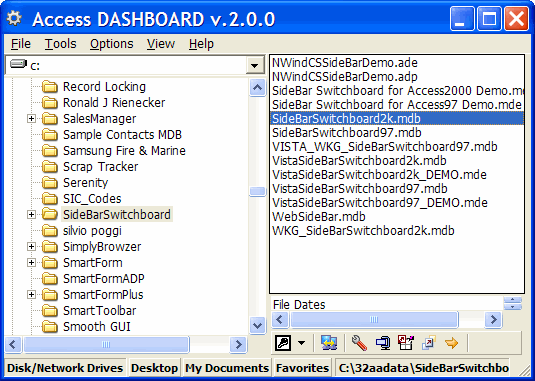
New Free MS Access Tool: The Access DASHBOARD®
Manage all your Access databases in one free application


I have just launched my latest free Access tool: The Access DASHBOARD®. Launch multiple versions of MS Access Databases. Supports Access 97 or later and JET 2 or later, and these Access files types:*.mdb;*.mda;*.mde;*.adp;*.ade. Windows file associations are NOT affected.


Download from the Free Access Tools tab on my Access Tools page.

The DASHBOARD® automatically determines in which version of JET adatabase was created. Each file is opened in the appropriate versionof MS Access. Users can manually override the version applied bythe DASHBOARD. You can use the Shortcut Builder to create customDesktop shortcuts.

In-built Tools allow you to Backup, Repair, Compact, and Decompile database files without leaving the DASHBOARD.

As an option, you can have your Windows Explorer Right-click PopUp Menu available friom within the DASHBOARD.

Wednesday, July 12, 2006

Office 2007 and OBAs: Customizable Business Applications

Building Office Business Applications: A New Breed of Business Applications Built on the 2007 Microsoft Office System This white paper introduces Office Business Applications (OBAs), a new breed of easily customizable solutions that address real-world business problems through the 2007 Microsoft Office system.
Data Access Tracing in SQL Server 2005

Data Access Tracing in SQL Server 2005 Learn how to apply the new tracing functionality in Microsoft data access technologies such as ADO.NET 2.0, MDAC 2.82, SQL Server Native Client, and the JDBC driver; and in the SQL Server network protocols and the SQL Server 2005 database engine.


MSDN Magazine August 2006: Focus On Office Development

The just released August 2006 issue of MSDN Magazine features these Office-related articles:

Business Apps: What You Need To Know About Using Office As A Development Platform

Gathering MOSS: New Dev-Centric Features In Office SharePoint Server Keep Your Apps Rolling

Add-In Power: Let Users Customize Your Apps With Visual Studio Tools For Applications

InfoPath 2007: Designing Form Templates With The New Features Of InfoPath

Monday, July 10, 2006

SQL Server Migration Assistant for Microsoft Access Requires License Key

Microsoft has just announced that the SQL Server Migration Assistant (SSMA) for MS Access, to operate properly requires registration, download, and update of a license key. This page provides access to a download of the license key as well as instructions on how to update the SSMA installation.
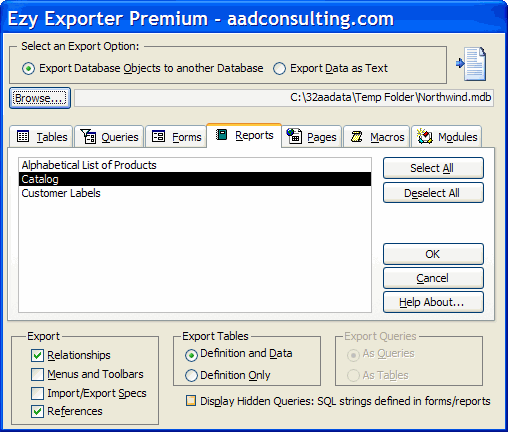
Ezy Exporter Premium Edition:
New Version 3.0 for Access 2000/2002/2003


The functionality Microsoft forgot... Export unlimited MS Access objects and data in bulk. The Access 2002/2003 version supports XML.

I have just launched a new Version 3 of Ezy Export Premium:


New features include:
  • Export these additional object collections: Relationships, CommandBars, Import/Export Specifications, and References
  • Select the folder to receive data exports
  • New GUI

Saturday, July 08, 2006

MS Access Database Repair and Recovery:
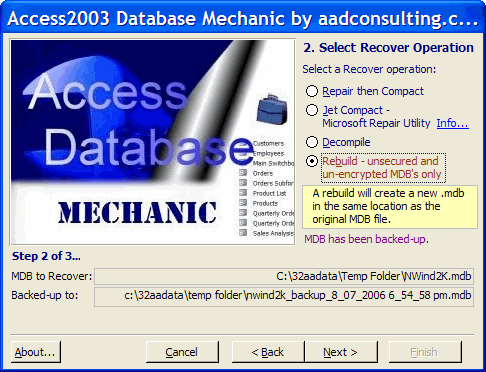
New v1.1 of Access Database Mechanic


My Access Database Mechanic tool is the top free download on aadconsulting.com.

The Mechanic automates the process of attempting to recover a corrupt MS Access database, using four operations: compact & repair, JET compact, decompile, and complete rebuild of an .mdb. The applet also features a fail-safe mechanism that creates a uniquely named back-up copy of the .mdb before any recovery operation is attempted. Versions are available for Access2000/2002/2003.

Version 1.1 adds:

  • Support for the Microsoft JET Compact Repair Utility
  • Now features rebuild for additional objects: Import/Export Specifications, References, and Custom CommandBars
  • File download is one-fifth the size of v1.0 with a new and faster Install set

On the download page there are also comprehensive resources and links to assist you in your Access database recovery efforts.

Wednesday, July 05, 2006

Classic Database Window and MenuBar for Access 2007 BETA 2:
Free Code


Get my free download of a sample database for Access 2007 BETA 2 that recreates the Classic Access Database Window - just import the objects into your ACCDB:

Sunday, July 02, 2006


Access 2007: First Impressions

I installed the Access 2007 BETA 2 over the weekend. These are my first impressions:
  • Install went smoothly and existing Access installations were not affected.

  • I was unable to open the sample applications/templates and received an error saying that I needed to load SQL Server Data Management Objects (SQL-DMO)? Running SQL Server 2005 Express did not fix the problem, and all download links for the sample databases from the BETA site were broken...

  • The RibbonBar navigation paradigm is bewildering and, from a developer's perspective, possibly a big mistake. It takes up a lot of screen space and the eye candy does not make up for the loss of accessibility and functionality from the ditching of the classic menubar/toolbar paradigm. It is telling that the VBA Editor retains the classic menubar and toolbars. It seems that Microsoft is deliberately pushing developers away from Office and VBA, while the Visual Studio Express applications retain the classic menus. There is a customizable QuickToolbar, to which you can add all available RibbonBar commands, but you can't create groups or nested hierarchies, and you can't add text to the icon buttons.

  • The change in the database format seems to stem from the need to handle RibbonBars and the new themes. This hardly compensates developers for the loss of Access security and the inability to implement classic menus. Changes to MDBs made in Access 2007 will be saved only in the new format. So for MDBs, Access 2007 offers only legacy support.

    This means that developers that need to support multiple Access versions, now also need to cope with incompatible file formats, as well as switching to and from the classic menus in Access prior versions and the clunky RibbonBars in Access 2007, and back again in the Access 2007 VBA Editor.

  • Ironically, the Switchboard Manager does not receive a make-over, using the Access 95 navigation paradigm AND the Access 95 format and colors.

Expect more posts as I delve further.

Thursday, June 29, 2006

Download Office 2007 Object Model Posters

2007 Office System Document: Object Model Posters Download these files to view object model posters for products and technologies relating to the Microsoft Office 2007System.
Improving SQL Server Performance

From TechRepublic.com:

Diagnosing SQL Server performance issues using sp_lock DBAs can effectively diagnose database locking issues by using the SQL Server sp_lock system stored procedure.

Demo: SQL Server 2005 High-Availability Capabilities Microsoft's demo focuses on the high-availability capabilities of Microsoft SQL Server 2005 and how it enables organizations to do more with less by delivering a data management and analysis solution that is dependable, productive, and economical.
Visual Studio 2005 Tools for Office Update: InfoPath 2007 Beta Support

With this update to the Microsoft Office InfoPath 2003 Toolkit for Visual Studio 2005 as included in Microsoft Visual Studio 2005 for the Microsoft Office System, you can develop InfoPath 2007 forms inside Visual Studio.

Wednesday, June 28, 2006

New Office 2007 Articles: Outlook, Excel, Access, and SharePoint

Developing Solutions Using the Consolidated Outlook 2007 Object Model Learn about new platform features in Microsoft Office Outlook 2007: an overview of the unification, security, performance, and forms improvements in this release.

Building Custom Solutions with Excel Services Excel Services let users calculate, display and explore Excel workbooks on the server side. Learn the reasons behind Excel Services, the benefits, and see a demo using a Web service to incorporate Excel-based business logic into your own server solutions.

Microsoft Office Access 2007: Rich Client Solutions Overview of Access 2007 redesign, improvements, and new features. See the new WYSIWYG design experience and interactive report browse view and how you can use Access as a rich client for Windows SharePoint Services v3 and Office Live.

Introduction to Upcoming SharePoint Products and Technologies An overview of the technologies that will release within Microsoft Windows SharePoint Services (version 3) and Microsoft Office SharePoint Server 2007, with a focus on specific developer opportunities.

Tuesday, June 27, 2006

New SQL Server Articles

From DevX.com:

Office 2007 Preview Site

Microsoft has launched an Office 2007 Preview site, where you can test drive the new version on-line: 2007 Microsoft Office System Beta 2 Test Drive

The browser-based trial offers a real-time test drive and does not require product installation or download. With the test drive you can use sample data that you can edit, send by e-mail, and post to Microsoft SharePoint sites in real time.

Included in the test drive:

Access 2007
Excel 2007
InfoPath 2007
OneNote 2007
Outlook 2007
Outlook 2007 with Business Contact Manager
Outlook Web Access
PowerPoint 2007
Project Professional 2007
Publisher 2007
SharePoint Designer 2007
Visio 2007
Word 2007
Windows SharePoint Services
Project Server 2007 (coming soon)
SharePoint Server 2007

Monday, June 26, 2006

Outlook 2007 Add-In Templates

Outlook 2007 Add-in Templates Provide a basic template for developing Outlook 2007 add-ins using Visual Studio 2005.

Outlook 2007 Add-In: Form Region Add-In The Outlook 2007 Form Region Add-ins are a learning tool that will help you understand how to design, build, and run custom form solutions based on Outlook form regions.

Friday, June 23, 2006

Help Desk Sample Applications for SQL Server 2005 Express Edition and Visual Basic

Help Desk Sample Applications for SQL Server 2005 Express Edition and Visual Basic This Help Desk Sample Application is a rich client and web application that provides incident tracking and resolution administration.
Survey Manager Sample Applications for SQL Server 2005 Express Edition and Visual Basic

Survey Manager Sample Applications for SQL Server 2005 Express Edition and Visual Basic The Survey Manager Sample Application is a rich client and web application for managing a database of teachers, students, classes, and surveys.

Wednesday, June 21, 2006


Office 2007: MSDN Just Published

Walkthrough: Word 2007 XML Format Walk through the new default file format for Microsoft Office Word 2007. Read detailed descriptions of the file format architecture, key components, and ways in which you can programmatically modify content.

Outlook 2007 Sample Add-ins: Rules Add-in, Travel Agency Add-in, and Prepare for Meeting Add-in Outlook 2007 introduces many enhancements to its object model that enable you to create richer solutions. Three sample add-ins, the Rules add-in, Travel Agency add-in, and Prepare for Meeting add-in are available in both Visual Basic .NET and C#.

Code Security Changes in Outlook 2007 Microsoft Office Outlook 2007 enhances code security to help protect Outlook users against malicious code while reducing security warnings for developers and users.

Outlook 2007 Sample Add-ins: Rules Add-in, Travel Agency Add-in, and Prepare for Meeting Add-in Outlook 2007 introduces many enhancements to its object model that enable you to create richer solutions. Three sample add-ins, the Rules add-in, Travel Agency add-in, and Prepare for Meeting add-in are available in both Visual Basic .NET and C#.

Isolating Microsoft Office Extensions with the COM Shim Wizard Learn about a set of new Microsoft Visual Studio 2005 wizards that automate the generation of COM shims for managed Microsoft Office extensions that do not use Microsoft Visual Studio 2005 Tools for the Microsoft Office System.


NEW Free BETA:
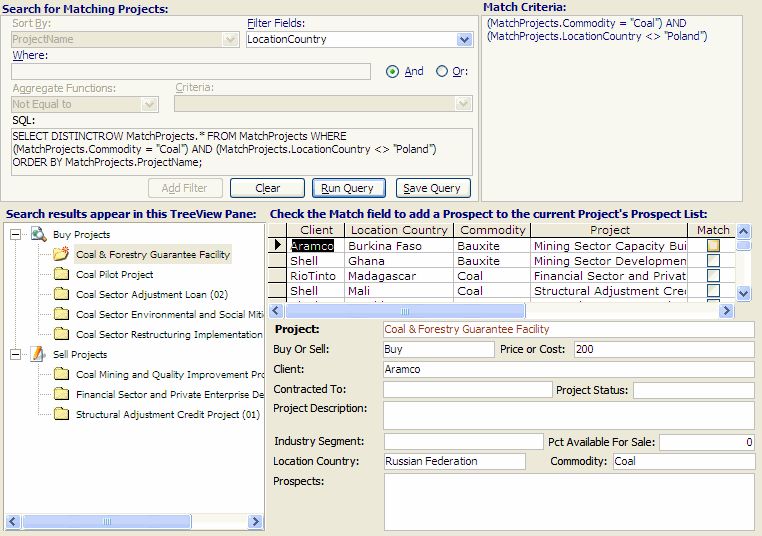
Matching Buyers with Sellers Access Database Application


A new Access Database Application from aadconsulting.com: Matching Buyers with Sellers Project Matching.
  • Easily track, Clients, Projects, and Contact Visits
  • Quickly Match Buyers with Sellers on multiple search criteria with a user-friendly matching process

Download Page

Tuesday, June 20, 2006

For Aussie Readers: Office 2007 BETA 2 Professional On CD

The July editions of APC and PC Authority magazines on the news-stands now, have the full Office 2007 Pro BETA 2 Install in their cover disks. Price of the mags is Aus$9.95.
Common SQL Server Problems

10 common SQL Server problems and solutions, from TechRepublic - Downloads - TechRepublic This handy two-page list outlines 10 familiar SQL Server problems and solutions.

Friday, June 16, 2006

Office 2007 Office Open XML Sample

2007 Office System Sample: Open XML File Format Code Snippets for Visual Studio 2005 Download this package to install open XML file format code snippets for use with Visual Studio 2005.

Thursday, June 15, 2006

Store XML in SQL Server 2005 with the New XML Datatype

From DevX.com. Making Sense of the XML DataType in SQL Server 2005 In SQL Server 2005, XML becomes a first-class data type. Developers can make minor remote modifications to stored XML documents easily, taking advantage of new support for XML schema-based strong typing, and server-based XML data validation.

Wednesday, June 14, 2006


Office 2007 Ribbon Portal

The Office 2007 Ribbon feature now has its own portal at the MSDN Office Developer Center, where you will find technical articles, code samples, developer documentation, and multimedia presentations on customizing the RibbonX user interface in the 2007 Microsoft Office release.

Fom an interesting post on Office 2007 from TechRepublic.com's, A. Russell Jones, at Tech-Ed 2006:

Microsoft provided all attendees with Office 2007 Beta 2, which replaces Office's familiar nested standard menus with a set of tabs and "ribbons". Microsoft claims this change—along with context-sensitivity that displays special functions when you select objects such as images, graphs, etc.—exposes more of Office's features to users. Perhaps so, but (at least in the beta) some of the features I commonly use weren't available from the ribbon, or at least, I haven't found them yet. For example, to run a Macro (formerly available through the Tools—>Macro—>Macros menu), you now have to first display the hidden-by-default "Developer" tab, a feature which is itself hidden under a button on the "Office" dropdown menu—which doesn't look like a menu at all. But other hidden features are welcome. For example Word Count is now always-available from the status bar. Despite some initial frustrations, I suspect I'll eventually like the new layout better.

And, of course, it's both customizable and programmable. Better yet, it's programmable through configuration. By writing some relatively simple XML, you can add your own custom tabs and tools, or control the built-in features. For those Office developers who want to restrict users' actions, a single command called "StartFromScratch" removes all the built-in ribbon features. You can build from there, re-enabling the built-in commands and tools you want users to have, overriding their default actions with custom code, providing a completely custom set of tabs and tools, or giving them a mixture of any of these options.

Users can even customize the ribbons you provide, creating their own preferred feature collections in exactly the same way they customize the built-in features. And this all works the same way across all the Office products.


Outlook 2007 Add-Ins

These three sample add-ins, are available in both C# and Visual Basic .NET versions, and demonstrate many of the new and enhanced features of the Outlook 2007 object model.

Friday, June 09, 2006

Microsoft SQL Server 2005 Upgrade Technical Reference Guide

Microsoft SQL Server 2005 Upgrade Technical Reference Guide contains guidance for SQL Server administrators, developers, and IT decision makers who want to move their SQL Server 2000 or 7.0 databases to SQL Server 2005.

The primary objects are:

  • Increase confidence and reduce uncertainty about upgrading previous versions of SQL Server to SQL Server 2005.
  • Lower upgrade risks by providing prescriptive, best-practices technical guidance about how to upgrade specific SQL Server features across all editions.
  • Provide Microsoft partners and field representatives with appropriate SQL Server 2005 upgrade resources to serve customers.
Content Details:

  • Section 1.0, “Upgrade Planning and Deployment,” provides a comprehensive overview of the key planning and deployment considerations for upgrading to SQL Server 2005.
  • Sections 2.01-2.05 cover special upgrade considerations for high availability and very large databases (VLDB).
  • Sections 3.01-3.08 cover upgrading relational databases to SQL Server 2005, including specific discussions on security, Transact-SQL queries, full-text catalogs, maintenance plans and SQL Server Agent jobs, Notification Services, Management Tools, and MSDE.
  • Sections 4.01-4.03 then cover moving to the SQL Server 2005 business intelligence components: Reporting Services, Integration Services, and Analysis Services.

    See the appendices for detailed feature and edition comparisons and highlighted upgrade tips and tricks.

Microsoft SQL Server 2005 Everywhere Edition

SQL Server Everywhere Runtime Microsoft SQL Server 2005 Everywhere Edition CTP is a compact database for rapidly developing applications in both native and the managed environment that extend enterprise data management capabilities to desktop applications.

SQL Server Everywhere is designed for developers who need lightweight, in process relational database solution for their applications that can be developed and deployed on desktop as well as on mobile devices. The SQL Server Everywhere CTP contains the runtime bits that can be used to develop and deploy applications on desktop only. SQL Server Everywhere is a powerful tool that makes it easy to develop desktop applications by supporting familiar SQL syntax and providing a development model and API consistent with SQL Server.

The SQL Server Everywhere CTP includes new features like:
  • DataDirectory support
  • ClickOnce support for easy deployment
See the ReadMe SQL Server Everywhere CTP Readme for more info.

You can also download the SQL Server Everywhere CTP Books Online. To learn more about the SQL Server Everywhere CTP, refer to the “Community Technology Preview: SQL Server Everywhere” topic.
New Access to SQL Server Migration Tool

SSMA for Access automates database migration from Access to SQL Server 2005. Microsoft SQL Server Migration Assistant (SSMA) for Access is a tool for migrating databases from Microsoft Access to Microsoft SQL Server 2005. SSMA for Access converts Access database objects to SQL Server database objects, loads those objects into SQL Server, and then migrates data from Access to SQL Server.

SSMA for Access supports Access 97 - Access 2003 databases and is FREE!

Thursday, June 08, 2006


Ezy Data Free Edition:
Stand-Alone Database Application for Windows

I have just launched Ezy Data Free Edition, a free lite version of Ezy Data 2000, the 5-star rated standalone database application. Users have access to over 40 table templates, and can create queries etc.

Ezy Data 2000 has received 5-star ratings from many download sites, including:

Introducing the Microsoft Office 2007 Open XML File Formats


Introducing the Microsoft Office 2007 Open XML File Formats Learn the benefits of the Microsoft Office (2007) Open XML Formats. "Users can exchange data between Office applications and enterprise systems using XML and ZIP technologies. Documents are universally accessible. And, you reduce the risk of damaged files."


Latest Articles on SQL Server


SQL Server Express: Using Data with Web Application Projects This white paper shows how to properly use SQL Server Express and Data Binding with Web Application Projects, an alternative Web project model that can be added to and used in Visual Studio 2005.


Internet Explorer Favorites Sample Applications for SQL Server 2005 Express Edition and Visual Basic The Internet Explorer Favorites Sample Application is a web application for keeping track of browser history and Internet Explorer Favorites.

SQL Server 2005 Upgrade Technical Reference Guide This 350-page document contains guidance for SQL Server administrators, developers, and IT decision makers who would like to move their SQL Server 2000 or 7.0 databases to SQL Server 2005.


Wednesday, June 07, 2006


Feast of New Office 2007 Resources

Visio 2007: Software Development Kit
The Beta 2 version of the Microsoft Office Visio 2007 SDK contains sample applications, code snippets, documentation, and tools, including the ShapeStudio, Event Monitor, Persistent Events, Print ShapeSheet, and Solution Publishing tools.

Groove 2007: Software Development Kit
The Groove 2007 SDK (Beta) contains documentation, WSDL, and sample code for applications that use Groove Web Services. In addition, the SDK contains developer documentation for the Groove 2007 Forms and Groove 2007 InfoPath Forms tools.

Download this series of developer-oriented videos to view virtual tours of new features in Microsoft Office 2007:

Creating Office (2007) Custom Task Panes
The 2007 release of the Microsoft Office system introduces custom task panes that give you the tools to put the features and information your customers need when and where they want them. Learn how you can use custom task panes in your applications.

Creating Word 2007 Templates Programmatically
Read details about how to create document templates programmatically for Microsoft Office Word 2007, including information about using the new content controls, document building blocks, and XML mapping. Review some of the newest members of the Word 2007.

Customizing the Office (2007) Document Inspector
Learn to customize the Document Inspector in 2007 Microsoft Office suites. Users now have one place to find metadata or hidden information in their documents and to take action. And, developers can create custom modules for special circumstances.

.NET Rocks! - Kimberly Tripp on SQL Server 2005 SP1 and More
Kimberly Tripp talks to us about improvements in SQL Server 2005 Service Pack 1, converting Oracle users to SQL Server, and much more.


What's New for Developers in Word 2007
This article provides a high-level overview of new features for developers in Microsoft Office Word 2007 Beta 2. The article reviews content controls, XML mapping, document building blocks, the Word XML Format, and other new features.

What's New for Developers in OneNote 2007 (Part 1 of 2)
What's New for Developers in OneNote 2007 (Part 2 of 2)
Two-part series introducing and explaining new features of interest to developers in Microsoft Office OneNote 2007. Developer-related features include a new COM API that offers new import, export, selection, and search function.

What's New for Developers in the Outlook 2007 Object Model (Part 1 of 2)
What's New for Developers in Microsoft Office Outlook 2007 (Part 2 of 2)
These two articles cover the enhancements and additions for developers in Microsoft Office Outlook 2007. Part 2 is accompanied by the What's New Add-In, which is available as a download.

SharePoint Server 2007 for MCMS 2002 Developers
Explore SharePoint Server 2007, which merges functionality of MCMS 2002 and SharePoint Portal Server 2003 with new functionality to create one integrated set of technologies built on Windows SharePoint Services V3.

Project Server 2007: Getting Started with a New Platform for Developers
Explore the Microsoft Office Project Server 2007 functionality that uses a completely new platform built on the Microsoft .NET Framework 2.0 and Microsoft Windows SharePoint Services (version 3).

Introducing the Microsoft Office (2007) Open XML File Formats
Learn the benefits of the Microsoft Office (2007) Open XML Formats. Users can exchange data between Office applications and enterprise systems using XML and ZIP technologies. Documents are universally accessible. And, you reduce the risk of damaged files.

Hosting the InfoPath Form Editing Environment in a Custom Windows Form Application

Learn how to incorporate this control into your application, work with the XML data generated by the Form Control, and use IOLECommands to replicate functionality of the InfoPath 2007 form editing environment.

Extending the Office (2007) Fixed-Format Export Feature
Create a COM add-in for an application in the 2007 Microsoft Office release, such as Microsoft Office Publisher 2007, that extends the Office fixed-format export feature to support new formats. The technique described requires knowledge of C++ and COM.

Developer Overview of the User Interface for the 2007 Microsoft Office System
Read an overview of the user interface (UI) system for the 2007 release of the Microsoft Office applications and the goals behind the redesign of the UI. Learn about the impact of the redesigned UI on custom solutions and add-ins.

Developer Introduction to Workflows for Windows SharePoint Services V3 and SharePoint Server 2007
Get a high-level overview of how Windows SharePoint Services (v3) implements the workflow capabilities of the Windows Workflow Foundation, and how SharePoint Server 2007 extends those capabilities with symmetrical InfoPath 2007 forms.

Customizing the Office (2007) Ribbon User Interface for Developers (Part 1 of 2)
Customizing the Office (2007) Ribbon User Interface for Developers (Part 2 of 2)
Part 1 is the companion to the part-one article of the same name, and contains detailed reference material about the controls and method signatures for the Ribbon user interface, and a section of frequently asked questions. In Part 2Learn about the scenarios and XML markup that you can use to customize the Ribbon user interface (UI) in the 2007 Microsoft Office release. The Ribbon UI replaces menus, toolbars, and most of the task pane UI in the 2007 release.

2007 Office System Document: Lists of Control IDs This download contains files that list the control IDs for built-in

Monday, June 05, 2006

Enterprise Content Management (ECM) Starter Kit for 2007 Office System (Beta 2)

The ECM Starter Kit for 2007 Office System contains ECM feature extension code samples, supplemental developer white papers, and Microsoft® Visual Studio® project templates for workflow in Microsoft Office SharePoint® Server 2007 (Beta 2 version).
Access 2007 Limits Published on Microsoft Blog "... post to lay out the limits in Access 2007 and make a little clearer how the application works and how it scales...


Updated Developer Content for Office 2007

Download updated versions of the Office 2007 developer content for use with the latest BETA version:

  • Combined 2007 Microsoft Office System Developer References
  • Access 2007 Developer Reference
  • Excel 2007 Developer Reference
  • Project 2007 Developer Reference
  • Object Library Reference for the 2007 Microsoft Office System
  • Publisher 2007 Developer Reference
  • SharePoint Designer 2007 Developer Reference
  • Visio 2007 Developer Reference
  • Visio 2007 ShapeSheet Reference
  • Word 2007 Developer Reference

Friday, June 02, 2006


SQL Server 2005 Express Edition with Advanced Services

Microsoft has just released:

SQL Server 2005 Express Edition with Advanced Services A new, free, easy-to use version of SQL Server Express that "includes more features and makes it easier than ever to start developing powerful data-driven applications for Web or local desktop development".

Readme Files for SQL Server 2005 SP1 and SQL Server 2005 SP1 Express Editions and Tools
Before you install SQL Server 2005 Service Pack 1 (SP1) or SQL Server 2005 SP1 Express editions and tools, review the readme for information about installing SP1 and to learn about common issues that can impact your installation experience or use of the product.

Thursday, June 01, 2006

Quick Tip: Custom Zoom Access Reports in VBA

The Access DoCmd.RunCommand Constants for zooming a report in Preview mode in VBA are fixed at:
  • acCmdZoom10
  • acCmdZoom25
  • acCmdZoom50
  • acCmdZoom75
  • acCmdZoom100
  • acCmdZoom150
  • acCmdZoom200
  • acCmdZoom500
  • acCmdZoom1000

To set a custom zoom level you can use the undocumented ZoomControl property of the Report object:

Reports(ReportName).ZoomControl = ZoomCoeff

Use with care! The property is not documented and therefore not supported by Microsoft.

Go to the AccessWeb for detailed sample code.

Tuesday, May 30, 2006

New Outlook 2007 Object Model Samples

Outlook 2007 Sample: What's New Add-Ins The Outlook 2007 What's New Add-Ins are a learning tool that will help you understand some of the important new features in the Outlook 2007 object model.
New Sample Applications for VB and SQL Server Express Editions

Each sample application provides a rich client user interface to view rich reports based on different business queries:

Friday, May 26, 2006

Intelligent Converters: Convert Access Database Tools

If you are moving your data across different platforms or applications, Intelligent Converters offers a comprehensive suite of data conversion software, and pricing is very reasonable and you can download free demos.

Converters include:
  • Access-to-MSSQL
  • Access-to-MySQL
  • Access-to-Oracle
  • Excel-to-MSSQL
  • Excel-to-MySQL
  • Excel-to-Oracle
  • MSSQL Migration Toolkit
  • MSSQL-to-Access
  • MSSQL-to-Excel
  • MySQL-to-Access
  • MySQL-to-Excel
  • MySQL-to-MSSQL
  • Oracle-to-Access
  • Oracle-to-Excel
Gallery of Office 2007 BETA 2 Screenshots

Check out these Office 2007 Beta screenshots - courstesy of TechRepublic.com.

Wednesday, May 24, 2006

Microsoft Office 2007 Learning Portal Offers Free Training

This MS Portal offers a wide range of courses on Office 2007 for those who have installed the BETA.

Courses are grouped as follows:
  • Home and Office Workers
  • Developers
  • IT Professionals

and include on-line courses, labs, and book downloads.

For those who haven't installed the BETA, but want an overview of the new features, I recommend this free dowloadable MS Press book from the Portal:

First Look 2007 Microsoft Office System (Downloadable PDF; 6,080 KB) What's inside the newest Microsoft Office system? How will the new look of Office change the way you work and make you more self-sufficient and effective? How can your business use its new workflow capabilities immediately in this new world of work? First Look 2007 Microsoft Office System gives you exclusive, advance insights and straight talk from the Office product group and other Office experts.

Tuesday, May 23, 2006

All About Office 2007 BETA 2

Today Microsoft released for public download Beta 2 of Office 2007 and the pre-release version of Visual Studio Tools For Office "v3.

ComputerWorld.com has also posted a detailed article on the features of the new beta: Review and Visual Tour: Microsoft's 2007 Office Beta 2

Warning: Don't install these Betas on production machines as they may damage your existing Office installations.

Monday, May 22, 2006


Office 2007 Virtual Tours For Developers

2007 Office System: How Do I ScreenCasts Download this series of developer-oriented videos to view virtual tours of new features in the 2007 Microsoft Office system.

Friday, May 19, 2006

Latest MS Access Knowledge Base Articles

Courtesy of KbAlertz.com:

Access 97

16583 ACC97: Problems Adding Records to Replicated Database Using ASP
160953 ACC97: ODBCKEY.INF in Data Access Pack Contains German String
172640 OFF97: Workbook Changed by MS Access May Not Be Recalculated
177105 ACC97: "There Is No Object in This Control" Error Inserting Web Browser Control
163841 ACC97: Removing Earlier Version Components Deletes Files on Server
177105 ACC97: "There Is No Object in This Control" Error Inserting Web Browser Control
165830 ACC97: Problems Adding Records to Replicated Database Using ASP
172640 OFF97: Workbook Changed by MS Access May Not Be Recalculated
160953 ACC97: ODBCKEY.INF in Data Access Pack Contains German String

Access 2000

210242 How to implement Query by Form (QBF) with dynamic QueryDef in Access 2000
209645 How to use the Query by Form (QBF) technique in Access 2000
210242 How to implement Query by Form (QBF) with dynamic QueryDef in Access 2000
209645 How to use the Query by Form (QBF) technique in Access 2000

Access 2002

918004 Error message when you use Office Genuine Advantage to validate Office 2003 or Office XP: "Validation Incomplete" or "Error code: 0x8018101"
918003 Error message when you use Office Genuine Advantage to validate Office 2003 or Office XP: "Validation Incomplete" or "Error code: 0x8018103"
918001 Error message when you try to validate Office 2003 or Office XP by using Office Genuine Advantage: "Validation Incomplete: No Office Products Detected" or "Error code: 0x8018109"
917999 Error message when you try to validate Office 2003 or Office XP by using Office Genuine Advantage: "Unable to Validate" or "Error code: 0x8018111"
918000 Error message when you use Office Genuine Advantage to validate Office 2003 or Office XP: "Validation Incomplete" or "Error code: 0x8018110"
887034 Information about ActiveX controls that are supported in Access 2002
295358 Description of new features and enhancements in Access 2002
870963 References that you may have to set when you work with databases in Access 2002
888994 Description of the Access 2002 post-Service Pack 3 hotfix package: November 16, 2004
885235 Description of the Access 2002 post-Service Pack 3 hotfix package: September 10, 2004
887036 You receive a "Can't find the database you specified or you didn't specify a database at all" Error message in a stand-alone version of Access 2002
293334 ACC2002: Event Topics, Property Topics, and Other Help Topics Related to Batch Transactions in Access 2002 Are Incorrect
870963 References that you may have to set when you work with databases in Access 2002
887034 Information about ActiveX controls that are supported in Access 2002
295358 Description of new features and enhancements in Access 2002
887036 You receive a "Can't find the database you specified or you didn't specify a database at all" Error message in a stand-alone version of Access 2002
293334 ACC2002: Event Topics, Property Topics, and Other Help Topics Related to Batch Transactions in Access 2002 Are Incorrect
888994 Description of the Access 2002 post-Service Pack 3 hotfix package: November 16, 2004
885235 Description of the Access 2002 post-Service Pack 3 hotfix package: September 10, 2004

Access 2003


916657 Description of the Office 2003 post-Service Pack 2 hotfix package: April 21, 2006
916658 You are prompted for credentials every two weeks when you try to view a Web resource in Office 2003
917689 Relative hyperlinks are changed and no longer work correctly in a file that is saved in Office 2003
917878 Description of the Office 2003 post-Service Pack 2 hotfix package: April 12, 2006
918062 Description of the Access 2003 post-Service Pack 2 hotfix package: April 18, 2006
917688 Description of the Office 2003 post-Service Pack 2 hotfix package: April 5, 2006
916657 Description of the Office 2003 post-Service Pack 2 hotfix package: April 21, 2006
916658 You are prompted for credentials every two weeks when you try to view a Web resource in Office 2003
918295 Error message when you use an .odc file to connect to a specific table in a mail merge data source in Office 2003: "Record 'number' contained too few data fields"
917832 Description of the Access 2003 post-Service Pack 2 hotfix package: April 18, 2006
918269 Description of the Office 2003 post-Service Pack 2 hotfix package: April 26, 2006
917832 Description of the Access 2003 post-Service Pack 2 hotfix package: April 18, 2006
918147 Description of the Office 2003 post-Service Pack 2 hotfix package: April 17, 2006

Thursday, May 18, 2006

Code VBA: Cool Coding Tool for the MS Office VBE

I just came across this product. The Code VBA add-in offers an amazing set of coding tools for the VBE. A set of 20 specialized code builders supports the fast creation of most used code, and an integrated code fragments library lets you find coding solutions easily.

Download a fully functional 30 day Free trial.

Feature: Code Library

  • Find and use built-in and custom procedures
  • Code fragments library
  • Find all built-in VBA procedures and code fragments related to keywords in seconds

Feature: Code Generators

  • Create procedures
  • Fast declaration of variables and constants
  • Work with enumerated types
  • Flexible error-handling

Feature: Object Oriented Programming

  • Work with classes, collections and properties

Feature: VBA Programming

  • Additional support for Access and Excel
  • A collection of 200 plus typical VBA code fragments for use with the Fragments Builder
  • Line of Code Builder shows all Access and Excel built-in functions
  • Fragment Builder for Access database actions, including DAO and ADO, and Excel
  • Insert Variable automatically picks up controls when in a Form module.

Wednesday, May 17, 2006

NEW TreeView Switchboard for MS Access

My latest Access Switchboard, the TreeView Switchboard, is a complete Explorer-like Replacement Switchboard for Microsoft© Access 97/2000/2002/2003. The TreeView pane can be resized or hidden on-the-fly at run-time, and Node icons are fully customisable.

Sunday, May 14, 2006

New Access MenuBar Switchboard Builder:
Maximize Application Screen Space


I have just launched The Access MenuBar Switchboard Builder Add-In for Microsoft© Access 2000 or later. In only 3 mouse-clicks, the MenuBar Switchboard Builder produces a complete replacement switchboard using the native Access Switchboard Items table.

A MenuBar Switchboard is an Access System MenuBar built on the native Switchboard Items table. The Builder creates the Switchboard MenuBar and adds a code module to handle all the Switchboard functions, with zero changes required to your database.

Thursday, May 11, 2006

Using the Outlook 2007 Object Model

Developing Solutions Using the Consolidated Outlook 2007 Object Model Learn about new platform features in Microsoft Office Outlook 2007.

Tuesday, May 09, 2006

New Visual Studio Tools for Office 2005 Resources

Visual Studio Tools for Office 2005 Toolkit: Requirements Authoring Starter Kit Learn how the Requirements Authoring Starter Kit (RASK) can help software development teams collect, interpret, distribute, and synchronize project requirements in a structured Word document using Microsoft Visual Studio 2005 Tools for the Microsoft Office System and the Microsoft Visual Studio 2005 Team Foundation Server.

Visual Studio 2005 Tools for Office Sample: Estimate Solution This download contains an Estimate sample solution built with Microsoft Visual Studio 2005 Tools for the Microsoft Office System.

Monday, May 08, 2006


Up-Coming Office 2007 WebCasts

Customizing the Office 2007 Ribbon June 19, 2006 - 11:00 AM Pacific

Office 12 File Formats June 21, 2006 -11:00 AM Pacific

Thursday, May 04, 2006

New Consolas Font Pack from Microsoft

Microsoft has made available for free download a new Windows font optimized for Microsoft ClearType.

The Microsoft Consolas Font Family is a set of highly legible fonts designed for ClearType. It is intended for use in programming environments and other circumstances where a monospaced font is specified. This installation package will set the default font for Visual Studio to Consolas.

I have used the font in my Office VBE's, and it certainly improves readability on my LCD monitor:

Saturday, April 29, 2006

MSDN TV: Building Custom Solutions with Excel Services

Building Custom Solutions with Excel Services This presentation covers the reasons behind Excel Services, the benefits of using them, and a demonstration of using a Web service to incorporate Excel-based business logic into your own server solutions.